



Convert Your Base44 Web App Into Native App – A Complete Guide
Published on:
23 June, 2026

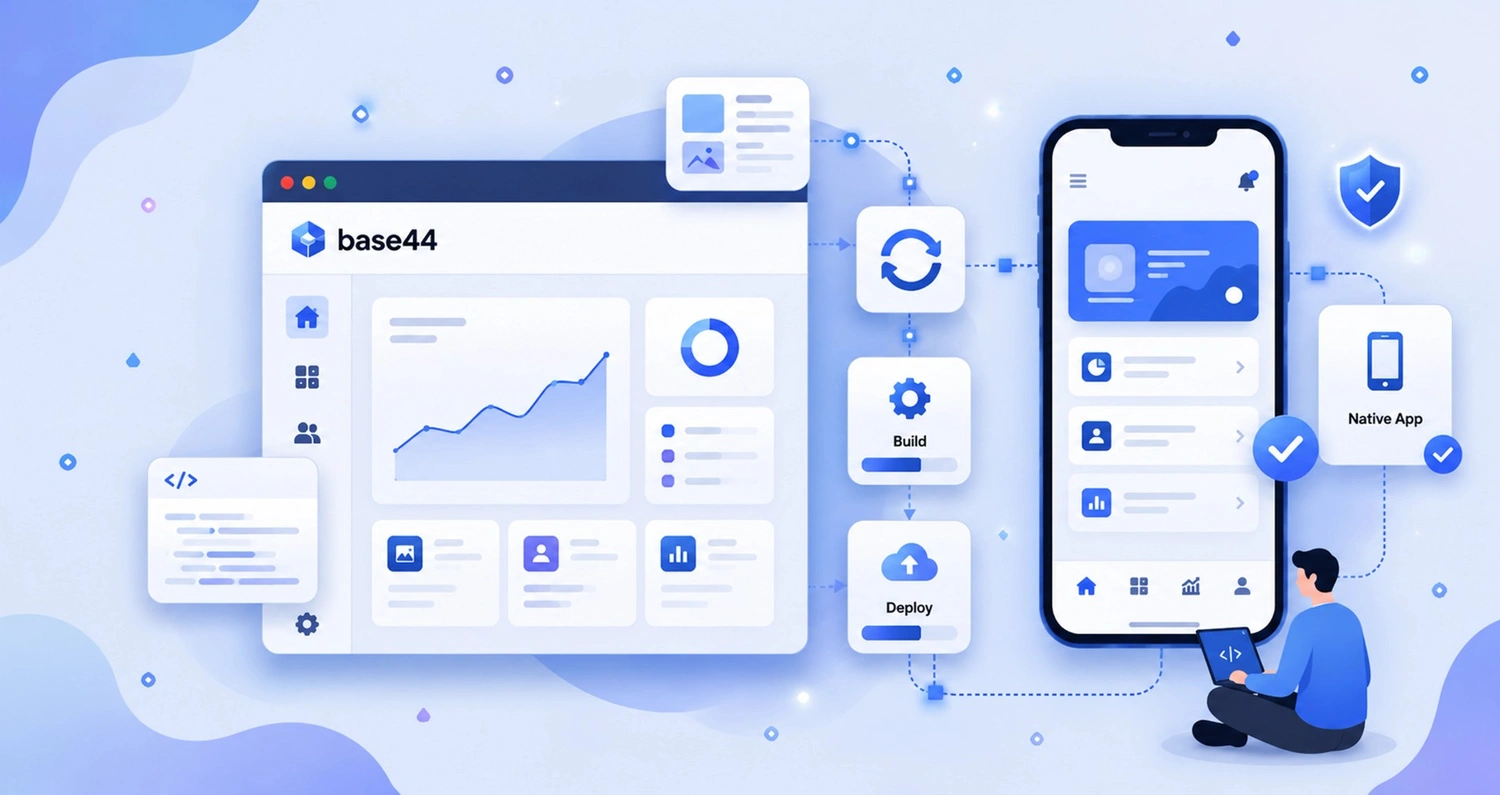
Base44 is one of the most popular ways to build a website application, just by describing it in natural language. The platform handles the frontend, backend, and database authentication for you. But your users still have to remember your website URL, open the browser, and wait until the website loads every time. Meanwhile, the mobile apps are already on their devices, just one tap away. Since Base44 does not support push notifications or app store visibility on its own, you are left with no way to bring users back or be discovered by new users. This is where many Base44 website builders feel stuck and start exploring options to transform their Base44 website into a real native mobile application.
Your search ends here. WebToNative is a no-code or low-code mobile app builder that converts any existing website into a fully functional mobile app for Android and iOS. The platform offers complete native app functionality inside the mobile app with customizations and other additional features.
This comprehensive guide will walk you through the conversion of your Basee44 website into an app, why this conversion is necessary, what a native app does to your business, and why choose WebToNative for the conversion process.
What is Base44?
Base44 is an AI-powered platform that builds a website and mobile application by describing what you want to build in English. You have to describe the features, interfaces, and workflows you want on your website. And Base44 generates the frontend, backend, database, and user authentication for your website without writing code or managing servers. The platform makes it easier and quicker to build SaaS-based applications like internal platforms, customer portals, and other web-based applications.
Base44 was acquired by Wix for $80 million in June 2025 and has since grown to over 2 million users. For new founders, small teams, startups, or anyone testing a new idea, Base44 is one of the easiest and fastest ways to transform your idea into a real-life product. It will build a live web application that is ready to use in any browser the moment you publish. Base44 offers packing through its Builder plan, generating the IPA and AAB files required for Apple App Store and Google Play submissions.
Six Essential Features of Base44
1. AI-Powered App Builder
You only have to describe your app idea in normal English language. Base44’s AI interprets your instructions and generates the code, design, structure, and logic for your app or website.
2. Built-In AI Features
You can simply add AI-powered features such as chatbots, predictive analytics, and automation to your app.
3. Automatic Backend Setup
Authentication, file storage, APIs, and the database are created automatically in the backend. It reduces the manual effort to wire them together.
4. File Storage and Email
Base44 makes it easy for users to upload and recover files, such as images and files, along with storage. Email capabilities are also built-in, making it easier to send marketing updates, onboarding sequences, or notifications directly from your app.
5. Integrations
Base44 supports integrations like Google Drive, Notion, Slack, Salesforce, Zapier, and Google Sheets, connecting your app to over 6,000+ apps.
Why Is a Browser-Based App Not the Same as a Native App?
| Feature | Base44 App | WebToNative App |
|---|---|---|
| What It Builds | Web application that runs in a browser | Native Android and iOS app that runs on a device |
| Apple App Store and Google Play Store | Yes, generates IPA and AAB files | Yes, complete production-ready builds with submission assistance |
| What App Store Version Is | Your web app wrapped in a basic shell, no native app and functionality | Your web app wrapped with native functionality perfectly |
| Push Notifications | Not supported | Fully supported through WebToNative’s add-ons |
| Home Screen Presence | Add a home screen shortcut through browser (PWA) | Real native app installed on the devices |
| Device Features (Location, Camera, NFC, Push Notifications, Security) | Not accessible | Enabled at the time of conversion |
| Backend, Frontend, & Database | Fully managed by Base44 | Stays on Base44 without any rebuild require |
| App Store Rejection Risk | Higher, just a basic web wrapper without native functionality | Lower or almost no, native features added efficiently |
| Coding Skills Required | Not required | Not required |
| Updates | Publish in Base44 dashboard | Reflect automatically in the native app |
Why Convert the Base44 Web App Into a Native App?
As your Base44 mobile app is solving real problems for users, a native version gives it the reach and feel that a web browser cannot match.
| Base44 Web App | Native App | |
|---|---|---|
| Access | Users must remember the website URL, open the browser, and navigate | One click from the home screen and accessed instantly |
| App Store Visibility | Not listed on any App Store | Visible on Apple App Store and Google Play Store |
| Trust and Credibility | Feels like a website | App Store presence signals reliability and security |
| Performance | Depends on browser speed | Faster loading speed, smooth intuitive navigation and interface |
| User Retention | No direct way to bring users back | Push notifications to engage and encourage users to come back |
| Home Screen Presence | Browser shortcut only | Real native app icon installed on user’s device |
How To Convert Your Base44 Web App Into a Native App?
WebToNative converts your existing Base44 web app into a native app shell for Android and iOS. Additionally, browser-based PWAs cannot provide on their own. There is no need for app rebuilds or maintaining a different codebase for each platform.
Your Base44 web app continues to power everything. The native app simply gives it a proper mobile front end and backend, along with essential mobile features that are configured separately from Base44.
Below are the steps to follow to convert your Base44 website into a mobile app using WebToNative.
Step 1: Ensure Your Base44 Web App is Ready.
-
Confirm your Base44 web app is published and live over HTTPS.
-
Check that the website is responsive and easy to navigate.
-
If any part of your website uses desktop interactions only, adjust those for touch before you start the conversion process.
Step 2: Add Your Base44 Website URL.
-
Navigate to the WebToNative home page. Log In Or Sign Up.
-
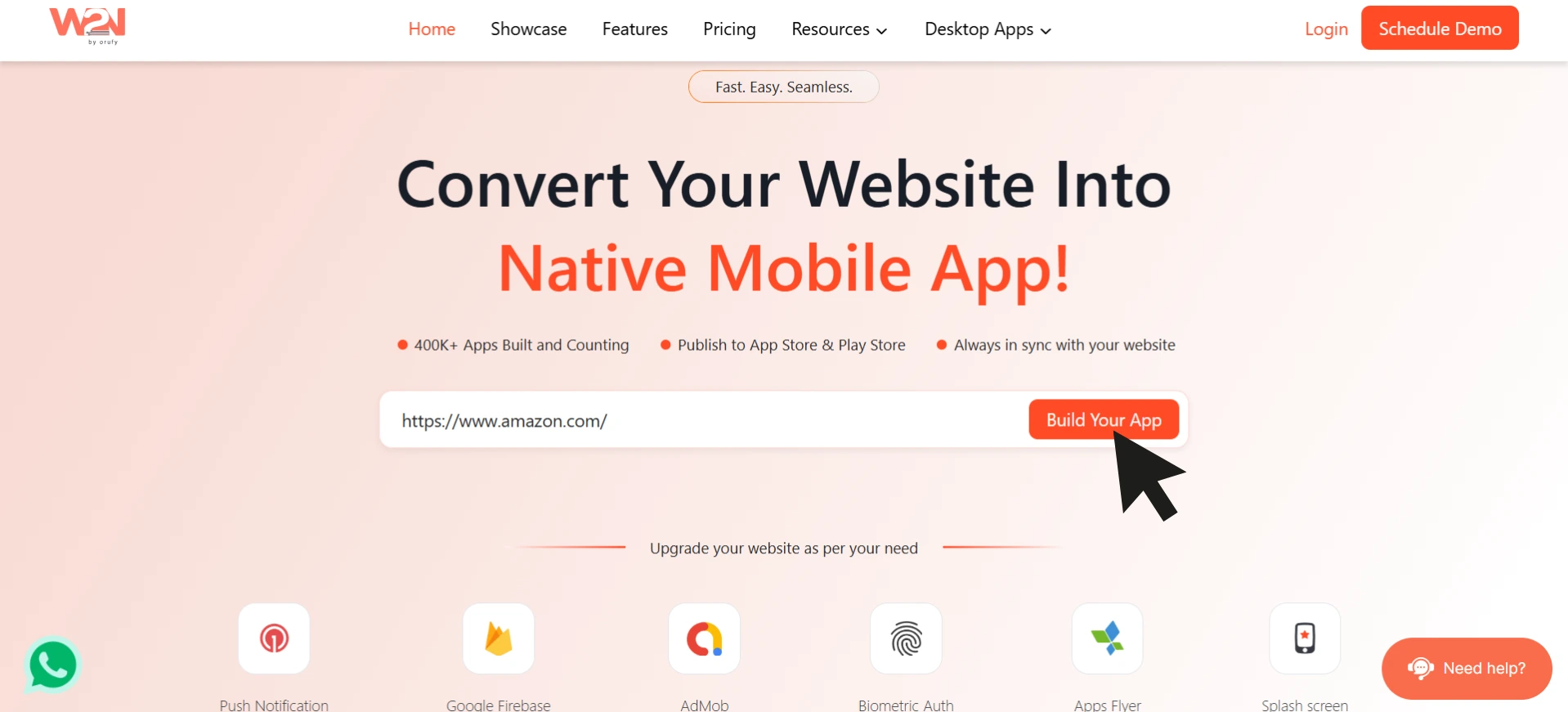
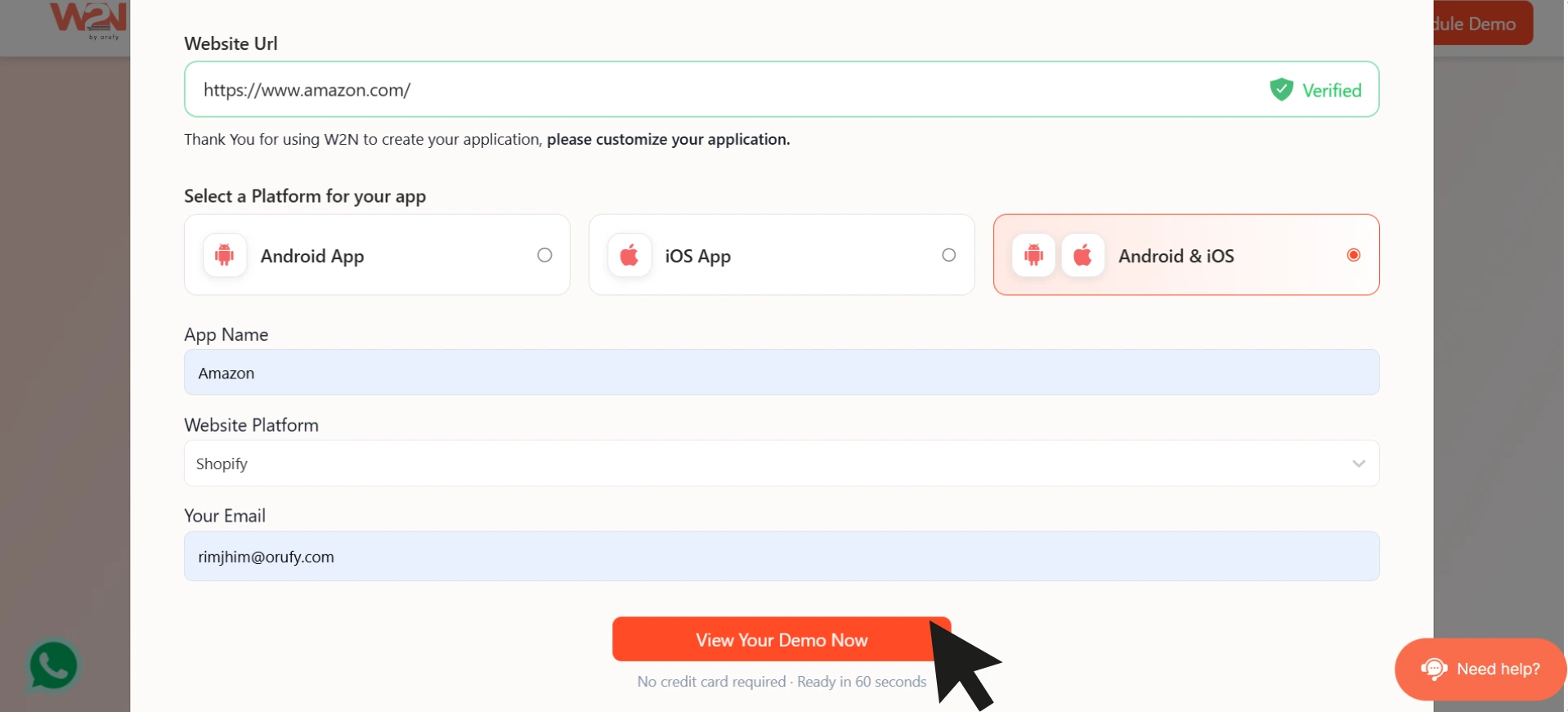
Enter your existing Base44 website URL. Click on Build Your App.
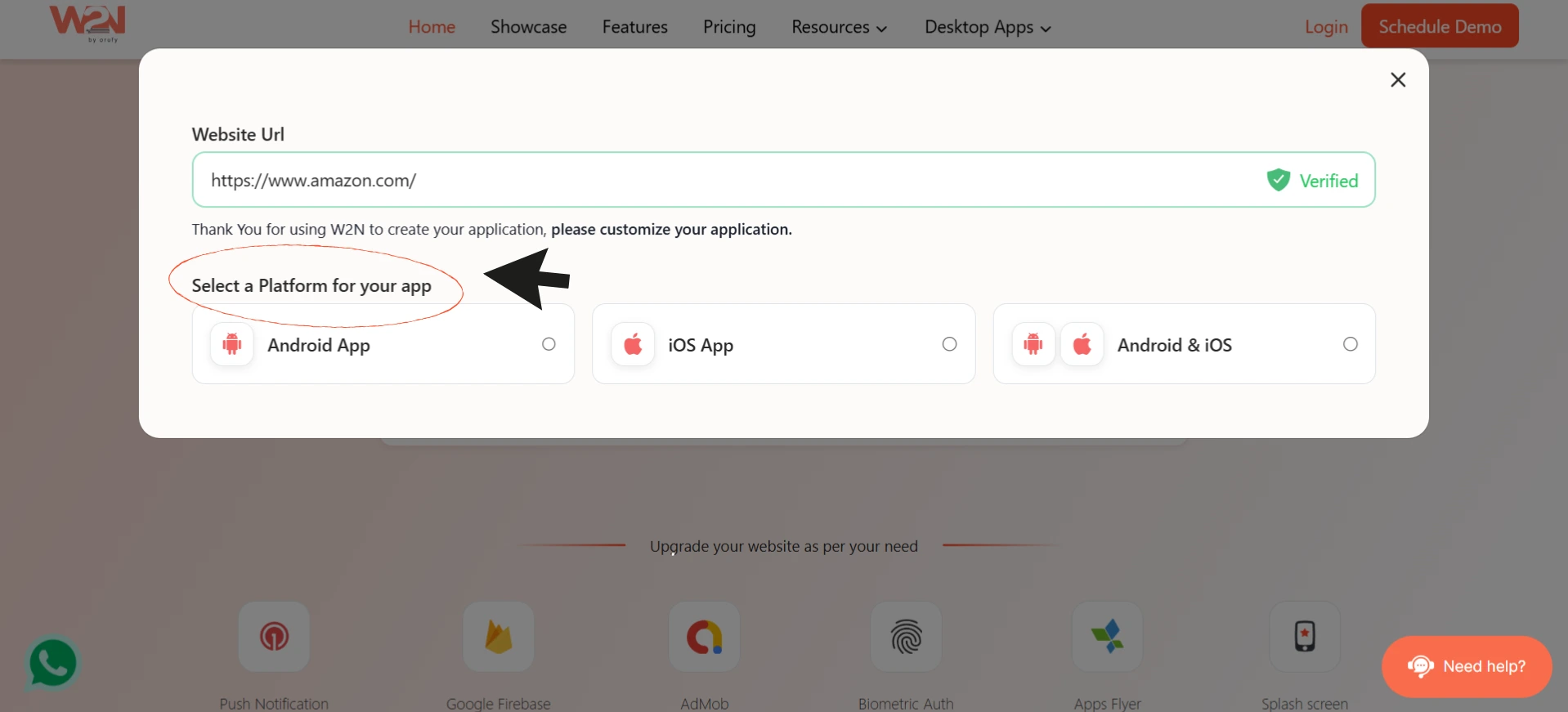
- Choose the platform for your app: Android, iOS, or Android & iOS.
-
Enter your app’s name.
-
Select the platform of the website from the drop-down menu.
-
Enter the active email address to receive updates of your app.
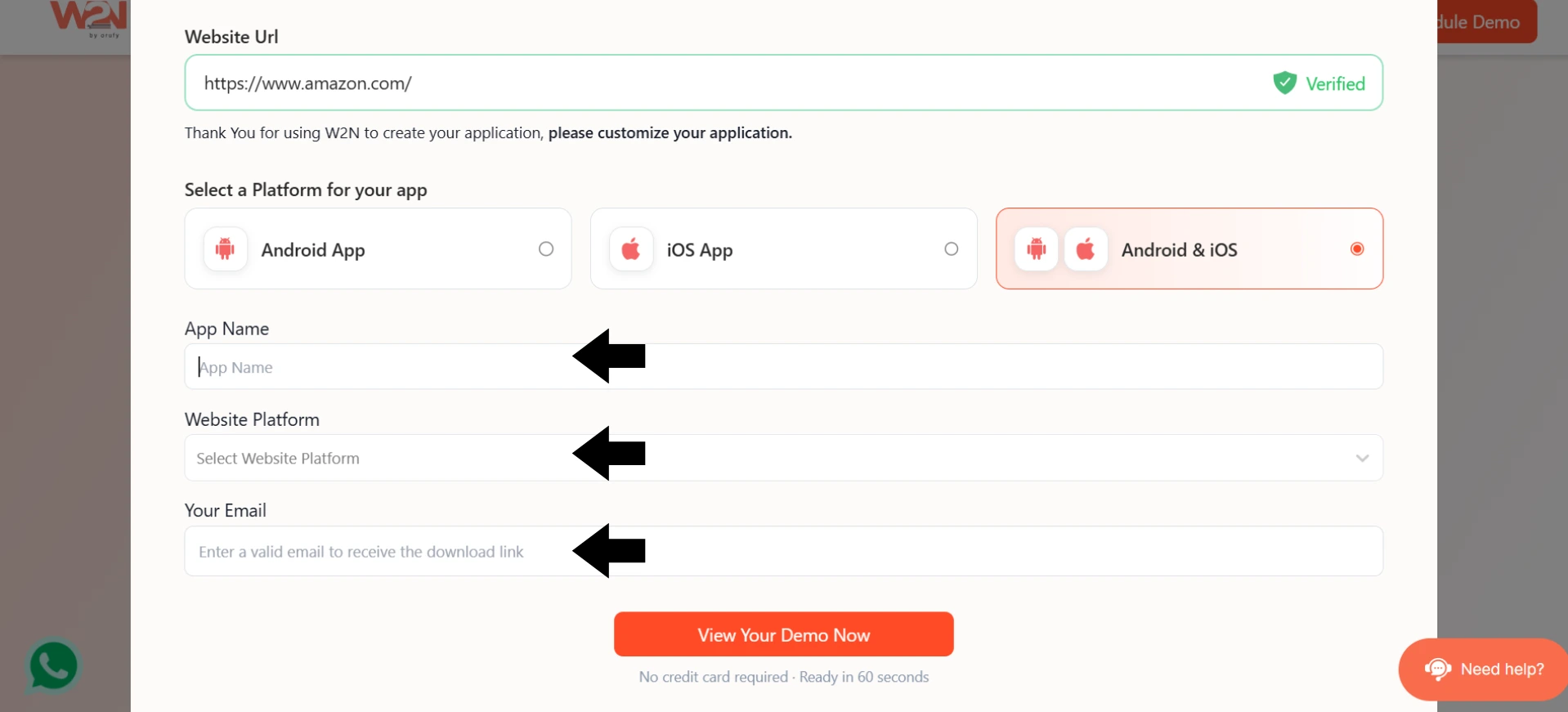
- Click on View Your Demo Now.
Step 3: Customize Your App.
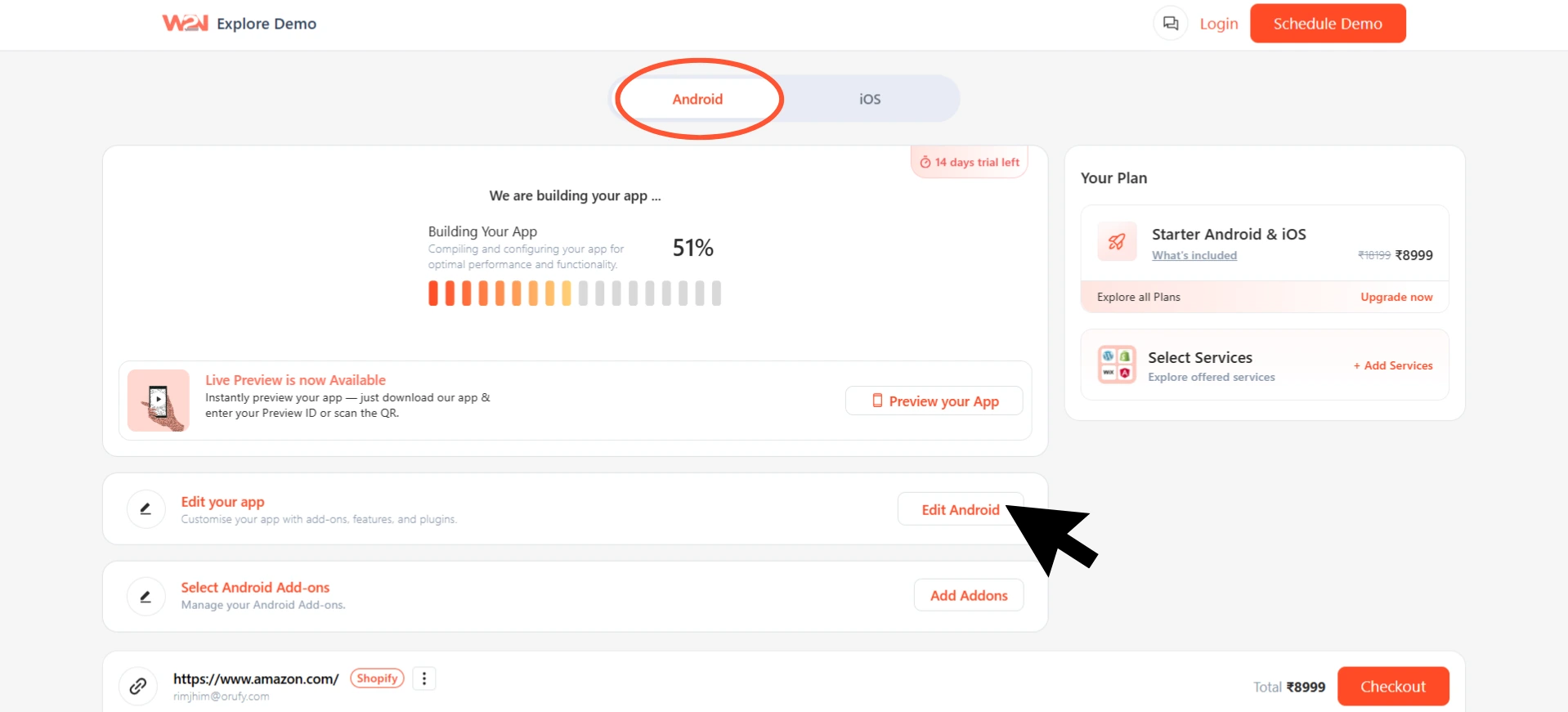
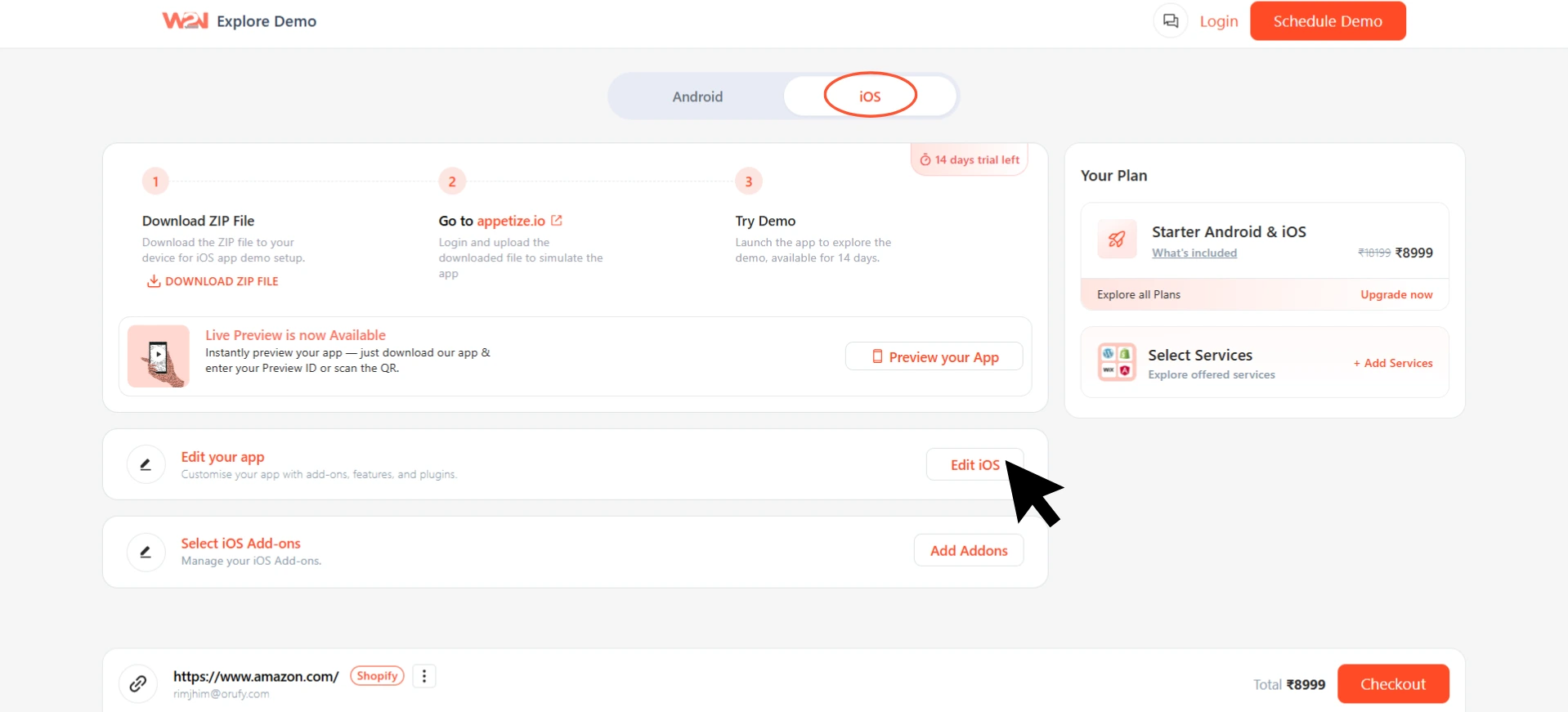
- Click on Edit Android or Edit iOS to customize your app for the selected platform.
-
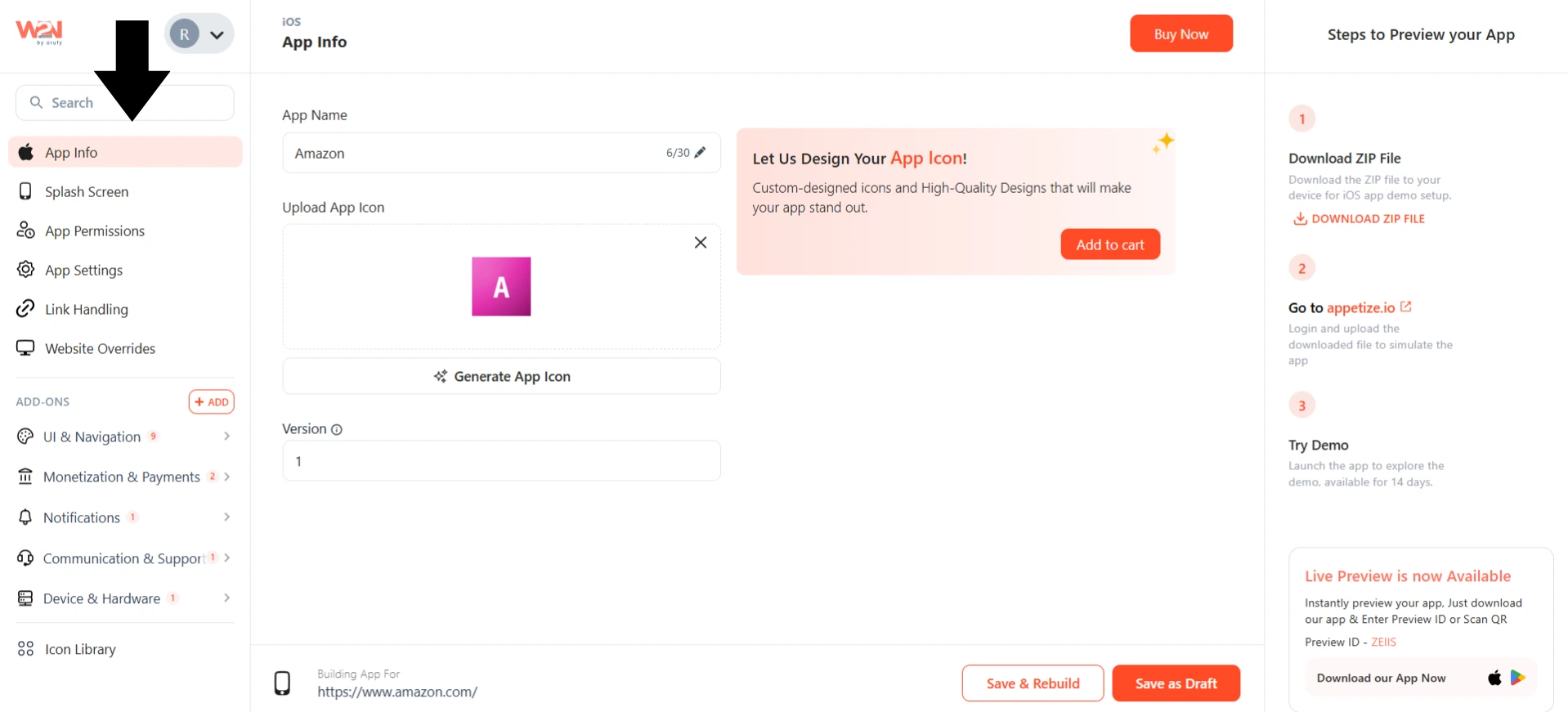
Upload your app’s icon.
-
Customize the splash screen for your app.
-
Ensure app settings and permissions are functioning properly.
-
Your Base44 mobile app’s interface stays the same. The native shell around it is what reflects your website.
Step 4: Enable Native App Features.
-
Enable all the device capabilities your app requires, such as push notifications, location, camera access, downloads, and uploads.
-
You can add additional functionalities to your app, such as Barcode Scanner, In-App Purchases, Firebase Notification Integration, Stripe, Near Field Communication, and more from WebToNative’s dashboard.
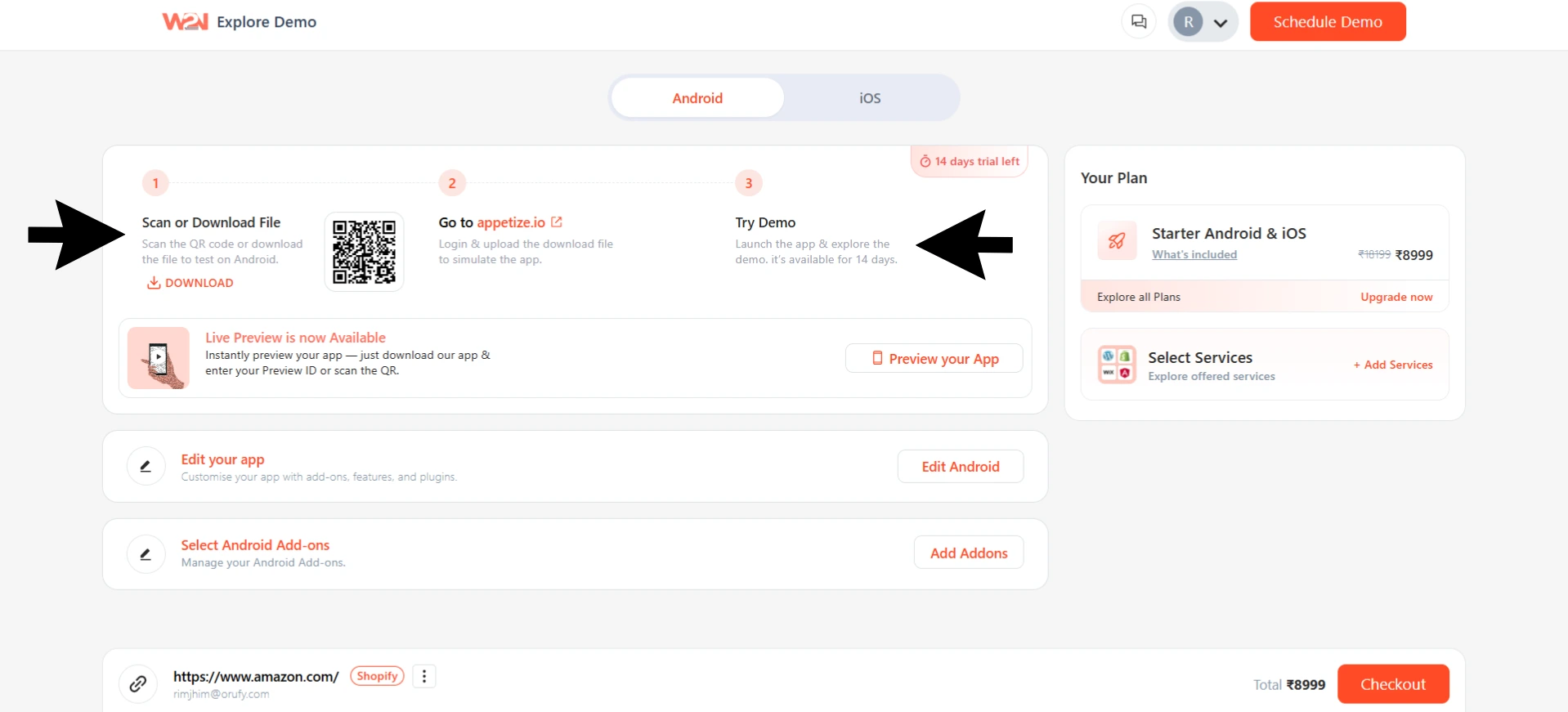
Step 5: Test on Real Devices.
-
Install your test app’s builds on your real devices by downloading the files.
-
Ensure the app functions correctly with features working properly as they must.
-
Check that app permissions and settings are working seamlessly as expected.
Step 6: Publish on App Stores.
-
After testing your app through platforms, prepare for app store listing with proper screenshots, descriptions, the app's policy, and everything.
-
Ensure the app’s production version is ready and submit it to the Google Play Store or Apple App Store.
-
Once your app is approved, it will be visible on the app stores.
NOTE: Every change you make on the Base44 website will be reflected inside the native app automatically in real-time.
Real Examples of WebToNative Building Base44 Apps
1. MoveNow!
MoveNow! is a fitness app designed to get users off the couch without any sugarcoating. It includes an AI coach, challenges, friend features, and activity tracking. MoveNow launched on the Google Play Store and Apple App Store at the same time using WebToNative, bringing together both Android and iOS mobile users.
2. Guzgo
Guzgo is a Mexico-based dining rewards app that connects people with associated restaurants, offering discounts through a digital membership card that runs an affiliate program to earn commissions on referrals. Guzgo turned to WebToNative to convert its website into an Android app to walk hand-in-hand with the growing restaurant network and affiliate base.
3. DrivePass
DrivePass is an all-in-one from CDL (commercial driver license) and non-CDL truck drivers, offering study guides, load tracking, fuel stops, practice tests, career tools, and job matching built on Base44. DrivePass launched its Apple App Store app using WebToNative, converting an existing Base44 website into an iOS app to deliver a feature-rich mobile app experience.
What Does A Native App Do For Your Business?
Converting your Base44 website into a mobile app is not just a technical upgrade. It shifts how people are looking for your business, how they will find you, and how they will pay for your products or services.
1. Higher App User Engagement and Retention Rates
A mobile app removes friction between users and your products or services. Users can open your app directly from their device instead of finding you on web browsers and waiting for the website to load. An app with push notifications works as a deadly combination that gives you a direct way to bring users back to the app and keep them engaged with your app through promotions, reminders, or alerts.
2. Stronger Brand Visibility
Listing on the Google Play Store or Apple App Store helps your product appear more reliable, safe, and secure. App store presence improves credibility and leaves a stronger impact on customers. This might be useful for new businesses or first-time app owners.
3. New Revenue Opportunities
With mobile apps, it is easier to deliver subscriptions, in-app purchases, and promotions. Most users trust mobile apps for payments or catering transactions, as they track or view the payment history.
4. Enhanced App Performance
Mobile apps deliver faster loading speed, intuitive navigation, and a better responsive app experience. Just a tap away, it is easily accessible when users need it and tracks everything about order history & other things.
5. No Development Maintenance
Your Base44 website remains the only foundation of everything. Each feature, update, or change is shown in the mobile app in real-time. It reduces the manual work to update on different platforms, saving both time and money.
Frequently Asked Questions
Q1. Do I Have to Redesign my Base44 Website to Convert It Into a Mobile App?
A. No, you don't have to redesign your Base44 website for the conversion. WebToNative wraps your existing website as it is into a mobile app. Everything in the app is the same as your website.
Q2. Updates to My Website Show Up in the Native App Immediately?
A. Yes, as the mobile app loads your website’s live content. So any changes made to the website will be reflected inside the app immediately.
Q3. Does Base44 support push notifications?
A. No, Base44 does not support push notifications within its platform. WebToNative adds this through its own native integration.
Q4. Can a Base44 PWA be Submitted to the App Stores Directly?
A. No, submitting a Base44 PWA or just a wrapped version to the app stores might lead to rejection. The mobile apps must provide something extra, more than their website.
Q5. Did I Require Developer accounts for App Store Submissions?
A. Yes, you must have active developer accounts for both the Google Play Store and the Apple App Store. These are necessary for listing your app on the app store and tracking it.
Q6. How Long Does WebToNative take to Complete the conversion process?
A. WebToNative takes minutes or sometimes a few hours, depending on your website’s complexity. And if you have made any changes or advancements to the mobile app, it might take time to build.
Q7. What is the Difference Between Base44’s Own App Store Packaging and WebToNative?
A. Base44's Builder plan can generate the necessary files needed for app store submission, but it is still your website wrapped in a basic shell without native functionality. WebToNative’s features, like push notifications, customization of the app shell, and guided app store publishing, which Base44's own packaging does not include.
Final Thoughts
Base44 is a fast way to build a fully working web application. Converting your Base44 app with WebToNative closes the gap. You keep your existing Base44 app exactly as it is, add the native features and app store presence it is missing, including push notifications, and reach users in the place they already spend most of their time, their phone's home screen.
If you are ready to get started, check that your app is responsive and live on HTTPS, decide which native features matter most for your users, set up your developer accounts, and begin the conversion.
Similar Blogs