



Guide to Apply for Production Access in Google Play Console
Published on:
19 May, 2026

Your app is built, thoroughly tested, and now it's time to launch it on the Google Play Store. But before your app goes live, Google’s production access needs to be approved. That’s not straightforward.
Many developers and app owners get stuck at this stage with closed testing requirements, app quality checks, production access questions, and more. You might feel nervous the first time you do it.
This guide simplifies the entire process with small steps, mistakes & their fixes, requirements before the process, and a few sample answers to help you get approval from the Google Play Console successfully.
What is Production Access in Google Play Console?
Production Access in Google Play Console is the authorization requirement for developers to release their mobile apps publicly on the Google Play Store. It works as a mandatory stage, ensuring apps are of high quality and exhaustively tested before launching globally.
Internal Testing VS Closed Testing VS Open Testing — What is the Difference?
Before beginning with the process, it is important to know how Google Play’s three testing tracks work. Many developers skip internal testing and go directly to closed testing. Later, results in multiple bugs during the 14 days of closed testing.
| INTERNAL TESTING | CLOSED TESTING | OPEN TESTING |
|---|---|---|
| Share your app with 100 reliable testers instantly. No review is needed, and the app is available within seconds. Use this testing to catch minor bugs or issues before starting the closed testing. | This is mandatory for production access. It must contain a minimum of 12 testers for 14 continuous days. Testers should join in the testing through the OPT link; no manually added emails are considered as testers. | Only available after the production access. Allow any user to find and download your test version on Google Play. Use this for wider beta testing after your approval. |
Internal Testing for 3 to 7 days —> Closed Testing for 14 days —> Apply for Production —> Open Testing
Step-By-Step Process to Apply for Production Access in Google Play Console
Follow the steps below to apply for production access in Google Play Console:
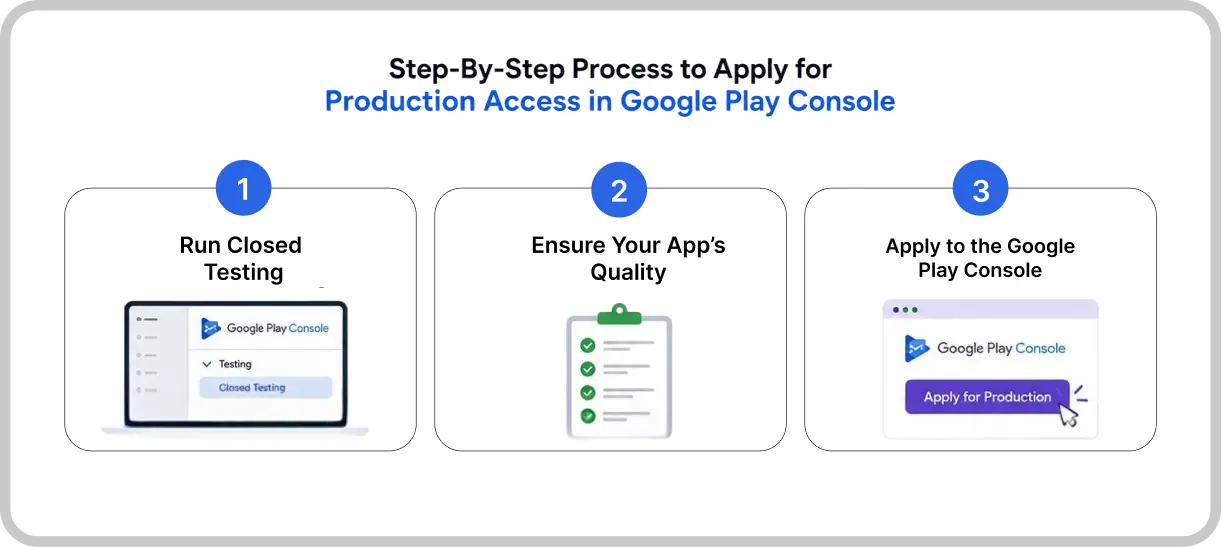
Step 1: Run Closed Testing
Navigate to Google Play Console. From the left sidebar, select Testing → Closed Testing. In this step, you have to create a new release for your app.
-
You have to add testers either by uploading the list of their email addresses or linking a Google Group.
-
Each tester will get an opt-in link to join the Google Group. They must opt in for 14 consecutive days.
NOTE: Each tester must join the group with the opt-in link only.
- If a tester drops out and rejoins, those days won’t count. Their days reset, and the count starts when the tester rejoins. You must ensure all the testers stay enrolled throughout the testing process.
NOTE: You can only move forward in the process when you have completed the full 14 days of closed testing with a minimum of 12 testers.
Step 2: Ensure Your App’s Quality
When closed testing is in progress, check whether everything in your Play Store Console is complete or not. Ensure the following things are completed:
-
Play Store listing is complete with proper descriptions, banners, and screenshots.
-
The privacy policy URL should be added.
-
The app's content ratings should be filled.
-
Developer account details must be complete.
If any one of these were missing, the “Apply for Production” button would not appear on your Google Play dashboard.
Step 3: Apply to the Google Play Console
Once your closed testing is complete, you can apply for production access. Navigate to the Google Play Console dashboard. As you will click on "Apply for Production." A form will open with a few questions that you have to answer about your app’s closed testing, app’s features, and production.
These questions are divided into three sections:
1. About your Closed Testing
The information you provide about your closed testing helps Google to ensure that apps have been comprehensively tested before publishing on the Google Play Store. We ensure that people are protected from low-quality apps and prevent them from malicious activities.
Below are the things you have to share in the section.
-
Tell how easy you found it to recruit testers for your app from the multiple options listed. It helps us understand how developers are tailoring Google Play’s testing requirements.
-
You must share the information about the engagement you received from testers during the closed testing phase. For example, whether testers used all the app’s features. If the testers are consistent about the app’s usage, how do you want the production user to use your app, and what differences do you expect to see.
-
You should summarize the feedback you received from the testers and let us know how you gathered their feedback.
-
Click on Next.
IMPORTANT: If you click on “Discard” or “Quit” without clicking on the “Next” button, your changes won't be saved.
2. About your app or game
The information you share about your app or game helps us better understand your app or game. Your answers are not shown on Google Play and won’t affect the features & services you access in Play Console. For example, how your app or game is being displayed and your eligibility for Google Play developer programs.
Below are the things you have to share in the section.
-
Let us know who the target audience of your app or game is. You must be specific about this answer.
-
This information depends on whether you are an app or a game developer:
1. For apps: Explain how your app can provide value to users. If you are unsure about the question. You must visit the Android Developers website to better understand the App’s Quality.
2. For games: Describe what makes your app stand out from other games.
-
Let us know how many installs you expect for your app or game in the first year. There are a wide range options, so select wisely. It is absolutely fine if you provide an approximate answer to this question.
-
Click on Next.
3. Production readiness
The information you share about your production readiness will help us understand that your app or game is ready for production.
Below are the things you have to share in the section.
-
Tell us all the changes you made to your app or game based on what you learned during the closed testing process.
-
Describe on what basis you decide that your app or game is ready for production.
-
Click on Apply.
How to Answer the Questions in the Production Access Form
Below are a few questions that might be asked in the production access forms, with their sample answer. It will make it easy for you to answer the questions.
Q1. How did you recruit testers for your closed testing?
Sample Answer 1. By working with a reputable company, I was able to get in touch with testers who could provide insightful and focused feedback. Additionally, they made efforts to test the app with real-time testers.
Sample Answer 2. Through collaboration with an established testing company, we received valuable feedback from qualified testers. The company also conducted real-world user testing sessions, gathering genuine insights about the app’s performance.
Q2. How easy was it to recruit testers for your app?
Sample Answer 1. Recruiting testers was neither difficult nor easy. I primarily contacted colleagues, friends, and community members who are similar to the app’s target audience.
Sample Answer 2. Recruiting testers took some effort, as the app has a specific target audience. I researched people and communities with a similar likelihood based on the app’s target audience.
Q3. Describe the engagement you received from testers during the Closed Testing process.
Sample Answer: Testers actively used the app across its core features throughout the testing phase. We tracked engagement through feedback forms, direct messages, and discussions. Key areas testers explored include the following (name a few features). Every day, a session was conducted to uncover new bugs or errors.
Q4. Provide a summary of the feedback that you received from the testers, including how you collected the feedback.
Sample Answer: Testers' feedback was collected through structured testing conversations, yielding positive responses. They provide actionable recommendations for the user interface and visual elements to improve the app’s functionality and appearance. Most feedback was focused on navigation flow, user interface, and performance.
Q5. What changes did you make to your app based on what you learned from the closed testing?
Sample Answer 1. We made changes to the app’s navigation by improving the splash screen and optimizing the user interface for a more user-friendly app experience based on the tester’s feedback. Minor improvements were also made to improve the performance of actions inside the app.
Sample Answer 2. We optimized the intuitive navigation with an added splash screen and fixed bugs. We implemented the requested features and ensured a smooth experience.
Q6. How did you decide your app is ready for production?
Sample Answer 1. The app’s improved user interface with highly engaging features makes it production-ready. We handled testing feedback, refined the design, and improved functionality to meet usability requirements. It is now more reliable, visually appealing, and error-free for a perfect public appearance.
Sample Answer 2. We defined that the app is production-ready with all the changes, including smooth navigation, UI elements, and recommended features. We have also tailored the tester’s feedback by enhancing the design and the app’s fun.
Sample Answer 3. The app is ready for production with an easy-to-use interface and highly interactive features. All the testers’ feedback has been addressed thoroughly to meet usability standards. Its stability and bug-free experience make it ready for launch.
Q7. What did you do differently this time?
Sample Answer 1. This time, we have improved the app’s accessibility, added new features, and fixed the bugs. We have also integrated the tester’s feedback into the development cycle. We have built a responsive and well-designed app to meet the user's growing expectations, focusing on usability and the app’s interface design.
Sample Answer 2. We actively integrated the tester’s development process to refine the interface, improving accessibility, adding new features, and making it bug-free. This time, our focus was on usability and intuitive design based on user experience.
Sample Answer 3. We improved, added fresh features, fixed errors, and implemented testers’ feedback. This time, the focus was on creating a well-designed app with a responsive design and engaging interface.
Submit Your Application
After you complete your production application, the Google Play Store will review your submission. When the review is complete, they will email the account owner with an update. The review process takes approximately 7 days or less.
If your app is successful, you can access Production and make your app available to users on the Google Play Store.
In case your app is not ready to get published, you may continue the closed testing of your app. For example, not including a minimum of 12 testers in your closed test or testers not being fully opt-in during the testing process.
How Long Does Google Play Production Access Take?
This is the most common question that arises in the developer's mind. Below is the complete timeline from the beginning to the end.
| PHASE | DURATION |
|---|---|
| Set Up Account and Store Listing | 1 to 2 Days |
| Internal Testing (Optional but Recommended) | 3 to 7 Days |
| Closed Testing | 14 Days |
| Apply for Production Access and Google’s Review | Maximum 7 Days |
| Total Minimum Timelines | 3 to 4 Weeks |
PRO TIP: You must recruit 15 to 17 testers for the closed testing process. If 1 or 2 testers drop out from the 14-day testing period, their count resets to zero. This makes the process more time-consuming as you have to restart the entire process from the beginning.
If Google Rejects Your Production Access Application? Here’s What You Should Do
Don’t panic; be calm and think wisely. Follow the steps below carefully:
Step 1: View Google’s Rejection Reasons
Google will send an email to your registered account email address. The email will tell you what you have left behind and the reason your application was rejected.
Step 2: Don’t resubmit the application instantly
The most important mistake people make is that they instantly submit the same answers, and again, it will result in rejection. Fix the highlighted issue.
Step 3: If Your Application was rejected for Testing Reasons
You must restart the testing process from scratch. Recruit new and trusted testers. There, the 14-day count restarts on the day they opted in.
Step 4: If Rejected for the Questionnaire Answers
Rewrite your answers more realistically. Mention exact data from your testing phase, number of sessions, bugs, fixed issues, and how you have tailored it to the testers' feedback.
Step 5: If Your Application is rejected due to missing store listing elements
Complete every required field in your Google Play Console dashboard. The button will not be enabled unless you have filled in and completed all the fields.
Step 6: After fixing all the Reasons
Wait for at least 1 or 2 days after making changes before reapplying for the production access.
Common Mistakes to Avoid and How to Fix Them
Below are a few mistakes to avoid when applying for production access and how to fix them.
1. Not filling out the production access form correctly.
Many developers don’t complete this form with all the required information. As a result, Google did not receive the account information that was expected about your app.
The Fix: Answers all the questions of the three sections comprehensively, clearly, and to the point. Write everything correctly and realistically.
2. Did not update your app.
Google expects that your app will be updated with all the changes you gathered from the testers’ feedback. If the changes are not made correctly, it signals to Google that you haven’t taken the feedback seriously.
The Fix: You should thoroughly follow the closed testing and tailor all the changes made during the testing process. You should make all the changes recommended and update the app accordingly on the Google Play Store.
3. Inconsistent Testing Activity
Testers did not use the app daily for the continuous 14 days. They did not maintain enough activity during the closed testing. Testers uninstall the app before completing 14 days of testing. These are inconsistent activities of testers that affect production access approval.
The Fix: Manage the testers to ensure they have done extensive testing of your app. You must keep track of their activity and the suggestions they provide.
FAQs
Q 1. What does it mean when the Google Play Store says testers must be opted in for 14 consecutive days before applying for production?
A. This means that the Google Play Store will not count testers who opted in for less than 14 days and then opted out. Even if they opted back in, they are opted in for a total of 14 days. The criteria are a minimum of 12 testers for 14 days opted in continuously.
Q2. What is the production access questionnaire in Google Play Console?
A. It is the application form you have to fill out and submit to the Google Play Store before publishing your app. There will be a set of questions based on your closed testing, the app's quality, and related questions about your app.
Q3. How long will it take to review the production access?
A. Google takes 7 days or less, but it might take a longer time to review. You must provide strong, clear, and practical answers with real testing to avoid delays and rejections.
Q4. What should I do if Google rejects my production access application?
A. Do not submit the same answers again. Read Google’s reason for rejection; fix the issues; rewrite the answers carefully; and conduct comprehensive testing before reapplying.
Q5. Who needs to apply for production access?
A. Only developers with personal accounts created after 13 November 2023 need to apply for production access approval. Accounts created before this date can directly publish their apps on the Google Play Store. Accounts created after this date must take production access approval, and then only they can publish their app.
Q6. Can I reapply for production access after rejection?
A. Yes. You can reapply for the production access after being rejected. You must ensure that you have addressed all the issues and mistakes before reapplying.
Conclusion
Applying for production access on Google Play feels exciting and, at the same time, exhausting. Google’s guidelines are straightforward; give them what they ask for, and the process will be streamlined.
Run your closed testing thoroughly, tracking your app’s performance & quality regularly, and improve your app based on the testing feedback. After all this, the time has arrived to apply for production access.
The most important thing in the entire process is the questions you answered in the production access form. Your answers must be realistic, practical, and accurate. This is the most common reason why Google rejects the apps.
Follow the above steps in this guide, and you will be prepared to submit an application that Google approves. Taking your app to the next level.
Similar Blogs