



HTTP User Agent and Custom Headers: A Complete Developer Guide 2026
Published on:
21 May, 2026

If you’ve ever wondered why your website serves a mobile layout to phones, a desktop layout to laptops, or why an API rejects a request from Postman but accepts the same request from a browser. You have to look at the HTTP headers your clients send before you get any response.
HTTP headers are invisible metadata packets that travel with every request and response. Two of them are especially important for developers building website applications and mobile apps.
The User-Agent header notifies the server what software is making the request: Chrome on Windows, Googlebot, or a Python script. The Custom Header defined by you allows you to pass app-specific data that the server requires, including request IDs, API keys, feature flags, and app version numbers.
This guide will make you understand everything from how both things work to security headers.
Key Takeaways
-
Every HTTP request contains invisible metadata called headers to control content type, caching, identity, authentication, and security.
-
The User-Agent header indicates which software is making the request, but it can be faked and is unreliable due to Chrome’s UA Reduction Project.
-
User-Agent clients hint that UA-CH is the modern structured replacement. Sec-CH-UA, Sec-CH-UA-Mobile, and Sec-CH-UA-Platform deliver accurate device data on demand.
-
Custom headers allow passing any specific data alongside a request, such as API keys, feature flags, app versions, and request IDs.
-
Security headers such as HSTS, X-Frame Options, and CSP protect your website from XSS, malicious attacks, and clickjacking. Every website must configure the three security headers.
What are HTTP headers?
Every time a browser or app requests a web server, it sends a small packet of metadata alongside. HTTP headers allow both the client and server to transmit additional information with a message in a request or response. A header in HTTP/1.x includes a case-insensitive name, a colon, and its value.
A few standard headers are defined by the HTTP specification, things like Content-Type, Cache-Control, and Authorization. Custom headers are the ones you built for your app's requirements. Both standard and custom headers are invisible to users but essential for developers.
There are two types of HTTP headers:
1. Request Headers: Sent by your browser to the server. Information such as the type of content you can accept, what language you prefer, whether you have logged in, and who you are.
2. Response Headers: Sent back by the server. Information such as what type of content this is, whether you can cache it, whether other websites are allowed to load this resource, and the security rules your browser must follow.
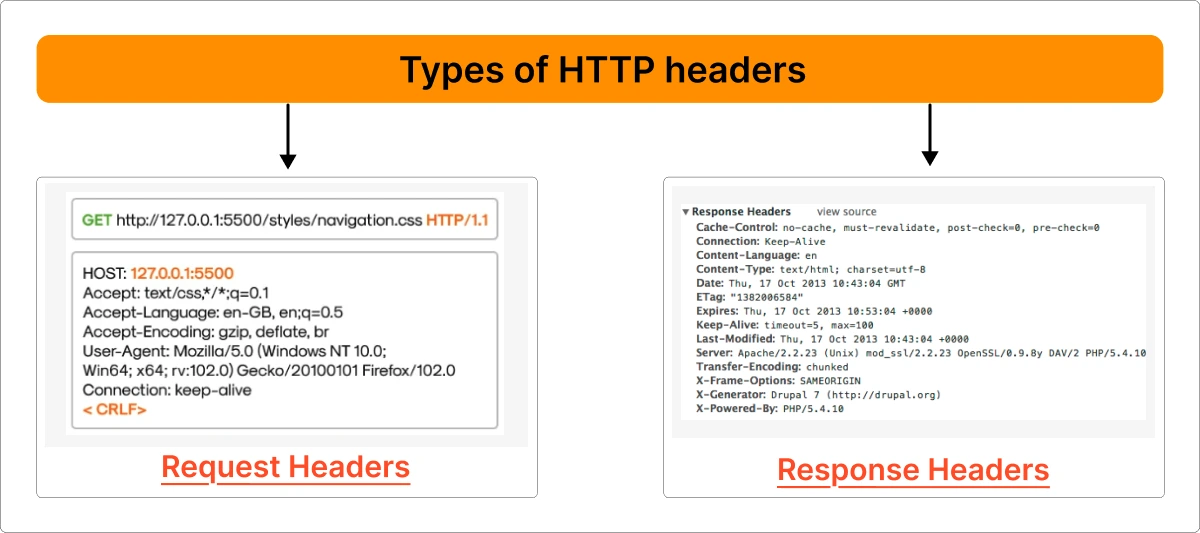
For example, an easier request looks like
GET /index.html HTTP/1.1
Host: www.example.com
User-Agent: Mozilla/5.0 Chrome/120.0.0.0
Accept: text/html
Accept-Language: en-US
Connection: keep-alive
How to See Your Own HTTP Headers?
You can see your exact HTTP header your browser sends and receives. It includes information such as custom headers, important security headers, User-Agent, and cookies used during the communication with websites.
Open Chrome on any page and follow the below instructions.
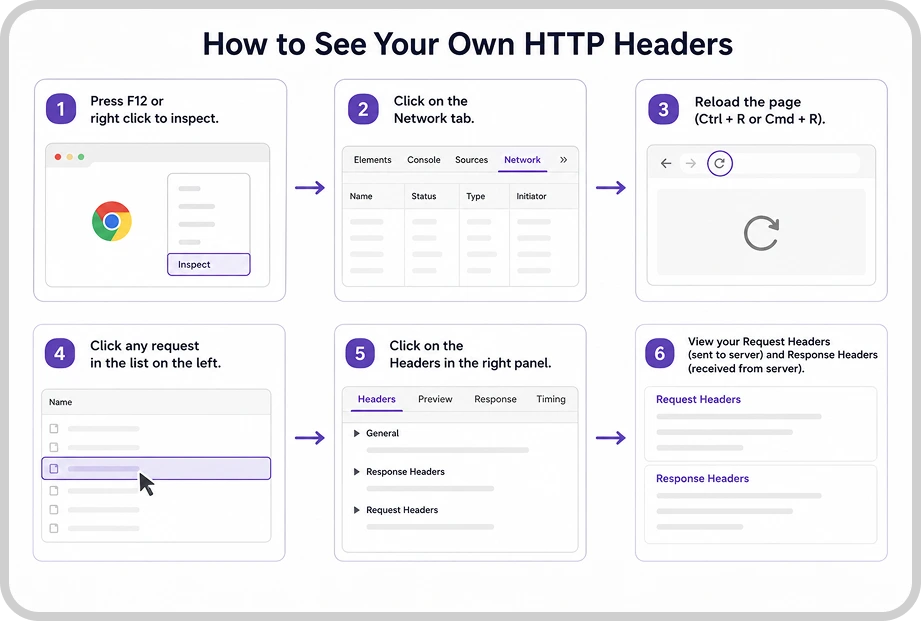
Step 1: Press F12 or right-click to inspect.
Step 2: Click on the Network tab.
Step 3: Reload the page → Ctrl + R or Cmd + R.
Step 4: Click any request in the list on the left.
Step 5: Click on the Headers in the right panel.
Inside Request Headers, you will see your actual User Agent, Cookie, Accept Language, and any custom headers that are sent from your browser to the server.
Inside Response Headers, you will see security headers such as Strict Transport Security, X-Frame Options, and Content Security Policy that the server sends back to the browser.
What is a User Agent?
A user agent is software responsible for identifying and enabling end-user interaction with the web content on the web. This includes web browsers such as Google Chrome and Safari, along with email clients, download managers, and command-line tools such as cURL.
The User-Agent HTTP header is how that software identifies itself to a web server every time a request is made. It is a string that helps websites and servers identify details about a user's device and application, such as the browser, app name, operating system, and version used.
For example, imagine ordering food online. Before the restaurant prepares your order, the app already tells them all the details about the customer, such as name, delivery address, app version, and device type. The user agent string works similarly. Your browser automatically shares basic information with the website. So, it can deliver the right experience for the device and browser.
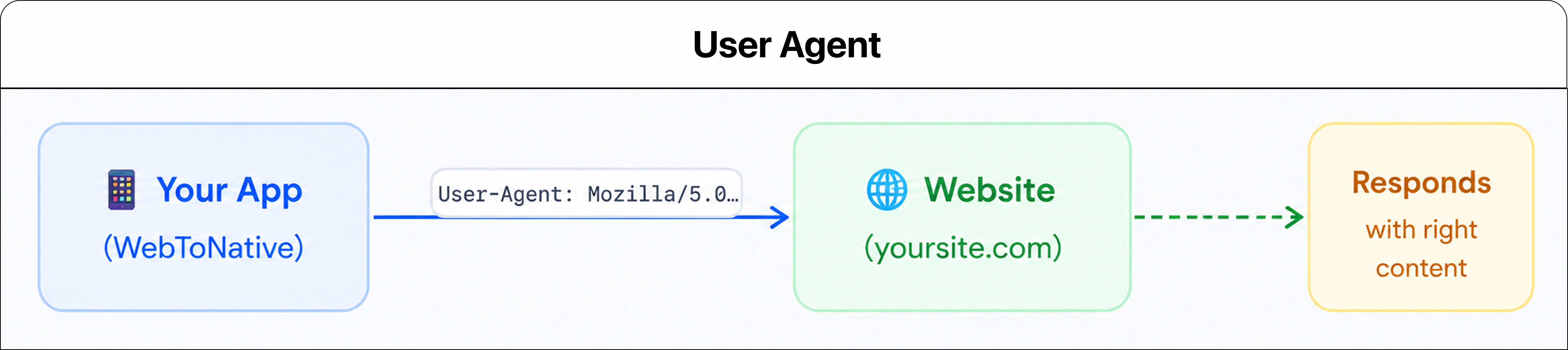
A user agent string looks like this: this is what Chrome on Windows sends in:
Mozilla/5.0 (Windows NT 10.0; Win64; x64) AppleWebKit/537.36 (KHTML, like Gecko) Chrome/143.0.0.0 Safari/537.36
Below is the table to know about each element.
| Element | What It Means |
|---|---|
| Mozilla/5.0 | A legacy compatibility token |
| Windows NT 10.0; Win64; x64 | Operating system: Windows 10 with 64-bits |
| AppleWebKit/537.36 | Browser’s rendering engine (used by Chrome and Edge) |
| KHTML, like Gecko | Old compatibility signal for servers |
| Chrome/143.0.0.0 | Exact browser name and major version |
| Safari/537.36 | Another compatibility token (Chrome claims Safari compatibility) |
The official User-Agent syntax is
User-Agent:<product>/<version> (<comment>).
Different browsers use different formats, but modern browsers often add important information to the field.
Real-World Examples
1. YouTube Mobile Vs Desktop
YouTube checks your User-Agent to detect whether you are using a mobile device or a desktop. That’s why you got the device-specific layout.
2. Googlebot (Google’s Crawler)
When Google indexes a website, they send a special User-Agent like this:
Mozilla/5.0 (compatible; Googlebot/2.1; +http://www.google.com/bot.html)
This enables search engines to appropriately index the website's content by identifying Google's crawler.
3. App Store/Play Store Redirects
When you open a link like
nameoftheapp.com/download. The server checks your User-Agent to determine which device you are using:
-
Android users are redirected to the Google Play Store
-
iPhone users are redirected to the Apple App Store
-
Desktop users will see a normal landing page screen
Why Does User Agent Matter for Your Web Application?
The server reads the User-Agent to make smart decisions.
-
Content delivery: Provide full desktop layouts to laptops and mobile layouts to phones. Otherwise, every user will get the same generic page with user-agent detection.
-
Bot Identification: The user agent can be used to identify crawlers, such as Googlebot, to define their presence in the string.
The string:
Mozilla/5.0 (compatible; Googlebot/2.1; +http://www.google.com/bot.html)
-
Compatibility Fixes: Apply CSS hacks or fallback code only for browsers that require them.
-
Analytics: You must know which browsers and devices your target users are on to drive real product decisions.
The Problem with User Agent String with a FIX
The User Agent header is not trustworthy. Legitimate users can change their user agent strings through browser extensions. It is often used for testing or accessing content restricted to certain devices. Malicious bots do the same on a routine basis, pretending to be real Chrome users. User agent strings are inconsistent and change regularly, resulting in incorrect assumptions about what browsers can do. This raises both security and privacy issues.
Since Chrome 107 in 2022, Google has started reducing the amount of information shown in traditional User-Agent strings to improve user privacy. Details such as exact OS versions, browser versions, and device models are more generic. That is why modern browsers use User-Agent Client Hints to share details more securely.
Instead of sharing the complete browser details in each request, websites only ask for specific details they need using Client Hints. The browser then shares limited information to improve user privacy and reduces unnecessary tracking.
These UA-CH headers help websites understand basic device and browser information.
The three most important User Agent-Client Hints headers in 2026:
1. Sec-CH-UA: It tells the website which browser the user is using, such as Chrome, Edge, or Safari, with their browser version.
2. Sec-CH-UA-Mobile: It tells whether the user is on a mobile device or desktop.
3. Sec-CH-UA-Platform: It shares the operating system, such as Windows, Android, or iOS.
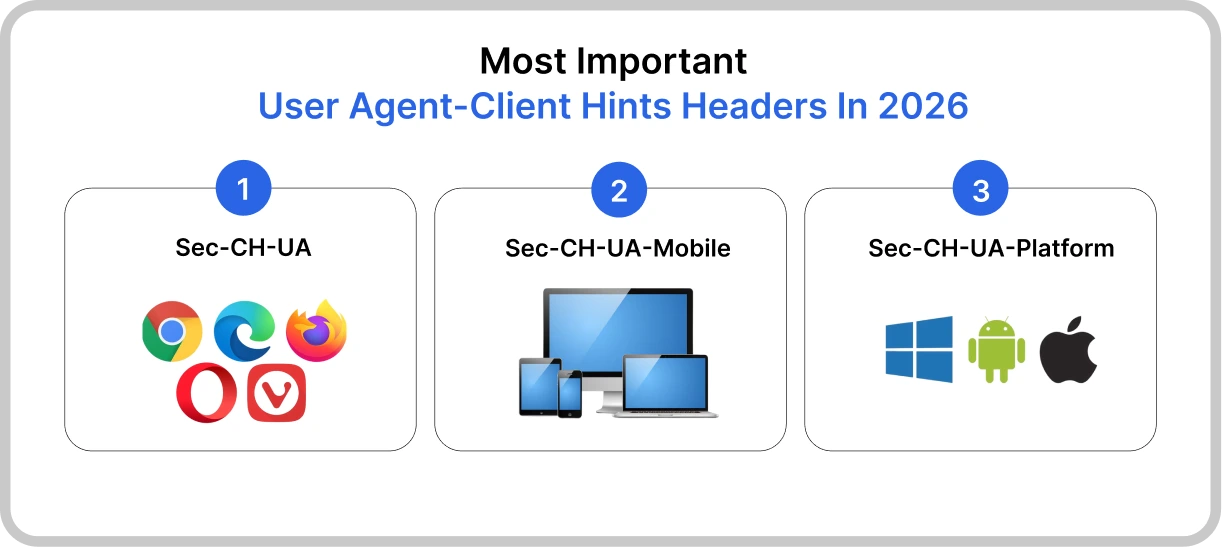
Instead of traditional User-Agent strings, browsers share only limited information unless the website specifically requests more. UA-CH works only on secure HTTPS websites and supported modern browsers.
PRO TIP: You must always keep an User Agent string fallback for older browsers and HTTP web browsers.
What Are Custom Headers?
Custom Headers or Custom HTTP headers that are created for your own apps by yourself. You make them because your application requires passing a little information. They are non-standard fields created by developers to meet the app’s requirements. It allows extending HTTP to transmit specialized information relevant only to the app or service.
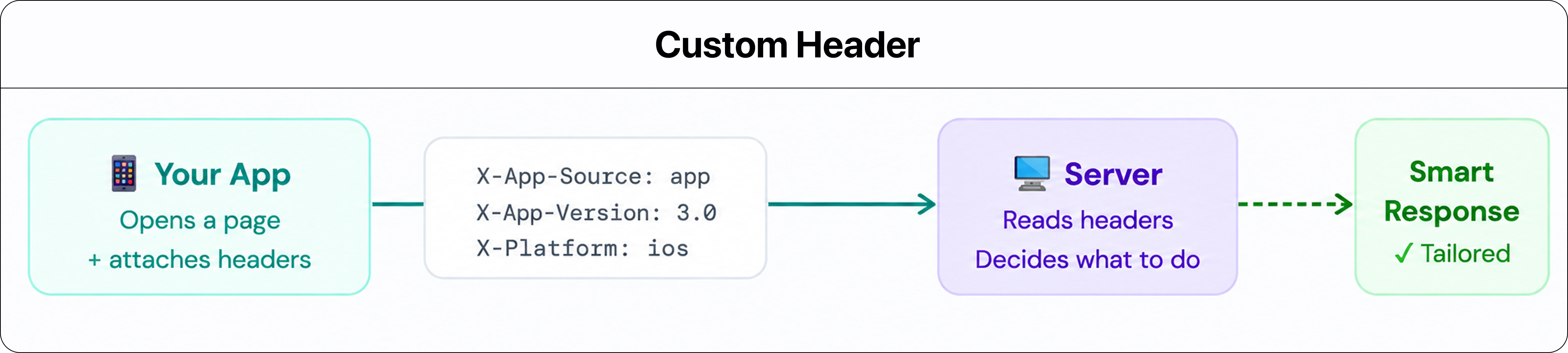
A few custom headers that developers create for their own purposes:
1. X-API-Key
A way to authenticate with an API. You only have to pass the secret key inside the header instead of the complete login flow.
2. X-Request-ID
A unique request ID is attached to a request so that developers can trace it across multiple servers when something goes wrong.
3. X-App Version
It tells the server which version of the app made the request. This is helpful when you are supporting multiple app versions at the same time.
4. Stripe-Version
Stripe is a payment gateway used by developers to lock their integration to a particular version of the API. It updates their API without breaking older integrations.
NOTE: If you are a developer making requests from a browser to a different domain. The server needs to explicitly say your custom header is allowed. It does this with the Access-Control-Allow-Headers response header. If it does not, the browser will block the request, not the server.
X-Prefix Header
Earlier, most developers commonly used the X-prefix in custom headers such as X-API-Key and X-Request-ID. Although X-prefix headers are widely used in existing systems that remain fully functional. The existing best practice for new custom headers is to use descriptive names without the X-prefix.
If you see X-prefix headers in earlier or existing projects, there is no need to change the headers, as they will work smoothly. But keep in mind when creating a new custom header, it is better to avoid the X-prefix and use descriptive headers.
For example, rather than using X-API-Key, use API-Key and Request-ID instead of X-Request-ID.
Real-World Examples
1. Web scraping and Bot Detection
If your website scraper sends requests with a User-Agent like python-requests/2.31.0, the websites recognize it as bot traffic. This might block the request, return empty responses, or show a CAPTCHA code. This is why developers change the User-Agent frequently to make it look like a real browser.
2. API Returning 401 Unauthorized
If an API returns 401 unauthorized, the problem is usually with the Authorization header. The token might be missed, sent in the wrong format, or expired.
3. Website Opening on HTTP Instead of HTTPS
Even when the SSL is there, some websites will open in HTTP rather than HTTPS. The Strict-Transport-Security (HSTS) header forces browsers to always use a secured HTTPS connection to prevent unsafe and man-in-the-middle attacks.
How Websites Protect You Through Headers — Security Headers
Security headers are response headers that tell your browser how to behave when it loads a page. They protect the website from serious attacks.
We will see how headers protect websites and become important for all website owners.
1. Content-Security-Policy (CSP)
This is the important one. It tells the browser exactly which sources are allowed to load scripts, fonts, images, and other resources on that particular page.
If the hacker injects a script from an unknown domain, the browser ignores it because it is not on the approval list.
2. Strict-Transport-Security (HSTS)
This tells the browser to always use HTTPS while visiting your website. If someone types http://yourwebsite.com, the browser will automatically update it to HTTPS.
3. X-Frame-Options
This stops your website from being loaded inside an iframe on another website. Without this, attackers can block your website with invisible elements and trick users into clicking things they did not want to click. This is called Clickjacking.
4. X-Content-Type-Options
It tells the browser not to guess what type of file it is. Sometimes browsers sniff file types and run things they should not. This security header restricts them to do this.
5. Referrer-Policy
This security header controls how much of the current URL is shared when a user clicks a link to leave your website. It is helpful for maintaining privacy by not sharing information through URLs or private data unnecessarily.
6. Permission Policy
It allows restricting which browser features your website uses. For example, you can say this website never needs access to the camera, geolocation, or microphone. It is useful for blocking features that the website does not require.
If you are a website owner and any of these are not set, you are leaving a lot of protection on the table for hackers.
User-Agent Vs Custom Header: A Complete Comparison
| User-Agent | Custom Header | |
|---|---|---|
| What It Is | A software that works based on a user to make requests | The headers built by developers to pass app-specific metadata that pre-built headers do not cover |
| Who It Is | A Client indicating Chrome, Safari, cURL, your mobile app, and Googlebot | A tool indicating key-value pair attached to an HTTP request or response |
| Role in HTTP | The entity making the request | Additional information traveling with the request |
| How It Identifies Itself | From the User-Agent header string | It carries data you define |
| Set By | The browser or client software automatically | Developers set manually in the application code |
| Examples | Chrome or Safari browser, Googlebot, cURL, Postman, and native mobile app | X-Request-ID, X-Tenant-ID, and API-Version |
| It Can be Faked | Yes, any client can send a fake User-Agent string | Yes, header values can be copied and validated on the server-side |
| Use in analytics | Tells what browsers and devices your users have | Tells the user’s test version |
| Bot Detection | Googlebot determines itself, but malicious bots fake themselves | Might help with signals such as X-Internal Service: true for secure services |
| Visible to Users | Not visible, only visible in the browser | Only visible in DevTools, cURL, or Postman |
| Ideal used for | Identifying who or what is making the request | Passing information such as rate limits, feature flags, or tracking IDs |
FAQs
Q1. Is the User-Agent header sent automatically?
A. Yes. Each browser sends it with every single HTTP request. You can look at it in Chrome DevTools → open the Network tab → click any request → look inside Headers.
Q2. Can I Set a Custom User Agent?
A. Yes, developers set custom user agents in API clients and bots at all times. You must use a descriptor such as MyApp/1.0 (contact@yourdomain.com), making it easier to identify what is hitting the server.
Q3. Do custom headers affect SEO?
A. No, but improper headers, such as blocking Googlebot by not reading its user agent, can affect your indexing and crawlability.
Q4. What will happen if I skip security headers on my website?
A. Your website will become prone to malicious and man-in-the-middle attacks. A security header works as a protection layer for every website owner.
Q5. My API keeps returning 401 unauthorized. What should I check?
A. Check your Authorization header. The token is either missing, in the wrong format, or expired. Ensure you are sending it as Authorization: Bearer your_token_here.
Q6. What is the difference between a User-Agent string and User-Agent Client Hints?
A. User Agent strings are automatically sent with every request with the browser, version, and OS in an unstructured text field. User Agent Client Hints are the modern replacement where your server requests only the specific signals through Client Hints.
Conclusion
HTTP headers are the invisible layer that works behind every interaction your app has with the server. On the other hand, the User-Agent tells the server who is making the request. Custom headers have everything your app requires to communicate with the server.
Security headers keep the complete exchange secured. Most of this works silently in the background. When something goes wrong, the headers are always part of an answer. Understanding both is important for your development, not optional for your development.
Similar Blogs