



Best AI Mobile App Builders in 2026 ( Tried & Tested)
Published on:
23 July, 2026

By Chavi Chandani
Technical Content Writer
Table of contents
Have you ever thought of building your own app?
Imagine you have a great app idea- maybe a travel planner, a shopping assistant, or something that's completely your own.
The only problem? You don't know how to code.
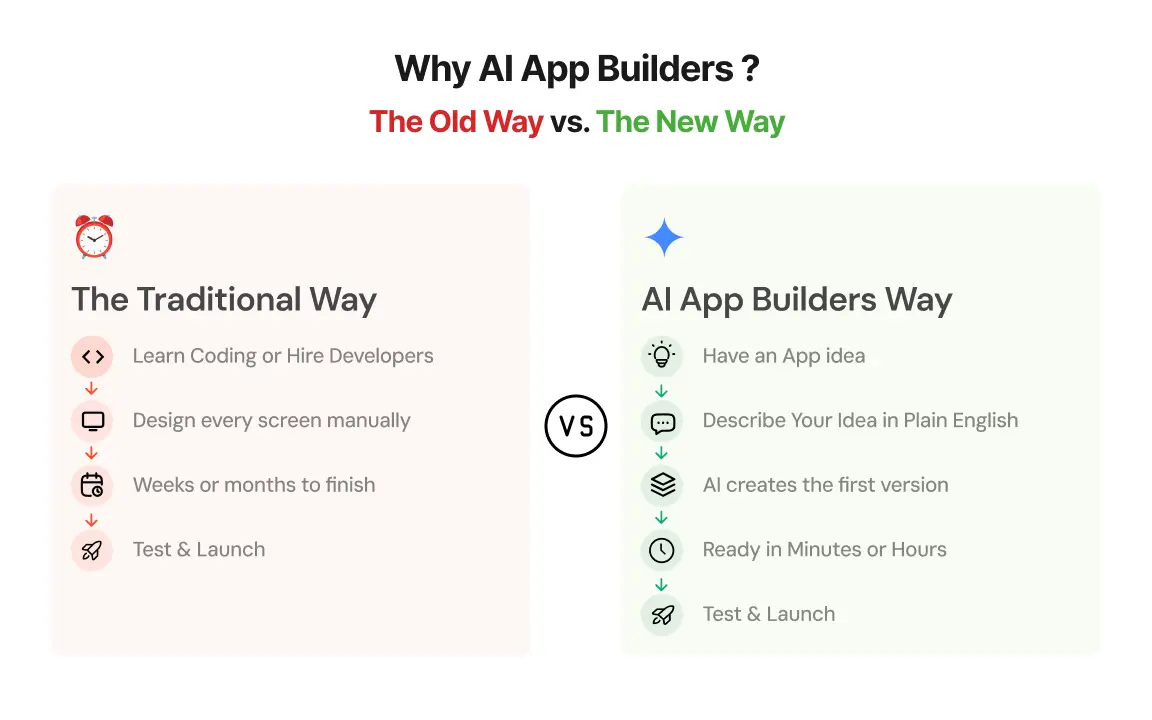
A few years ago, building an app meant learning programming, hiring developers, spending a lot of money, and waiting for months. For most people, that wasn't even an option.
But not anymore.
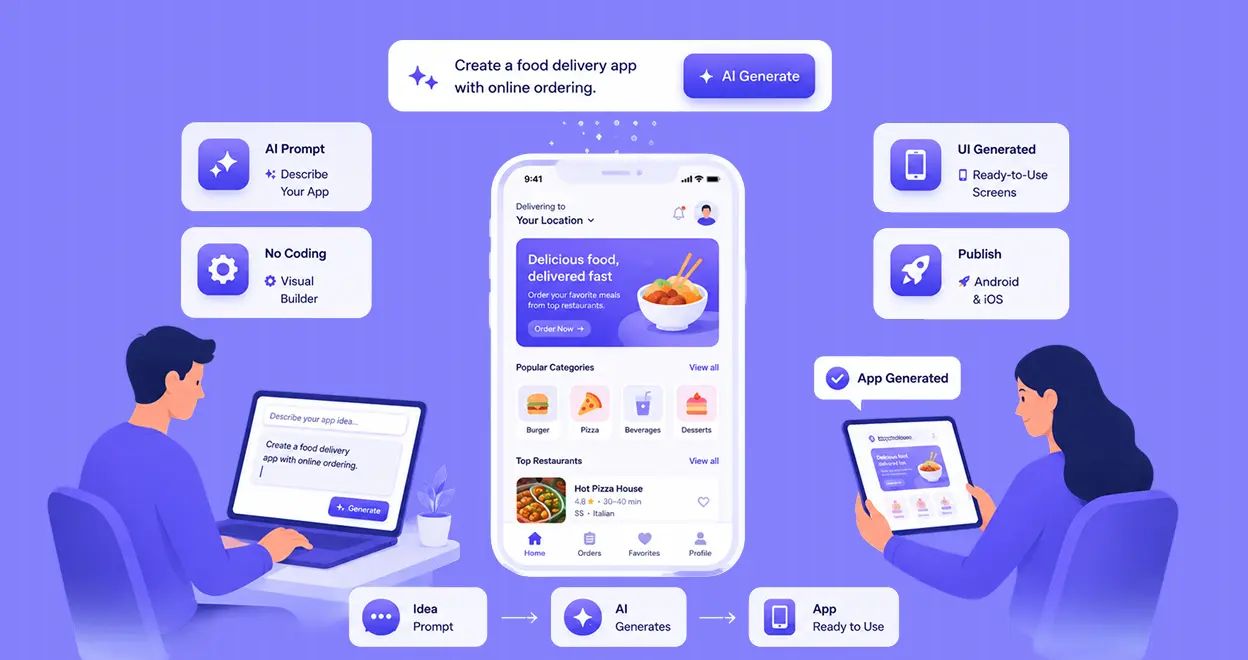
Today, AI mobile app builders let you create an app without writing code. You simply tell the AI what you want, and it helps turn your idea into a real app.
Think about it. What if that idea has been sitting in your notes app for months, waiting for the right time, the right budget, or someone who knows how to code?
Whether you're a small business owner, an entrepreneur, a freelancer, or even someone who just has a great idea, AI app builders make app development much easier.
Now the real question is—how do you know which one is the right choice for you?
Let's find out.
What Are AI App Builders?
An AI app builder is a tool for people who have an app idea but don't know how to code.
All you have to do is tell the AI what kind of app you want, just like you're texting a friend. It understands your idea and can actually make a working app for you.
For example, let's say you have a small art business and want to sell your artwork all over the world. You know your art, but you don't know how to build an app—and that's completely okay.
You can simply type something like “ I want an app where people can see my work, buy it, save it to their wishlist, customise their orders, contact me, and send their queries.” You can even tell the AI what colour theme you want, what kind of logo you like, and how you want the app to look and function.
It’s not magic - it’s just AI doing the hard work for you. Within hours or in just a few days, you can have your own app that’s ready to use. And if you ever want to change something later, you can easily customize it according to the growing trends.
I'll show you the best AI app builders, how they work, and which free AI app builders are worth trying.
Benefits
1. Perfect for non- technical founders: Have a great app idea but no coding skills? No problem. AI App builders can do it for you and help you to build your dream app without hiring a developer.
2. Reduces development cost: Hiring developers, designers, and testers can be expensive. With an AI app builder, you can build your app yourself and save a lot of money and time, especially if you're a startup or small business.
3. Easy to scale: As your app or business grows with time, you can easily add new features, handle more users and update your app without rebuilding the entire app from scratch.
4. Instant deployment: Once your app is ready, you can easily deploy it in just a few clicks. No complicated setup- just build, publish, and share your app with the world.
Testing Every AI App Builder with the Same Prompt
Before comparing the best AI app builders, I decided to use the same prompt for every platform. This helped me understand how each AI-powered app builder performed under the same conditions.
1. App Type: Build a modern e-commerce app for my resin art business called "The Palettes."
2. Design & Theme: Use a clean pastel theme with beige, white, and soft pink colors. Make the design modern, attractive, and mobile-friendly.
3. Customer Features: Include a homepage, product catalog, product pages, shopping cart, wishlist, secure checkout, search bar, customer login/signup, order tracking, customer reviews, contact page, and About Us page.
4. Custom Orders: Add a section where customers can place custom orders for birthdays, weddings, and special events.
5. Admin Panel: Create an admin dashboard to manage products, orders, inventory, and customers.
6. Final Requirement: Make the app ready for publishing and ensure it provides a smooth user experience.
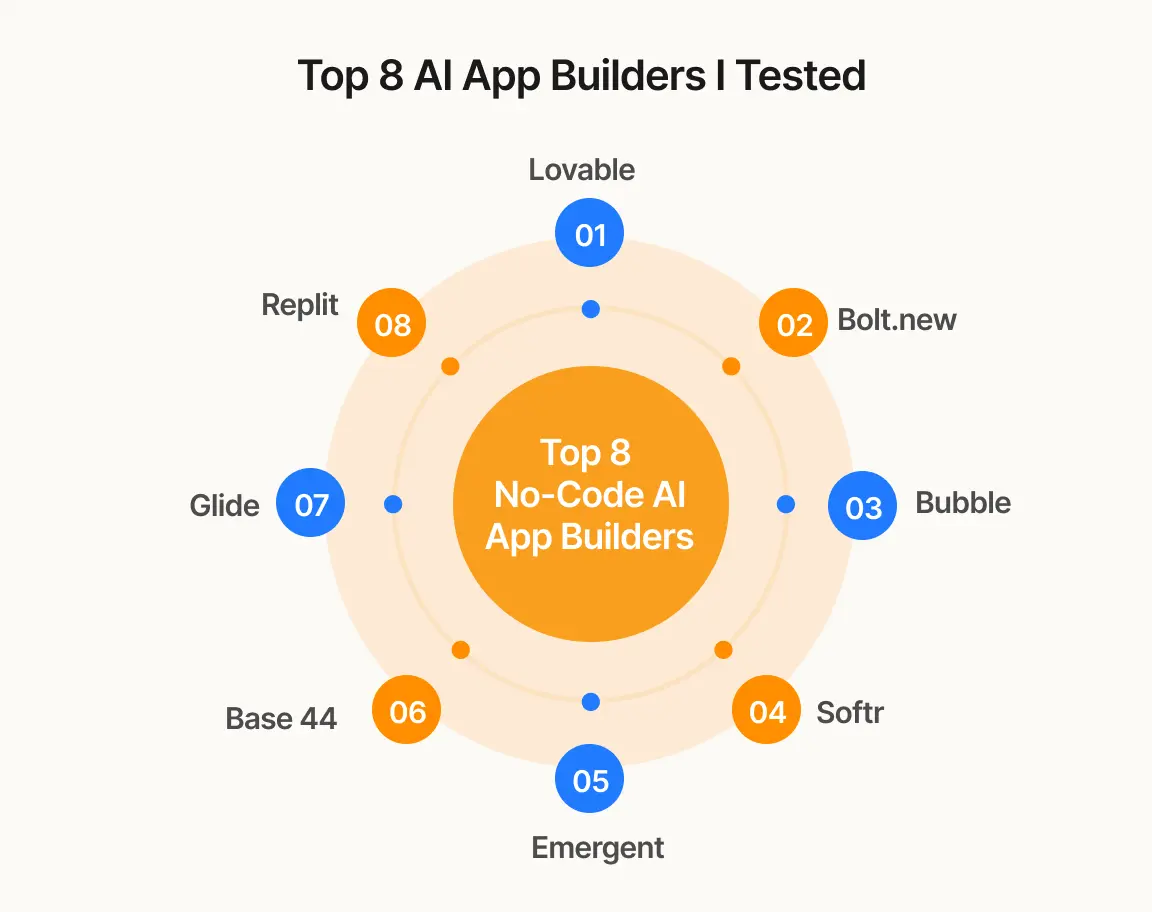
Top 8 AI-App builders
1. Lovable:
If your goal is to build a complete mobile application without spending weeks coding , Lovable is a great option for you. It not only develops the user part but also the backend stuff (database, login systems, integrations) that normally needs a developer
-
You don't need to use heavy languages; just type “ Create an art page with login, payments, and order tracking”.
-
It is great for startups and MVPs because you can go from your idea to an app very quickly.
-
Free plan available, Pro starts at $25/month.
My experience:
Time Taken From Prompting to Building the Website
It took around 10–15 minutes to build the application.
Which Features Were Used
I used the same prompt as I did for the other AI app builders. Lovable asked me to choose the design before building the app by giving me three options: the color theme, graphics, and fonts. It also generated artwork automatically for reference, and the color shades matched perfectly. There were several templates available that I could view and use.
How AI Was Used & Worked
Lovable understood my prompt clearly and generated the app accordingly. The AI first asked me about my design preferences before starting the build, which helped personalize the app. On the free plan, I was only able to enter one prompt, so I couldn't test further edits or improvements.
How the Support Team Responded
I couldn't find a chatbot or any quick help option when I wanted to make changes to my app. There wasn't much guidance provided during the building process, and the app preview was also not very clear.
My Overall Experience I really loved Lovable's UI. Their website looks very attractive, and the colors they have used give it a classy feel.
2. Bolt.new
Bolt.new helps you turn your cool ideas into working applications by just telling your thoughts to AI. Bolt is almost for everyone who knows zero coding, has a fresh idea, and wants to implement it.
-
It creates your app just by chatting with AI
-
Runs entirely in your browser - saves you from software installation costs
-
Free plan available, Pro starts at $25/month
My experience:
Time Taken From Prompting to Building the Website
It took around 5–10 minutes to build the application. The app was generated quickly, and the overall process felt smooth.
Which Features Were Used
Bolt created almost everything I needed, including the homepage, product pages, cart, wishlist, checkout, order tracking, login/signup, customer account, and an admin panel. It also generated a beautiful pastel-themed design with attractive fonts, smooth animations, and a responsive layout. To test its editing capabilities, I asked it to add Dark Mode/Light Mode and an AI chatbot, and it successfully added both features.
How AI Was Used & Worked
Bolt understood my prompt on the first attempt and generated the expected output. Before building the app, it showed me a complete plan of everything it was going to create, including the database, pages, admin panel, and design. This helped me understand exactly what was happening before the generation started. When I requested new features, such as Dark Mode/Light Mode and an AI chatbot, Bolt first displayed a step-by-step roadmap of the changes it would make and then implemented them successfully. I found this approach very beginner-friendly because it explained every task before making changes.
How the Support Team Responded
Everything happened through a chat interface, which guided me throughout the entire process. I didn't need to contact the support team because the AI itself explained each step clearly and made the editing process easy to understand.
My Overall Experience: I loved the UI and overall interface of the app. It was simple, easy to understand, and very beginner-friendly. One thing I liked the most was that Bolt always created a detailed roadmap before building or editing the app, making the entire experience clear and easy to follow, even for a non-technical user.
3. Bubble:
Bubble takes a different approach to building apps. Instead of just generating code, it creates everything inside the visual editor, so you can drag, move, and edit according to your preferences.
-
Gives you the flexibility to keep improving your app
-
AI can build the first version of your app in minutes
-
It generates pages, workflows, and the basic design for your app
-
Free plan available, Starter with web & mobile- $59/month
My experience:
Time Taken From Prompting to Building the Website
It took around 3–4 minutes to build the application. For longer or more complex apps, it may take more time.
Which Features Were Used
Bubble generated the app based on my prompt and created the exact look I wanted. It also included a few extra headings and sections on its own, making the app feel more complete. To test its editing capabilities, I asked it to add Dark Mode and an AI chatbot. The chatbot required connecting a ChatGPT plugin or another chatbot plugin, and Bubble provided step-by-step instructions to set it up.
How AI Was Used & Worked
Before building the app, Bubble asked me to review and approve all the details. Once I approved them, it started generating the app. This was the feature I liked the most because I could verify everything before the build began. The AI also added a few extra sections automatically, which improved the overall layout. I could continue adding new features either by giving more prompts or by editing the app manually.
How the Support Team Responded
Bubble provided a starter video that explained how its features work. As a non-coder, I found the step-by-step guidance very helpful throughout the process. When I wanted to add an AI chatbot, Bubble explained that I needed to connect a ChatGPT plugin (or another chatbot plugin) and guided me through the setup process. I tested Bubble on the free plan, but publishing the app and accessing more advanced features requires upgrading to a paid plan.
My Overall Experience
I loved how beautiful and subtle the app looked after it was generated. The approval step before building and the clear guidance throughout the process made Bubble easy to use, especially for someone without a coding background.
4. Softr
Softr is one of the first AI native platforms for making business apps and software. It automatically adds user login, databases, and security settings and makes your work easy. If you’re looking to build business software, Softr is worth taking a look at.
-
It is designed to build business tools like CRMs, client portals, project trackers, and other management tools.
-
Changes can be made easily using a visual editor
-
Great for businesses who want secure and ready-to-use tools.
-
Free plan available; Basic starts from $49/month
My experience:
Time Taken From Prompting to Building the Website
It took around 10–12 minutes to set up everything and build the application.
Which Features Were Used
Softr generated the complete app, including the database, sample products, orders, admin panel, and connected all the pages automatically. It also created products and order data to make the app look complete. To test its editing capabilities, I asked it to add a Dark Mode/Light Mode toggle and an AI chatbot, and it added both features within a few minutes. The app was responsive, and I was able to preview it directly inside Softr.
How AI Was Used & Worked
Before building the app, Softr asked me a series of questions instead of generating the app immediately. It asked about the payment method, guest checkout or login, shipping preferences, authentication methods, navigation layout, and theme. I liked this because it customized the app according to my preferences. Once I confirmed everything, Softr started building the app step by step. Rather than showing only a loading screen, it displayed every task it was completing, such as creating the database, generating sample products, setting up the admin panel, and connecting all the pages. As a non-technical user, I found it interesting to watch the entire process.
How the Support Team Responded
Based on my experience, they did respond but it took quite a long time to receive a reply. If you need immediate assistance while building your app, you may have to wait longer than expected for support.
My Overall Experience
I liked that Softr automatically generated sample products and orders, which made the app feel complete and helped me understand how everything would work before publishing. Personally, I felt the design was more business-focused than visually creative, so you may need to customize it according to your own style. One of my favourite features was the admin panel, as it made it easy to manage products, customers, and orders from one place.
5. Emergent
Emergent is an AI- powered app builder that lets you create web and mobile apps just by telling your app idea in your own language. AI takes care of the design to the deployment process.
-
It is like having your own development team with you.
-
After the app is built, it checks for errors and fixes problems until it generates the perfect output for you.
-
Free plan available; Standard plan starts from $20/month
My experience:
Time Taken From Prompting to Building the Website
Emergent started building the app almost immediately after I entered my prompt. However, the app couldn't be completed because my free credits were exhausted before the build finished.
Which Features Were Used
Emergent began creating the core pages of the app, including the Orders, Wishlist, Custom Orders, Contact, About, Profile, and Admin pages. It also showed the progress of each task as it worked through the project.
How AI Was Used & Worked
I used the same prompt as I did for the other AI app builders, and Emergent understood my requirements quickly. It started building the app step by step and displayed each task it was completing, making it easy to follow the progress. Unfortunately, before it could finish generating the app, my free credits ran out, so I couldn't test the final output or explore all the features.
How the Support Team Responded
I did not interact with Emergent's support team during my testing, so I can't comment on their response. The platform simply asked me to upgrade to a paid plan and purchase more credits to continue building the app.
My Overall Experience
Based on my initial experience, the building process looked promising. I liked that Emergent understood my prompt quickly, showed the progress in real time, and created different app pages. However, because of the free plan's credit limit, I wasn't able to review the completed application or fully evaluate all of its features.
6. Base 44
Base44 lets you create mobile apps by just describing your idea. Base44 was developed by a single person: Maor Shlomo, and was acquired by Wix for over $80 million. Pretty wild story.
It is more than an AI App builder- it comes with an AI Super Agent which helps you to simplify tasks, ask questions, and help run your business smoothly.
-
Perfect for solo founders
-
Free plan available, and paid plans start from $16/month.
My experience:
Time Taken From Prompting to Building the Website
It took me around 10-15 minutes to build the app.
Which Features Were Used
While building my art app, the AI included styling instructions with high-level design suggestions. It also had its own admin panel where I could change the app name, share it, and set the app visibility to private or public. The platform automatically set up the backend and database, so I didn't have to configure anything myself. It also suggested additional features that could improve the app and the overall experience.
How AI Was Used & Worked
Even if you're confused about what to build and only have a rough idea, it can suggest different app ideas and provide recommendations. It also suggested features that were necessary and could make my app better.
How the Support Team Responded
The support was interactive and responded to my doubts instantly. Whenever I had a question, I received quick responses, which made the overall experience smoother.
My Overall Experience
Overall, I had a good experience using the platform. I liked that it automatically handled the backend and database setup, so I didn't have to worry about any technical work. It also suggested useful features and app ideas, which can be helpful if you're unsure what to build. Although it took around 30–40 minutes to build the app, I found the process easy to follow, even as a non-technical user.
7. Glide
Already using Google Sheets or Excel to manage your business? Glide can convert those sheets into working apps without starting from scratch. You don’t need to design your screen manually; just ask the AI, inform the changes, and it updates the app for you.
-
Can be used in businesses for customer management, order tracking, and different workflows.
-
It has the original drag-and-drop Glide. Now, with Glide OS, you can create apps.
-
Free plan available; Explorer plan starts from $19/month
My experience:
Time Taken From Prompting to Building the Website
It took me around 15-20 minutes to build the app.
Which Features Were Used
I uploaded an Excel sheet containing my art business data, including product names, prices, stock availability, orders, and delivery status. Glide converted the spreadsheet into a working app. I also used AI to make a few design changes until I was satisfied with the final look.
How AI Was Used & Worked
Instead of starting from scratch, I uploaded my existing Excel sheet, and Glide automatically converted it into a working app within minutes. As my business grew, managing everything in a spreadsheet became difficult, so I wanted an app that I could access from my phone. I also used AI to customize the design according to my preferences.
How the Support Team Responded
I couldn't find a chatbot or any quick support option while testing Glide. Because of that, I wasn't able to get instant help or ask questions during the app-building process.
My Overall Experience
What impressed me the most was how easily Glide converted my Excel sheet into a working app. It made the entire process simple and saved me from creating everything manually. Being able to turn my existing business data into a mobile app was a great experience.
8. Replit
Replit is a vibe-coding platform that allows anyone to build mobile apps by just describing what you want in simple text and watching it build the server, design, backend, and other components right in front of you.
-
Monetize your app with Revenue Cat. It is the tool that helps you collect money when people subscribe to or buy something inside your app. The best part is it is directly linked to the App Store or Play Store.
-
Replit has launched its latest version, Agent 4, with more cool features.
-
Free plan available; Replit core starts from $18/month.
My experience:
Time Taken From Prompting to Building the Website
It took around 15–20 minutes to build the application.
Which Features Were Used
I asked Replit to create an app with sections for products, custom orders, a wishlist, a cart, order tracking, a contact page, and the overall design. It generated all of these based on my prompt. I was also able to preview the app, request changes whenever needed, and publish it.
How AI Was Used & Worked
I described my app idea in my own words, and Replit understood my requirements. Even if you don't describe the design, it automatically creates one for you. Throughout the process, I could preview the app and ask for changes wherever needed. I tested the platform using the Free Plan as a new user.
How the Support Team Responded
The support was interactive and responsive throughout the process. Whenever I had a question or needed help, I received quick responses, making it easy to continue building and improving my app.
My Overall Experience
Honestly, I was surprised by how easily Replit turned my app idea into a real working application. As someone with no coding experience and no idea how apps are built, I found it impressive that it could do everything in just a few minutes. If I want to build another app or continue improving this one, I'd definitely consider upgrading to the Replit Core plan so I can add more features and components.
Which AI App Builder is right for you?
Here's a detailed comparison of the best AI app builders and premium platforms based on my personal testing.
| Platform | Best For | Key Strength | One Limitation | Price | Build Time | Design & Customization | Backend & Database Support | Publishing & Deployment | Support & Guidance | Integration with Existing Tools |
|---|---|---|---|---|---|---|---|---|---|---|
| Lovable | Best for users who have basic coding knowledge | Creates modern-looking designs using a single prompt | Can be a little tricky for non-tech users | Free plan available, paid plans start from $25/month | 10–12 minutes | Modern & attractive designs | Built-in backend | Good deployment options | Limited guidance | Multiple integrations |
| Bolt.new | Developers who want speed + control | Everything happens through a chat. It understands your prompt well and builds a complete app very quickly | Free credits can finish quickly | Free plan available, Paid plans start at $25/month | 5-10 minutes | Highly customizable | Full-stack support | Easy deployment | Excellent guidance | Good integration |
| Bubble | Beginner friendly | Has a visual editor with workflows and drag-and-drop usage, and you can change any part of your code | Some features need plugins or a paid plan | Free plan available; paid plans start from $59/month | 3-4 minutes | Highly customizable | Powerful database | Publishing requires paid plan | Good tutorials & guidance | Plugin ecosystem |
| Softr | Business portals & dashboards | Guides you step by step while creating your app and automatically sets up your database and admin panel. | Design customization is more limited than some other builders. | Free plan available, paid plans start from $49/month | 5–7 minutes | Business-focused designs | Strong database setup | Easy publishing | Slow support response | Airtable & business integrations |
| Emergent | AI-built apps | Plans your app first, then builds it step by step while showing its progress. | Free credits may finish before the app is completed. | Credits run out quickly, paid plan starts at $20/month | Fast initial setup | Clean generated pages | Automatically generates backend and database | Available on paid plans | Shows build progress step by step | Supports integrations and workflows |
| Base44 | AI business apps | Gives useful suggestions, automatically creates the backend, and lets you keep adding features until you're satisfied | More AI messages and advanced features require a paid plan. | Free plan available, paid plans start from $16/month | 5–7 minutes | Good customization | Automatic backend support | Good deployment options | Instant responses | Many built-in connectors |
| Glide | Spreadsheet apps | Turns your Excel or Google Sheets data into a working app in just a few minutes. | Best for business apps, not highly customized apps. | Free plan available, paid plans start from $19/month | 5–10 minutes | Clean designs | Spreadsheet-based backend | Easy deployment | Limited quick support | Google Sheets & Excel |
| Replit | Developers and businesses | Creates a real working app with editable code, so you can change anything if needed. | Can feel a little technical for beginners. | Free plan available, paid plans start from $18/month | 10–15 minutes | Good default designs | Full backend support | Easy deployment | Responsive | Developer integrations |
There is no such thing as the perfect AI app builder. It completely depends on what you're building, your app type, your experience, and how much you want to spend.
One thing they all have in common is that they offer a free plan. You can easily test them, build your app, and then figure out which one works best for you.
You need to find out which app builder best suits both your working style and your app requirements.
Do You Really Need to Build an App From Scratch?
One Question That Changes Everything
A lot of people reading this probably already have a website. Then why spend so much effort building an app again if you already have a working website?
You already have something live and working. Maybe it's an e-commerce website, a to-do list, a health tracker, or anything else. But what if you want to convert that website into a mobile app without coding?
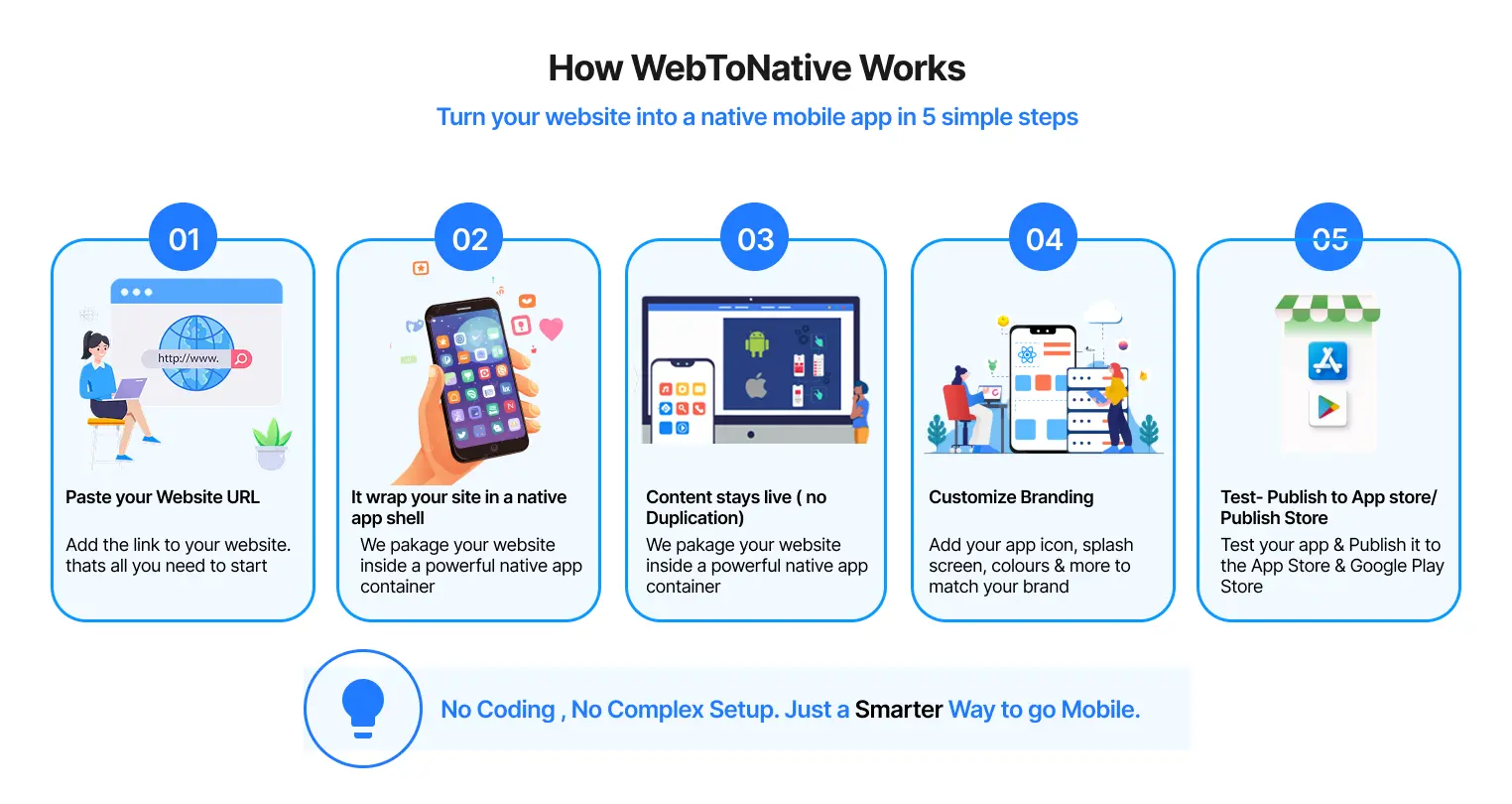
This is where a different kind of tool comes in—not an AI app builder, but a no-code app builder that converts your website into an app. It doesn't generate anything new or create an updated version. It simply takes your existing website and turns it into a working app.
So, if you're someone who can relate to this, then maybe you don't need any of the AI app builders above. You might just need a tool like WebToNative instead.
What is WebToNative?
WebToNative is a no-code platform that converts your existing website into a fully functional Android and iOS app. Instead of rebuilding everything from scratch, it simply transforms your website into a native mobile app that is ready to be published on the Play Store and App Store. You don't have to repeat the whole process and can simply publish your app. Learn more about turning a website into an app with WebToNative.
The platform offers a 14-day free trial with paid plans starting from $15/month The best part? Any changes you make to your website are automatically reflected in the mobile app without rebuilding anything.
It is like giving your website a home on your users' phones. It adds advanced features that websites usually don't have.
These include:
-
Push notifications
-
Splash screen
-
Biometric login (Face ID/Fingerprint)
-
Home screen app icon
-
Native navigation
-
Play Store & App Store support
Why I Think This Is Useful
After testing all the best AI-powered app builders, I realized something.
AI app builders are great when you have a startup idea. But if you already have a website and are still choosing to rebuild all your work and effort again, I believe it isn't necessary.
In that situation, converting your website into an app can be a much simpler and faster option.
That's where WebToNative fits in.
Traditional Programming vs. AI App Builders vs. WebToNative: Which Path Fits You?
| Feature | Traditional Programming | AI App Builders | WebToNative |
|---|---|---|---|
| What is it | Building an app completely from scratch using programming languages like Python, Java, Kotlin, etc. | AI creates an app from your idea using simple prompts with little or no coding. | Converts your existing website into a live, working mobile application. |
| Best For | Complex, large-scale products | Apps built from scratch | Businesses that already have a working website |
| Coding Required | Yes – A development team is usually required. | No – Just describe your app idea in plain English. | No – Simply provide your website URL. |
| Time Taken | 3–12 months | Minutes to hours | A few minutes |
| Average Cost | $20–$150+ per hour | Typically $0–$100+/month depending on the platform. | $15–$35/month (including a 14-day free trial) |
| Need to Design UI | Yes, everything must be designed manually. | No, AI generates the UI for you. | The existing website design is used. |
| Push Notifications | Requires development. | Depends on the platform. | Supported. |
| Ideal User | Professional developers and businesses. | Entrepreneurs, freelancers, startups, and small businesses. | Website owners and bloggers. |
| Pros |
|
|
|
| Cons |
|
|
|
Frequently Asked Questions
Q1. Do I need a coding language to use an AI app builder?
A. No, AI App builders are designed to help non-coders, beginners, and small businesses. You just need to specify the design and other details of your app and consider it done.
Q2. Can I build an app for free?
A. Yes, most AI app builders offer a free trial, helping you to learn and understand the different tools. To build or publish your app, you may require a paid plan.
Q3. Can I switch between AI app builders if I'm not happy with one?
A. Yes, but keep in mind you'll usually need to start from scratch since most tools don't let you import a project built on a different platform. This is why testing with a free plan first (like we did here) is worth doing before committing.
Q4. Is Bubble good for beginners?
A. Yes. Bubble provides step-by-step guidance, but some advanced features require plugins and a paid plan.
Q5. Do I need to rebuild my website to use WebToNative?
A. No, and that's the main advantage. You can just use your existing website to build an app. Any changes made to the website will also be shown in the app.
Q6. Is WebToNative an AI app builder?
A. No. WebToNative is a no-code platform, not an AI app builder. It takes your existing website and creates a beautiful app without rebuilding anything.
Conclusion
Building an app from scratch is no longer a task that’s limited to developers and businesses. Whether you have a new idea or an existing website, there are now plenty of tools to help you achieve your goal of having your own application.
Throughout this blog, I personally tested the 8 best AI app builders to understand how they work, what they offer, and where they perform best. Each of them has its own strengths and limitations, and there isn't a single tool that's best for everyone.
If you're starting from scratch with your cool idea, AI app builders can help you achieve that in minutes without any coding knowledge. You just need to bring your ideas and a wonderful concept; the rest, AI app builders will help implement for you. And if you already have a website worth publishing, then rebuilding an app again may not be the smartest idea. In that case, converting your website into an app using a tool like WebToNative can save both time and effort.
So, the thing is, the right tool isn't about choosing the "best" one; it's about solving the problem you're actually trying to solve.
At the end of the day, the best choice depends on your goals, budget, and where you're starting from.
Before making a decision, ask yourself one simple question:
"Am I building something new, or do I already have something worth turning into an app?"
Similar Blogs