



Which AI Website Builder Should You Choose in 2026?
Published on:
21 July, 2026

I wanted to build my own e-commerce website with proper product listings, a functional product cart, a smooth checkout process, and flexibility to run a business website freely. Instead of juggling inside a tool or platform, I decided to test all 10 leading AI website builders in 2026 with the same brief.
I tracked how long each platform took to go from prompting to a working website, which features were used, how AI was used & worked, and how their support teams responded when I got stuck along the process.
Here is the actual and unfiltered breakdown of what each platform has delivered.
What are AI Website Builders?
AI Website Builders use artificial intelligence to automatically build, design, and develop a website. Instead of choosing a blank template or traditional website development, you only have to describe everything you want on your website, along with your business description.
Benefits of Using an AI Website Builder
1. Reduce Website Development Costs
An AI website builder reduces the cost of hiring developers, designers, or purchasing separate tools for design and hosting. Many times, this leads to extending the extensive development budget, which impacts the other budgets.
Even a free AI website builder can hamper the domain setup process, SEO, and content creation, making AI website creation budget-friendly for small businesses.
2. Quicker Website Development
Many AI website builders automate repetitive tasks such as content writing and design layout. This helps a website build faster than the traditional website development process. It helps the website launch faster to market.
3. Faster and Efficient Workflows
An AI website generator handles all templates, images, and copy based on your business details, so you can stop wasting time on brainstorming. This saves hours of planning and keeps you focused on refining your website rather than starting from scratch.
4. User-Friendly Interface
Most AI website page builders have drag-and-drop editors with templates and other features. Platforms such as Wix's AI website builder and Hostinger’s AI website builder offer guided steps with real-time previews, making it easier for anyone to build and customize their website.
5. AI-Driven Design Assistance
An AI website design generator assists with images, content, and layouts to tailor your business requirements and target audience. It provides a strong AI website design while keeping the website personalized and on-brand.
Real Cost of Building a Website — The Numbers Difference
The table below takes you through the entire real and exact cost you have to incur to build your website. The prices are platform-specific and based on my research about the platform.
| Website Builder | Ease of Use | Pricing (Billed Annually) | Hidden Costs | Hosting (Per Year) | Content Management System Elements | Storage | Credits (Per Month) | Design & Customization |
|---|---|---|---|---|---|---|---|---|
| Wix | Beginner-friendly and AI chatbot builder | $17 to $159 per month | Free domain for 1 year only, then $15- $20 billed annually | Included | Not applicable | 2GB to Unlimited (Plan-Specific) | Not disclosed | 800+ design templates but few appear to be generic |
| Framer | Takes time to understand and design-centric | $10 to $30 per month | Requires a separate platform to sell products (No built-in store for e-commerce websites) | Included | 2 (Basic Plan) to 10 (Pro Plan) | 50GB to 100GB bandwidth | 1,000 to 3,000 | Best website design appearance and ideal for building portfolios |
| Hostinger | User-friendly with a 4-click website generator | $3.99 to $16.99/month | Budget-friendly at first, but renewal is expensive | Included | Not Applicable | 10GB to 100GB | 5 to 15 vibe coding credits | Functional with limited customization |
| Lovable | Easier to prompt but harder to edit the website | $21 to $42 per month | Domain not included | Included | Not Applicable | Not Applicable | 100 to 200 | AI full-stack design with heavy-code edits |
| Durable | Quick setup but limits flexibility after | $22 to $41 per month | Free domain included | Included | Not Applicable | Not Applicable | 1,000 AI chat messages and 50 images | Templates appear to be the same across users |
| Squarespace | Fully guided but not automated | $16 to $99 per month | Free domain 1st year only | Included | Not Applicable (Unlimited pages) | Unlimited | Not Applicable | Most polished templates |
| 10Web | Requires WordPress knowledge | $10 to $23 per month | Free domain available up to $30 value | Included | Unlimited (Actual WordPress) | 10GB to 25GB SSD | 100 to 300 | Actual WordPress with higher customizations |
| Webflow | Harder to understand and build for professional website designers | $15 to $25 per month | Domain not included | Included | 50 to 2,000+ (plan-dependent) | 50GB to Unmetered Bandwidth | 200 to 400 | Entire CSS control with clean code export |
| Emergent | Easy prompt with effective technical backend | $17 to $167 per month | Domain not included and additional credits cost more | Included | Not Applicable | Not Applicable | 100 to 750 | AI design with backend but not pixel-perfect |
| ChatGPT | Requires coding skills | $20 per month | Hosting and domain completely separated | Not Included | Not Applicable | Not Applicable | Usage limits, no credits system | Complete custom and unlimited control |
The Prompt I Used in All the AI Website Builders
Create a luxury high-end fashion couture e-commerce website called Aarika Couture.
Brand Style:
-
Premium, elegant, luxurious, modern Indian fashion house
-
Inspired by Sabyasachi, Tarun Tahiliani, Manish Malhotra, Pernia's Pop-Up Shop
-
Color palette: Ivory, Gold, Champagne, Beige, Black, Rose Gold
-
Premium typography with editorial fashion-magazine aesthetics
-
Smooth animations, luxury feel, cinematic visuals
Website Pages:
1. Home Page
-
Full-screen hero banner with bridal model wearing luxury lehenga
-
Luxury video background
-
Featured Collections section
-
New Arrivals
-
Best Sellers
-
Bridal Couture Collection
-
Designer Saree Collection
-
Celebrity-Inspired Looks
-
Customer Testimonials
-
Instagram Fashion Gallery
-
Newsletter Subscription
-
Luxury Footer
2. Collections Page Categories:
-
Bridal Lehengas
-
Designer Sarees
-
Wedding Collection
-
Reception Gowns
-
Festive Wear
-
Indo-Western Collection
-
Luxury Suits
-
Designer Blouses
-
Accessories
-
Men's Wedding Collection
3. Product Detail Page
-
Large image gallery
-
Zoom functionality
-
Multiple product images
-
Fabric details
-
Size guide
-
Custom tailoring option
-
Wishlist button
-
Add to cart
-
Buy now
-
Related products
-
Customer reviews
4. Bridal Couture Page
-
Premium bridal lookbook
-
Wedding stories
-
Luxury bridal campaigns
-
Custom bridal consultation booking form
5. About Us
-
Brand story
-
Designer vision
-
Craftsmanship section
-
Artisan heritage
6. Lookbook
-
Editorial fashion photoshoots
-
Seasonal collections
-
Interactive gallery
7. Contact Page
-
Inquiry form
-
WhatsApp integration
-
Store location map
-
Appointment booking
Features:
-
Fully responsive mobile-first design
-
Premium animations using Framer Motion
-
Fast loading
-
SEO optimized
-
Multi-language support
-
Wishlist
-
Shopping cart
-
User accounts
-
Secure checkout
-
Razorpay and Stripe payment integration
-
Order tracking
-
AI fashion recommendations
Special Luxury Sections:
-
Celebrity Closet
-
Bridal Consultation
-
Custom Design Service
-
Made To Measure
-
Luxury Packaging Showcase
-
Fashion Journal / Blog
Design Requirements:
-
Ultra-premium luxury appearance
-
Large professional fashion photography
-
High-end editorial layout
-
Smooth transitions
-
Glassmorphism effects
-
Elegant hover animations
-
Luxury shopping experience
Generate a complete modern React website with beautiful UI/UX, premium components, production-ready design, and luxury fashion branding.
Top 10 AI Website Builders of 2026
1. Wix
Wix was one of the leading platforms to introduce an AI website-building platform. You only have to answer a few questions regarding your business, and it builds your website. Many businesses and individuals considered the platform to be the most popular and trusted name in the category.
-
It has an AI text writer, image generator, and SEO assistant.
-
Over 800 templates to pick from
-
A free plan available, with paid plans starting from $17/month.
My Experience
Time Taken From Prompting to Building the Website
After entering the website description, name, and goal, I was taken to the design website page, where a default AI prompt was already written. I could edit it or add more details before hitting the generate button. Once I ran it, the website was completely built in around 5 to 8 minutes.
Which Features Were Used
I used the website description input, the website name field, and the goal as traffic, engagement, or sales. I also went through the suggested apps section, including options like displaying content on an Instagram feed, sharing updates through Wix Blog, and selling products through Wix Stores.
From the dashboard, I also explored the payment flow, website settings, marketing, analytics, and website setup. On the editor side, I added containers, images & more pages and switched between desktop and mobile phone views to preview the website thoroughly.
How AI was used & worked
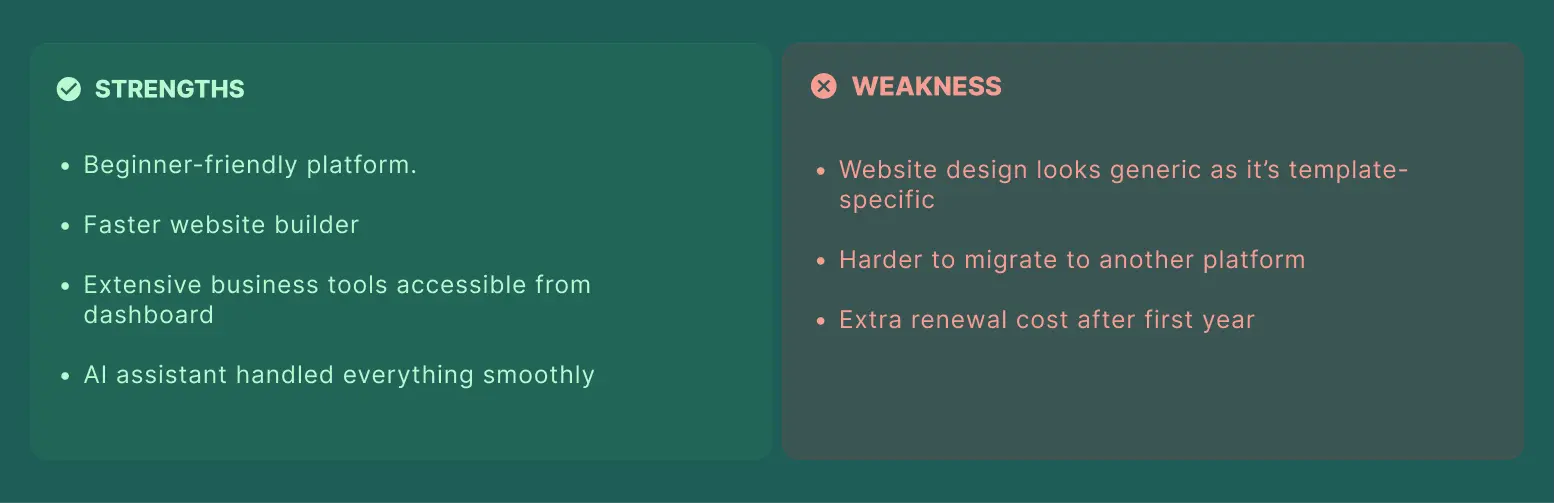
I chose not to use the AI chatbot when it first asked before designing the website. Since AI came into play while designing the website, the actual engine that generates the website is based on the prompt. The AI assistant also helped me throughout the entire editing process, making customizations such as adding containers and swapping elements feel much easier than expected. Clicking on any element brought up a set of AI-assisted customization options, and navigation never felt confusing during the entire process.
How The Support Team Responded
Actually, I haven’t connected with the support services because the platform was easy to use and completely understandable. The AI assistant helped me in every way possible. So there was no need to contact the support team for any assistance.
2. Framer AI
Framer AI began as a design platform and later added AI features, focusing entirely on making websites appear professional and visually appealing. It is perfect for designers and creatives who are passionate about how their website appears and feels. With the help of AI, you create layouts and completely customize each detail.
-
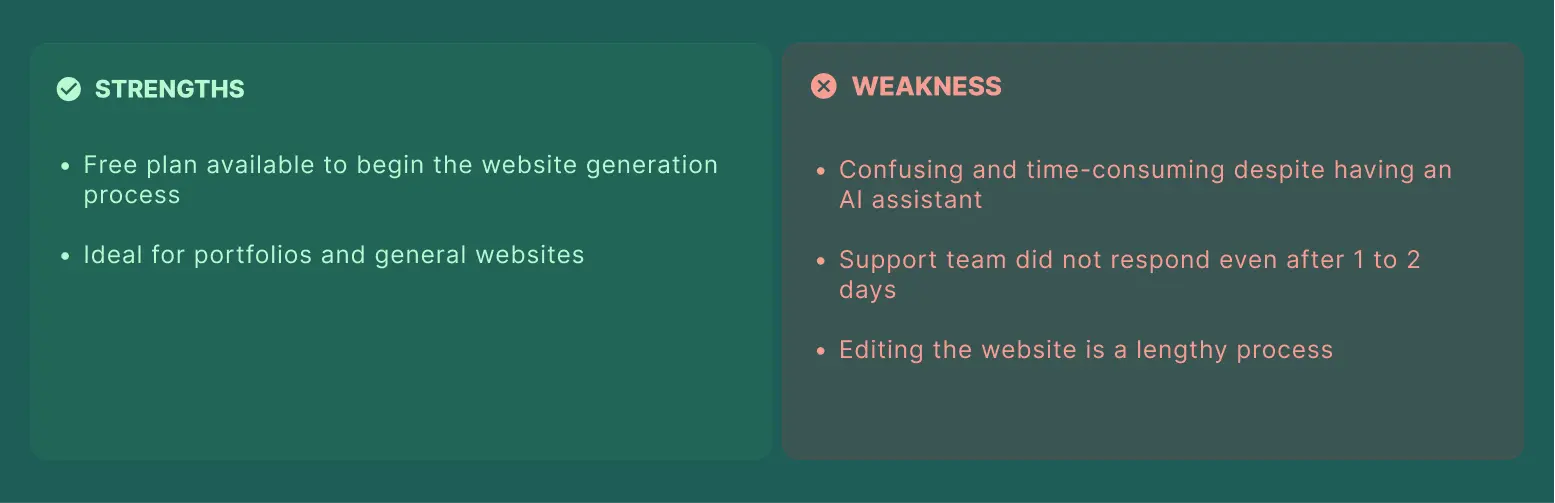
Ideal for portfolios, design-led websites, and agencies.
-
Smooth animations and real-time editing with others
-
A free plan is available, with paid plans starting at around $10 to $30 per month.
My Experience
I created an account to sign in to the platform. I was redirected to a project dashboard where I was stuck. It was harder to figure out what I actually had to start with. The AI assistant I used to create a page for the website did not meet my requirements. The website page was improper with elements, content, and a cluttered color theme. The website generated was generic. Adding an image or editing the content inside the platform was a lengthy process, as you have to upload everything to the CMS first, and then it will reflect on the website. I have only made this possible with the help of an AI assistant, but commanding the assistant was difficult. Later, I contacted their support, but there was no response even after 1 to 2 days. The whole experience was irritating, confusing, and left me stuck without any proper guidance. Lastly, I want to say that the platform is very time-consuming and requires too much manual effort.
3. Hostinger
Hostinger is renowned as a hosting company and is best known for its hosting services. Its AI website builder is included as part of their website hosting plan. This allows us to help build a working website with content. It is an ideal match for something functional without spending much money.
-
It includes a logo maker, an image generator, and AI writing platforms.
-
Also offers SEO suggestions and email marketing tools.
-
Starts with a paid plan from $1.79 to $2.99 per month on long-term plans.
My Experience
Time Taken From Prompting to Building the Website
Actually, I won't be able to tell you this, as I have used the template to build the website. So, like, I have logged in and chosen the template, and that’s it. It might have taken me less than 2 to 3 minutes.
Which Features Were Used
The template I have selected, and I clicked on the Start Building button, and then I was taken to the editing section directly. I worked with content across a wide range of platforms, swapped images, and used the option to show or hide different elements or boxes. I have added new pages and used the SEO settings section to optimize each page. I also explored the customization options available for fonts and buttons.
How AI Was Used & Worked
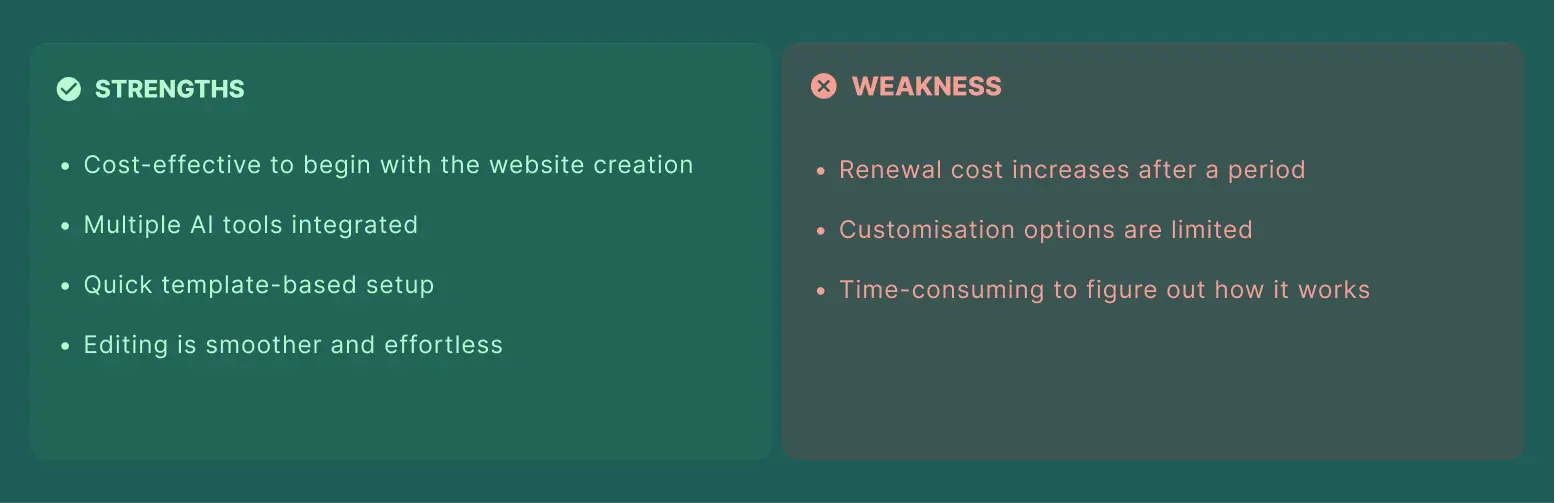
What stood out on this platform was the multiple AI tools available, including an AI image generator, AI writer, AI logo maker, AI page generator, and an AI SEO assistant. It also has multiple language support and other third-party integrations. I used the AI assistant whenever I felt stuck or confused during the process. The platform also offered the same desktop and mobile phone preview as most other website builders.
How The Support Team Responded
The platform was user-friendly and easy to navigate, so I did not need to contact support, although I did use the AI chatbot completely when I got stuck.
Overall Experience
-
Logging in was smoother and quicker. Editing and navigation felt painless.
-
Adding additional pages was too simple.
-
The platform is generous and good, but it might take a few minutes to understand where to go and where to find customizations, and it’s harder to find other features initially.
4. Lovable
Lovable allows you to build both websites and working web applications just by describing what you want in natural language. It has become very popular because it is fast and easy to use. You also get a visual editor where you can customize things directly from the dashboard.
-
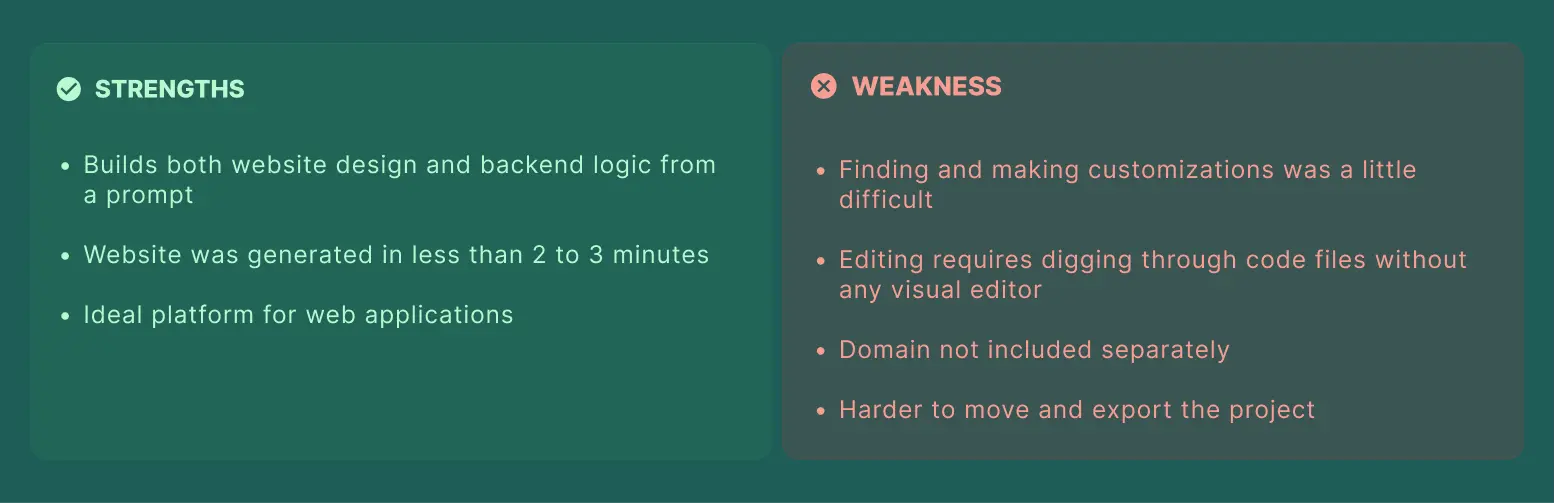
Builds both the design and backend of your website or app
-
It shows a live preview and publishes with one click.
-
A free plan available, with paid plans starting from $20 to $25 per month.
My Experience
Time Taken From Prompting to Building the Website
I opened Lovable and put in a prompt about what kind of website I wanted to create, which pages were required, and everything about how the website should function. Then I logged in, and it asked for my name, my role, and the size of the company. After that, I was redirected to the page where I had entered the command and ran it. In less than 2 to 3 minutes, the website was created and started showing up.
Which Features Were Used
I used the prompt to describe the website and pages I needed. Once the website was generated, I tried to find the customization options to make the edits.
How AI Was Used & Worked
The AI was used right from the beginning to generate the entire website from a single detailed prompt. When I got stuck trying to find customizations, I turned to their AI assistant for help, but it only gave me code and instructions on how to edit the text rather than a direct visual option. To make any actual edit, I had to go into the files section, dig through it to find the right file, figure out where to edit, and then check if it actually worked. Editing something like an image meant rewriting it in the form of code. I found this exhausting, and the interface felt cluttered and too time-consuming to fully understand.
How The Support Team Responded
To be honest, the platform was itself time-consuming, and a person with low technical knowledge cannot make use of most of the platform.
5. Durable
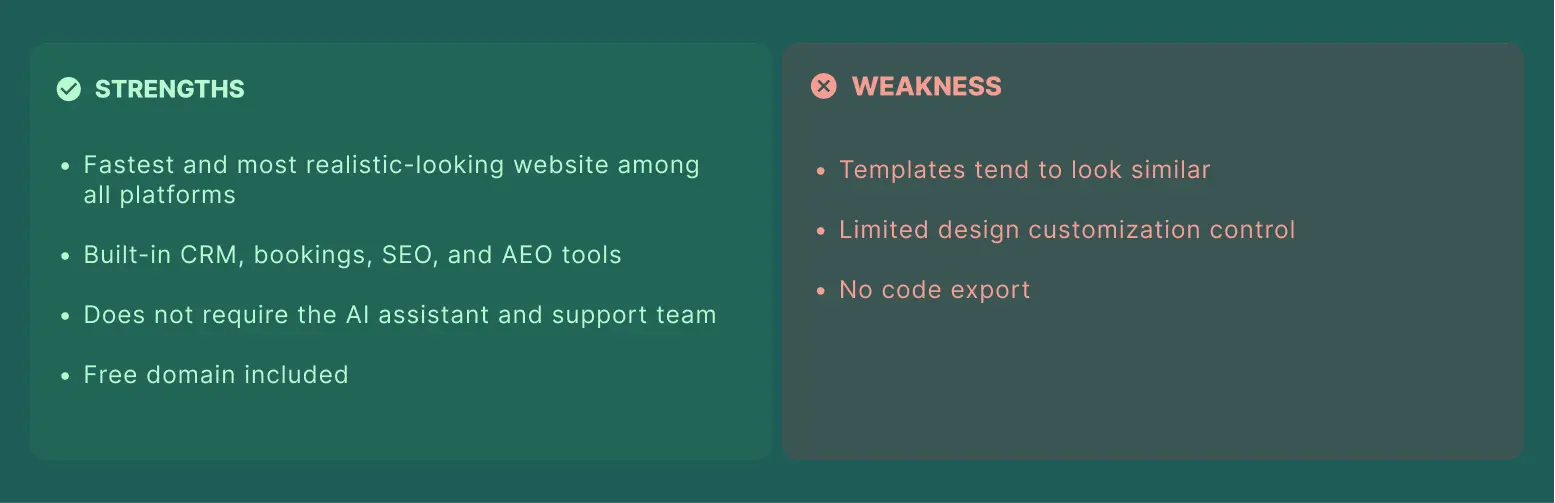
Durable is an AI website generator known for its speed. It helps develop a small business website with content and branding in around 30 to 47 seconds. It also has a handful of business tools along with the website tools themselves.
-
It has built-in CRM, marketing tools, and invoicing.
-
It has an automatically adjusting mobile view to look proper on mobile devices.
-
A free plan is available, along with paid plans starting from $12 to $15 per month.
My Experience
Time Taken From Prompting to Building the Website
I went to the Durable website and landed on the AI prompt page, where I entered the prompt I had prepared. I clicked next. It asked me what my current monthly revenue was, whether I wanted my website in English or Hindi, where the business was located, and the name of my business. Since I had already mentioned the business name in my prompt, it picked that up automatically, though I could also change it or get AI suggestions for it. I clicked on “Start Building," and on the same screen, it asked for the business description, which was already generated from the AI prompt given. Within a few seconds, the complete website was fully designed and developed.
Which Features Were Used
The website came with a review section, best sellers, and CTAs already included. It also offered different themes, and if I did not like the one it used, I could go to “Edit Website” and customize color palettes, corners, and fonts. I could also shuffle the elements and containers it had used. I previewed the website in both desktop and mobile phone views. It also included SEO and AEO tools, along with a Bookings feature to manage orders and bookings, a customer management section from the dashboard, and payment acceptance for methods like credit cards.
How AI Was Used & Worked
The AI generated the entire website from my prompt within seconds, and the best part was that it didn't look like something built by an AI website builder. The color combinations felt realistic and well put together. I was able to understand and navigate the entire website without needing any support assistance or the AI chatbot.
How The Support Team Responded
Support assistance was not required, as the website was easy to navigate. Everything from customizations to tools was clear.
6. Squarespace
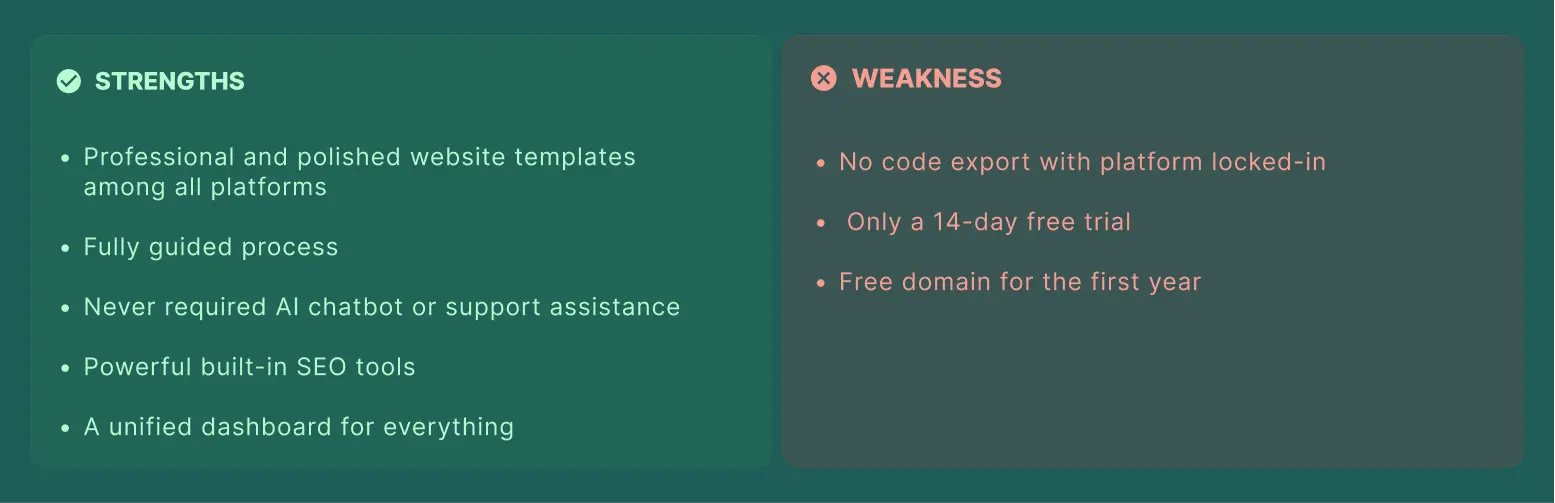
Squarespace Blueprint AI Builder, which works a little differently. It shows multiple design options and allows you to select the one you like. It is well-known for having some of the most beautiful and professional templates.
-
It has a guided five-step design process using Blueprint AI.
-
Over 190+ designer-made templates with built-in online store features.
-
A 14-day free trial with paid plans starting from $16 per month.
My Experience
Time Taken From Prompting to Building the Website
I logged in and clicked “Get Started.” It asked about my website's topic via a drop-down menu with categories such as fitness, apparel, design, and fashion. I selected fashion designers and collections as the website topic. Next, the platform asked me about what I wanted to do with my website through checkbox options. I checked the boxes for the options, including selling products, building a community, selling services, showcasing work and expertise. Then, I was given two options for how to start building a website: either using professional website templates or building with AI. I have chosen the building with AI option. The platform took 1 to 2 minutes to set itself up.
Which Features Were Used
After the setup was completed, the hero section of the website was displayed on one side while I filled in the details, such as the name of the website, on the panel beside, providing a live preview of the information being filled in and chosen. The next section was Brand Personality, which covers the tone, voice, and content direction of the website. It displayed the demo templates matching each personality option. Next, I was asked to select the pages I wanted to add to the website from a drop-down menu. I selected the About, Contact, Shop Appointments, and Services pages. After this, I selected the color theme for the website using different given color palettes with a live preview showing how the pages would look in different palettes, followed by selecting the fonts to be used on the website pages. Once done with choosing the fields, the website was created based on all the requirements and selections. It took me straight to the dashboard, where I manage the website navigation, SEO, and domain settings. I have also added the services, edited content, and set up booking pages, including availability and booking type. I have explored a few additional features, such as creating gift cards, applying discounts, contact management, and website analytics, all inside a single dashboard.
How AI Was Used & Worked
I have used the AI website builder instead of customizing a built-in website template. It has built the entire website based on my chosen fields for topics, goals, personality pages, and color themes. From setting up everything to finishing all the customizations, I haven't used any AI chatbot or support assistant.
How the Support Team Responded
I did not require any support or assistance throughout the process, from setting up to website dashboard settings customization. I used their 14-day free trial, after which you have to purchase a plan.
Overall, the platform was highly productive, user-friendly, easy to understand, and navigate. Everything from SEO to advanced website functionality was available within a single dashboard. I highly recommend this platform to people who want to build their websites without being irritated and confused.
7. 10Web
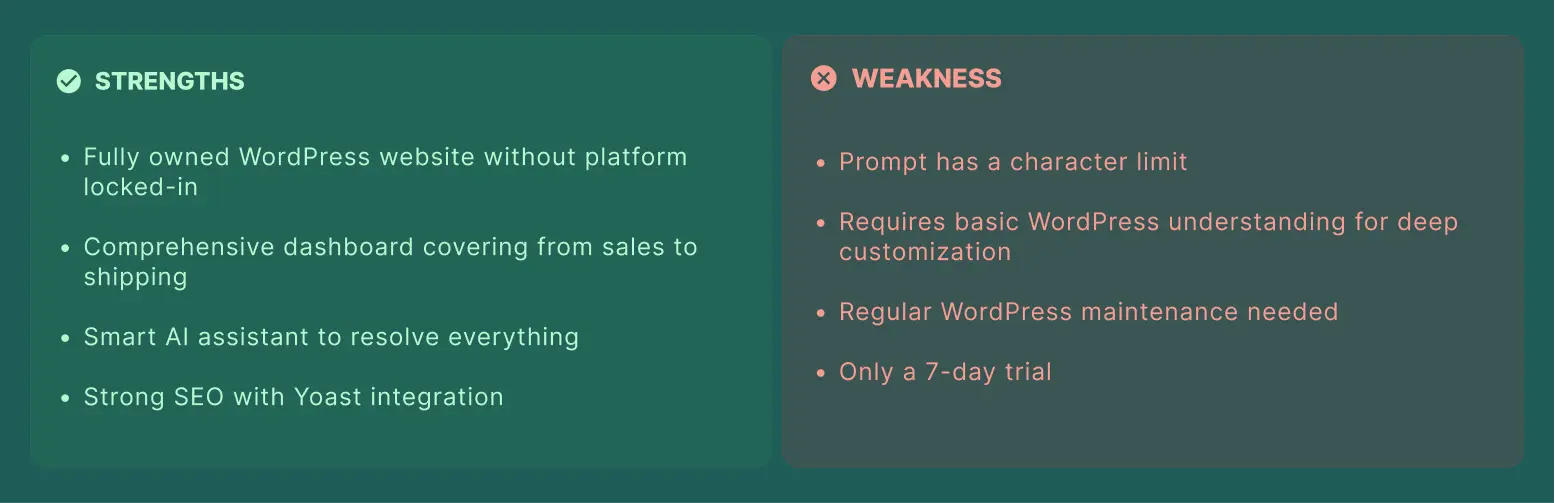
10Web is a great choice for those who want an AI website generator built on WordPress. It offers you a real WordPress website that you can control completely and customize anytime. Over 2 million websites have been generated using the platform (SOURCE: 10Web).
-
It allows copying the layout of any website just by entering the link.
-
It has an Elementor-based editor with online store support.
-
A 7-day trial is available without a free plan. It has a paid plan starting from $10 per month.
My Experience
Time Taken From Prompting to Building the Website
After creating an account, I landed directly on 10Web’s AI website builder page, where I had to enter my prompt. My prompt was a bit long and exceeded the platform’s character limit. So, I had to shorten the entire prompt before submitting. It took 1 to 2 minutes to generate the website structure, including which pages would be included and what elements each page would have. I could customize this structure before proceeding. Once I clicked on “Start Building” to begin the actual website generation, it took 2 to 3 minutes to build the complete website.
Which Features Were Used
On the left side was an AI chat, and next to it was the live preview of the website. There was an option to view the entire code of the website, along with editing, viewing different pages, and customizing buttons. I clicked Edit, then tapped on the content and image I wanted to change, and a panel opened on the left with customization options like adding links, text color, size, font, and layout. I have removed or added elements as needed. I made these kinds of changes across different pages. I also customized the website theme, including colors, fonts, and shadows, with all the changes reflected in the live preview alongside the editor. I have added more pages as well. In the Settings section, I checked the website’s speed score and overall website analysis. The e-commerce section had a wide range of fields for managing sales, customers, products, emails, shipping, and payments, all inside one dashboard. I also explored different payment gateways and how you can manage the payment transactions.
How AI Was Used & Worked
The AI generated the entire website structure and design based on my prompt. I used the AI assistant’s help while exploring the settings section. The website turned out professional and matched the requirements I had described in my prompt.
How The Support Team Responded
The AI assistant was smart enough to help me when I got stuck. So, I haven't contacted their support team for any assistance or help.
8. Webflow
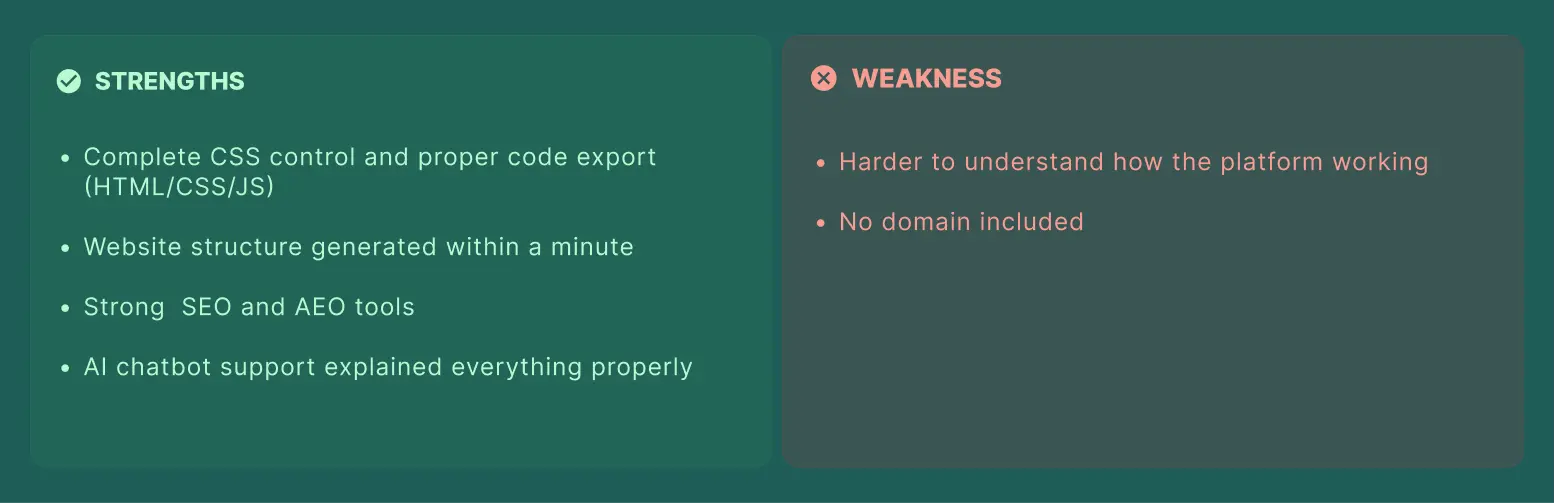
Webflow combines one of the platform's most powerful design tools with AI generation. It is popular among designers as it gives complete control over how everything appears. It allows exporting clean website code, unlike most other builders.
-
Complete code export in HTML, CSS, and JavaScript.
-
It has a built-in content management system.
-
A free plan is available, with paid plans starting from $15 to $18 per month.
My Experience
Time Taken From Prompting to Building the Website
After entering the prompt in the AI chat and running it, the website structure was ready in less than a minute. The platform allowed editing the prompt or editing the website structure. If the website structure is ideal, you can click on “Generate Site" to start building the website.
Which Features Were Used
I logged in to Weflow. They asked me my name and whom I wanted to build the website for. Later, they gave me three options: clients (freelancers or agencies), my company, and me. It also asked whether I was a student and what type of website I was looking for, including business, e-commerce store, portfolio, blog, and others. They also asked me whether I wanted to hire someone to help me build the website and how much I could pay to match the website with the ideal partners. It then gave me three options: AI site builder, template, or blank site. I have chosen the AI site builder option. Once the website was generated, all the pages showed up in a live preview. I have clicked on the page to edit it, changing themes, fonts, animations, images, typography, and roundness. I have also moved elements around, added new elements, changed the page sequence, and viewed the website on different devices, including desktop, tablet, mobile view landscape, and mobile view portrait.
How AI Was Used & Worked
The AI generated the entire website structure and design from the prompt within less than a minute. The website structure took 1 to 2 minutes to make for the entire website. It was easy to use but needed a thorough understanding and time to figure out how the element works and where it is placed.
How The Support Team Responded
I have only used the AI chatbot for support, which helped explain how things worked wherever required. This is the only one I have done.
9. Emergent
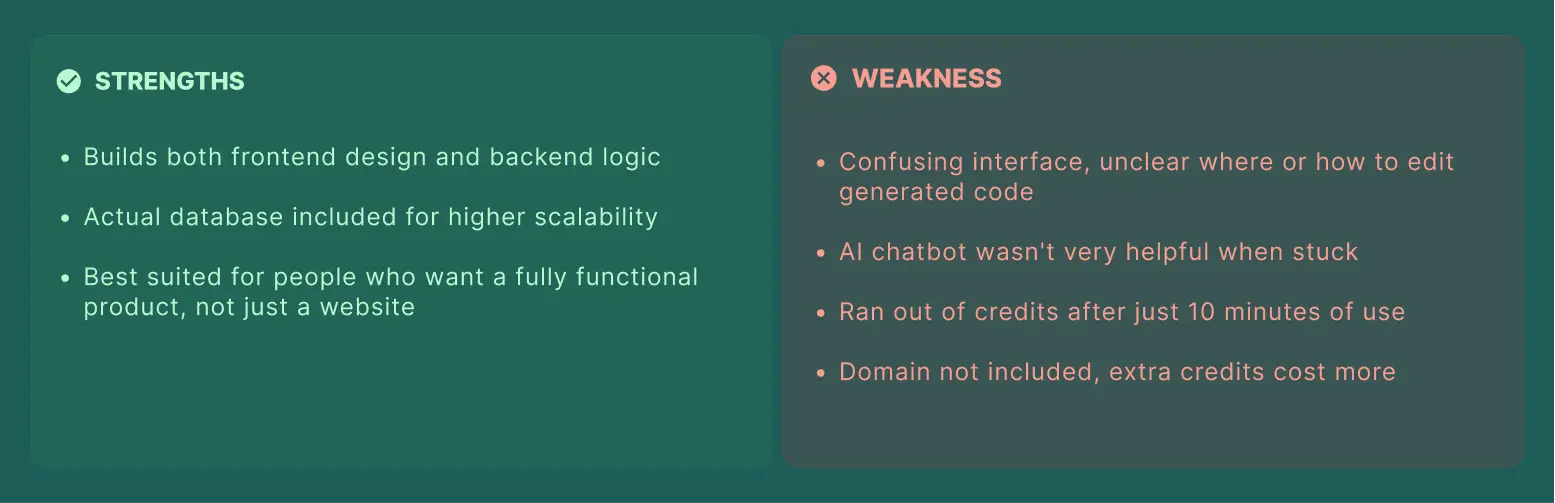
Emergent does more than just create your websites. It uses multiple AI agents to build both the front-end and back-end functionality, such as databases and logins, from a single command. It is an ideal choice for people looking for a fully functional website, not just an ordinary web page.
-
Maintains design, front-end, back-end, and publishing on a platform.
-
It allows you to export the code if you want to host it yourself.
-
Uses a credit-based pricing system along with paid plans starting from $17 per month.
My Experience
I signed up on Emergent, and an AI box appeared where I had to enter my website prompt. I entered my website prompt. It generated a few code files. I had no idea how or where to look for editing the elements. The AI chatbot was not answering properly either; nothing really made sense in terms of how to manage and edit the website. It felt too confusing and got stuck each time. After running the prompt, the platform took 5 to 8 minutes to build the website. But I was not able to understand how to edit the page, the content, or the images. After 10 minutes, a message popped up saying I did not have enough credits. The platform is ideal for developers.
10. ChatGPT
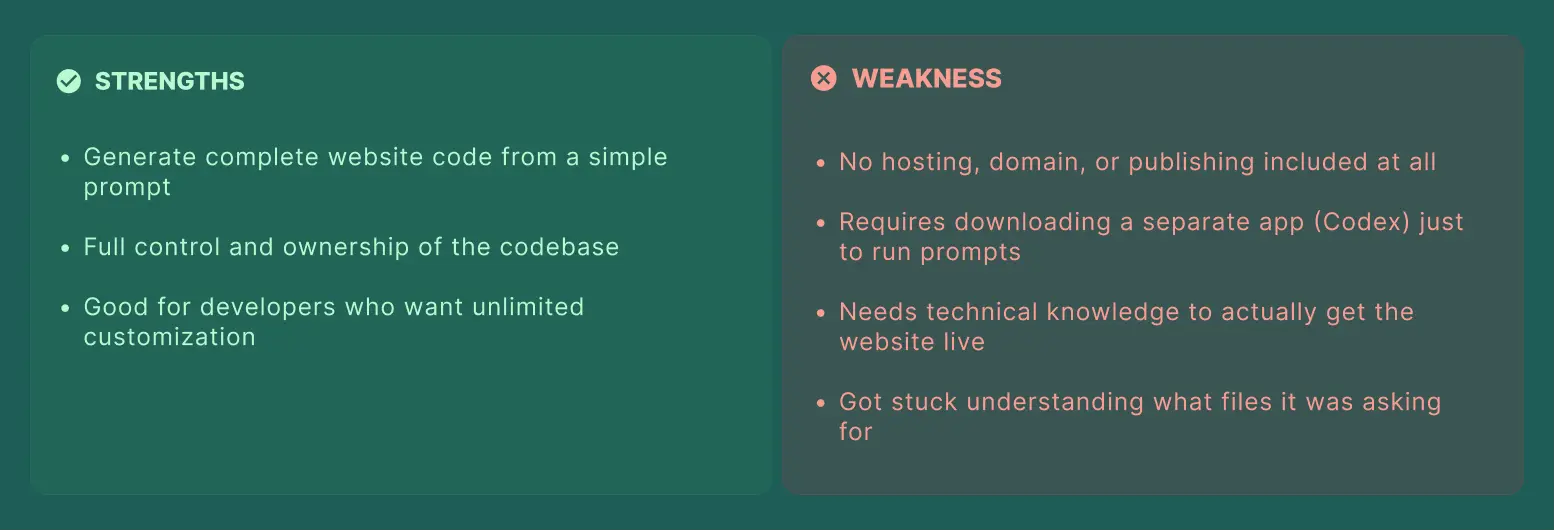
ChatGPT can write complete website code, including design, functionality, and layouts, just by describing what you need. However, the platform fails to host and publish the website. You require a separate platform to make it live. It is helpful for those individuals who can handle codebases themselves.
-
Write full website code from a simple natural language command.
-
You can explain the code and fix issues when you ask.
-
The platform does not offer hosting, domain registration, or publishing.
My Experience
I opened ChatGPT’s Codex and then had to download the app, since it does not work without downloading it. I downloaded the app, logged in, and ran my prompt inside it. But it started asking for some files to run inside, and I had no idea what that meant. So I got stuck and confused about moving forward. Using ChatGPT as a website builder means you separately need hosting, domain, storage, and more on top of it.
All Top AI Website Builders — The Ultimate Comparison
Below is the detailed tabular comparison of all 10 AI website builders.
| AI Website Builders | Best For | Starting Price | Free Plan | AI Approach | Key Features | Code Export | Limitations | SEO & Marketing | Scalability & Growth |
|---|---|---|---|---|---|---|---|---|---|
| Wix | All-rounder and beginner-friendly websites | $17 per month | Yes (But with Wix branding) | Conversational chatbots ask about your business than starts the website building process | AI text writer, SEO assistant, 800 + templates, image generator | No | Website design might look generic because of its template-based development. | Built-in AI SEO assistant with Google Ads, social media, and Email marketing | No code export and harder to migrate |
| Framer AI | Creative portfolios and Designers | $10 to $30 per month | Yes (Framer's sub-domain) | Suggest a layout based on design principles (You have to refine visually) | Built-in CMS, real-time collaboration, and smoother animations | No | Not built for complex and multi-feature websites | Built-in but limited access to SEO tools | Not for complex websites and no code export is supported |
| Hostinger | Small businesses and budget-conscious | $1.79 to $2.99 per month | No, just a 7-day trial | Simple 4-click generator based on basic business questions asked | AI writer, image generator, SEO assistance, and logo maker | No | Customization options are very limited | Basic SEO suggestions | Limited scalability and ideal for less complex websites |
| Lovable | Web applications and fast-working prototypes | $20 to $25 per month | Yes, with limited credits | Full-stack AI builds both the design and backend from a command | Visual click-to-edit mode, one-click publishing, and real-time preview | Yes (Through GitHub) | Harder to move your project to another platform | SEO support in the development stage | Highly scalable but heavy lock-in |
| Durable | Local businesses | $12 to $15 per month | Yes | Generate a website using your business type and location | Mobile-optimized, built-in CRM, invoicing, and marketing tools | No | Limited design customization, and the website appears to be similar | Built-in SEO and GEO tools | Not ideal for e-commerce with no code export |
| Squarespace | Creative and service-based businesses | $16 per month | No, just a 14-day trial | Blueprint AI shows design options | 190 + premium templates, all-in-one hosting, and built-in online stores | No | Longer development process, as it’s more guided than automated | Strong built-in SEO tools | No code export plus platform lock-in |
| 10Web | Individuals and businesses require an AI-built WordPress website | $10 per month | No, just a 7-day trial | Generate a complete working WordPress website from the given description and details | Elementor editor, website copying by URL, and WooCommerce support | Yes, it’s an actual WordPress website | Regular WordPress maintenance is required | Powerful SEO with Yoast integration | Fully exportable but requires maintenance |
| Webflow | Designer needing complete CSS control | $15 to $18 per month | Yes | AI website builder generates a complete and consistent design system | Built-in CMS, powerful enterprise security, and complete HTML/CSS/JS export | Yes | Enhanced learning curve | Strong SEO and AEO tools | Powerful scalability with enterprise readiness |
| Emergent | Businesses, individuals, and people who require an entire website, mobile apps, and dashboards | $17 per month | Yes, with limited credits | Multiple AI agents to build the design and back-end logic, both | Database authentication and integrations are included automatically | Yes | Use a credit-based system to easily add heavy usage | Not a primary focus | Highly scalable with an actual database included |
| ChatGPT | Developers who require raw website code | Free and ChatGPT Plus | Yes | Generate complete HTML, CSS, and JS from your given command | Describe code, fix errors, and walk through each step | Yes, you own the entire code | No hosting or publishing. You need to use a separate platform to live and publish your website | No built-in SEO and marketing tools | Unlimited but skill-dependent |
What’s Next: The Step Most People Skip
As you have built your website with the right AI website builder and it’s live. But most people skip this step, as a website alone does not cover everything anymore. Most of the customers are on their mobile devices scrolling inside mobile apps. Searching or writing URLs seems to be effortful in a web browser. Building a fully functional mobile app from scratch felt like a new project until you found out about the development cost, increased maintenance, and long development time. As I have found out, you don't actually have to start building the app from scratch. It turns out your existing website can become a mobile app too.
Here comes WebToNative as an ideal solution. A no-code and low-code mobile app builder that converts the existing website into a fully functional mobile app for Android and iOS. The platform keeps managing your website, real-time synchronizing the app with the website, and offering the complete native essential features. It offers a wide range of add-ons so you don't have to search for any additional functionality. WebToNative assists from entering the URL to publishing on the app stores.
| FEATURE | Traditional Mobile App Development | AI Mobile App Builders | WebToNative — No-Code Mobile App Builder |
|---|---|---|---|
| Time to Build | Months | Days to Weeks | Minutes to Hours |
| Cost | $5,000 to $50,000 | $20 to $200+/month | Starts from $10 to $30 per Month |
| Technical Skills Required | Higher and requires skilled developers | Requires proper prompting and fixing | None |
| Connects to Your Website | Builds separately | Build from scratch with prompts | Yes |
Frequently Asked Questions
Q1. Which AI website builder is best for e-commerce in 2026?
A. Durable and Squarespace are the best AI website builders, especially for e-commerce stores. Both platforms generate professional-looking dashboards with built-in features, including bookings, payments, and customer management, without writing code. Wix and 10Web are solid options if you want more control over website customizations alongside AI generation.
Q2. Can I build a website for free using AI?
A. Yes, most platforms included above in the list, including Wix, Squarespace, Durable, Webflow, and more, offer a free plan or credits to start the process. However, free platforms come with their branding, limited storage, and limited credits. It’s most likely to buy once you have used the free trial completely.
Q3. Do AI website builders work for beginners without requiring coding?
A. Most of the AI website builders are focused on building for non-technical users without any coding hustle. Hostinger, Durable, and Webflow are some of the examples you can use as a beginner.
Q4. How long does it take to build a website using AI?
A. The time to build a website varies depending upon the platform. A few platforms such as Durable, Wix, and Webflow generate a working website in under 10 minutes.
Q5. Is ChatGPT worth it for building a website?
A. No, ChatGPT can write website code without providing hosting, domain, and publishing. You also require separate cloud storage and technicalities to take a website live for a non-technical individual.
Q6. Can I convert my AI-built website into a mobile app?
A. Yes, once you have built a website using AI tools like WebToNative, it can be converted directly into a native app for Android and iOS without requiring a rebuild or scratch.
Conclusion
Ten Platforms. One Prompt. Ten Different Results. There is no universal winner among the ten platforms. Durable and Squarespace nailed it without touching a single line of code. Lovable and Emergent were built for people who don't mind coding without any prior experience. Wix, 10Web, and Webflow give more control but have to be learned about before building. Honestly, the AI wasn't the highlight, but the platform experience was. Pick based on what you actually need and work within the platform.
Similar Blogs