



How to Convert Your Wix Website Into a Native App (2026 Guide)
Published on:
19 August, 2026

By Chavi Chandani
Technical Content Writer
Table of contents
You’ve spent weeks building your Wix website. Your pages are ready, your products are live, and your users are already using it. But now you want an app too. The problem? You probably don’t want to build everything all over again.
The good news is, you don’t have to. Your existing Wix website can be the starting point for your app.
Before you start, there’s one thing to keep in mind. In 2026, simply putting a Wix website inside an app may not be enough for App Store or Google Play approval. Your app should offer a proper mobile experience and useful functionality beyond just displaying a website.
So, instead of simply wrapping your Wix site, let’s look at how you can turn it into an app that actually feels like one.
With WebToNative, you can convert your Wix web app into a native Android and iOS app without rebuilding everything from scratch.
In this guide, we’ll walk through how to convert your Wix website to an app, what happens to your existing features, what you can add to the app, and what you should check before sending it to the App Store or Google Play.
Why Convert Your Wix Website Into an App?
If you're thinking about converting your Wix website to a mobile app, here are a few reasons why it can be worth it.
1. Give Users Easier Access
An app gives users a quicker way to reach your business. Instead of opening a browser and searching for your website, they can simply tap your app and get started.
-
Users don't have to open a browser and search for your website every time.
-
They can simply tap the app icon and open it instantly.
-
This makes it easier for regular users to come back to your app.
2. Stay Connected With Push Notifications
With push notifications, you can stay connected with users even when they are not using your app. Send useful updates at the right time and give them a reason to come back.
-
Send updates, reminders, offers, and other important messages directly to users.
-
You can keep users informed even when they aren't actively using your app.
-
Useful for things like order updates, booking reminders, or new content.
3. Keep Your Brand on Their Phone
Once someone installs your app, your brand is always just one tap away. Your app icon stays on their home screen, making it easier for users to remember and return to your business.
-
Your app icon stays right on the user's home screen.
-
This keeps your brand visible and only one tap away.
-
It also gives users an easier way to return to your business whenever they need it.
4. Give Users a Better Mobile Experience
Your website may already work well on mobile, but an app can make the experience feel more natural. Users can access important features more easily and navigate without opening a browser.
-
An app can feel more natural and convenient to use on a phone.
-
You can make important actions easier to access and navigate.
-
Instead of feeling like a website squeezed onto a phone screen, the experience can feel more app-like.
5. Use Native Mobile Features
A mobile app can do more than simply display your website. With WebToNative, you can add useful mobile features that make the app easier, faster, and more convenient for your users.
-
Apps can make use of features available on the user's phone.
-
With WebToNative, you can add features such as biometric authentication, push notifications, and native navigation.
-
These features can make your app more useful and convenient for users.
6. Keep Your Existing Wix Website
The biggest advantage is that you don't have to throw away what you've already built. Your Wix website can remain the base while WebToNative helps turn it into an app your users can easily access.
-
You don't have to rebuild your website from scratch.
-
Your existing Wix website can continue to be the base of your app.
-
WebToNative helps bring that website experience to mobile while letting you add native app features.
| Feature | Wix Website | Native App With WebToNative |
|---|---|---|
| Access | Needs a browser and URL every time | One tap from the home screen |
| Offline Access | Doesn't work without internet | Some essential app features can still work with low or no internet |
| App Store | Not available as a regular mobile app | It can be published on Google Play and the Apple App Store |
| Push Notifications | No direct way to reach users | You can add push notifications to send updates and reminders |
| Device Features | Limited to what a browser allows | Access to biometric login, camera, location, etc. |
| Brand Visibility | Only visible when someone visits the site | App icon stays on the user's home screen |
| Speed | Loads through the browser each time | Opens instantly and feels faster |
What Happens to Your Wix Features After Conversion?
The good news is you don’t have to build everything again. WebToNative uses your existing Wix website as the base of your mobile app, so your website content and features can continue to be used.
What Stays the Same?
Your Wix Store and Bookings
If your Wix website has products, a cart, checkout, or bookings, these can continue to work through your existing website.
Your Content
Your blogs, pages, images, and other website content stay connected to your live Wix site. So when you update your website, those changes can also show in the app.
User Accounts and Login
If your Wix website has user accounts and login, users can continue using them through the app. Make sure to test the login flow on your phone before publishing.
So basically, you don't have to leave your Wix features behind. Your existing website does most of the work, while WebToNative helps bring that experience to mobile and lets you add native app features.
Things to Check Before Converting Your Wix Site
Before turning your Wix website into an app, take a quick look at your website first. You don't need to prepare anything complicated, but checking a few things can save you trouble later.
Check Your Mobile Design
Open your Wix website on your phone and see how it looks. Check your text, images, buttons, menus, and forms. Everything should be easy to see and use on a small screen.
Test Your Important Features
Try the features your users actually need, such as:
- Login and signup
- Forms
- Shopping cart and checkout
- Bookings
- Payments
If something isn't working properly on your website, fix it before converting it into an app.
Check Your Apps and Integrations
If you've connected other Wix apps or third-party tools to your website, check that they work properly. These features may need extra testing when your website is used inside a mobile app.
Basically, make sure your Wix website works well on mobile first. Once the basics are sorted, you're in a much better place to turn it into an app.
Step-by-Step: How to Convert Your Wix Website Into an App Using WebToNative
Ready to turn your Wix website into a mobile app? The process is pretty simple. You can create a demo first, check how it looks, and then customize it before publishing.
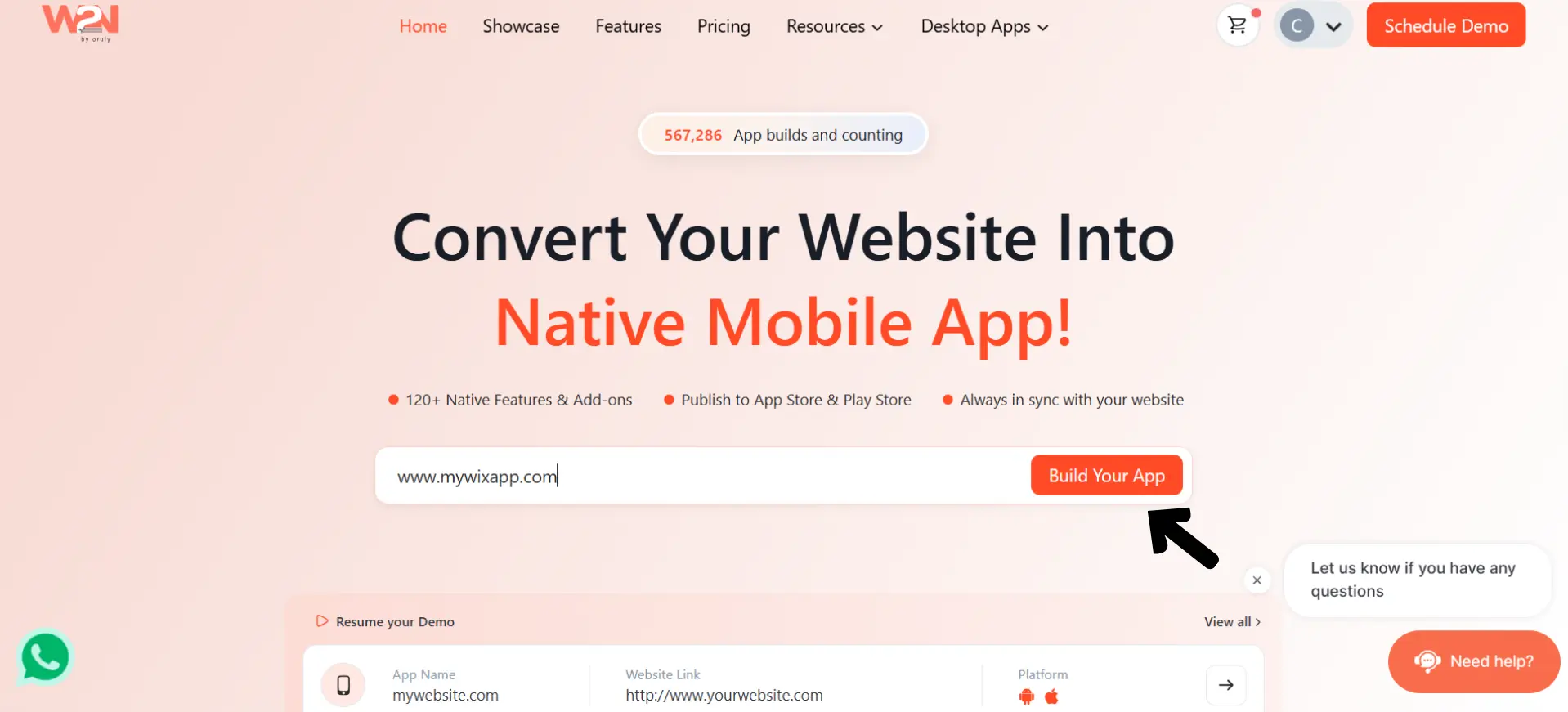
Step 1: Enter Your Wix Website URL
Start by entering your Wix website URL on WebToNative. This is the website you want to convert into a mobile app.
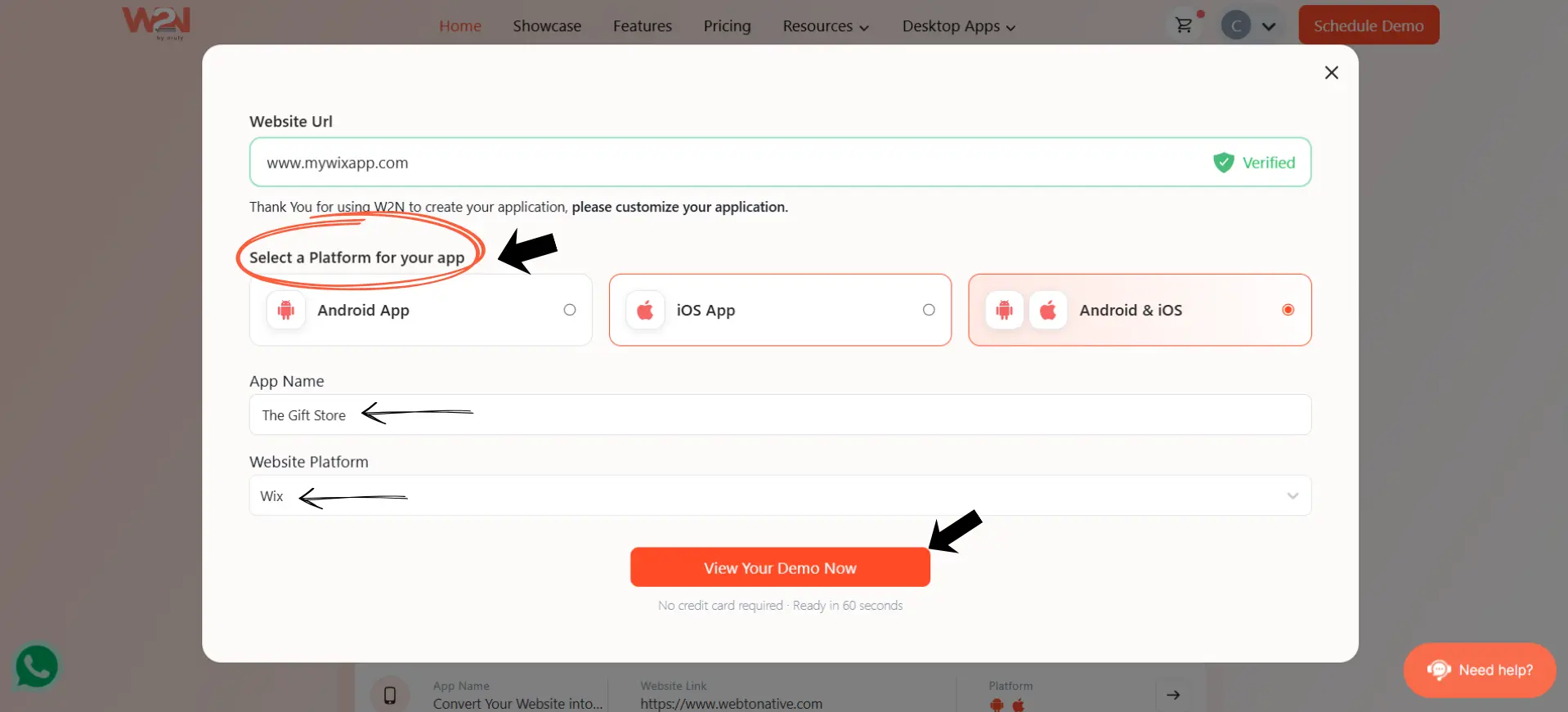
Step 2: Choose Your Platform
Next, choose where you want your app to work:
- Android
- iOS
- Android & iOS
If you want your app on both platforms, simply select Android & iOS.
Step 3: Select Wix and Add Your App Name
Choose Wix from the Website Platform dropdown and enter the name you want to give your app. Once everything looks good, click “View Your Demo Now.”
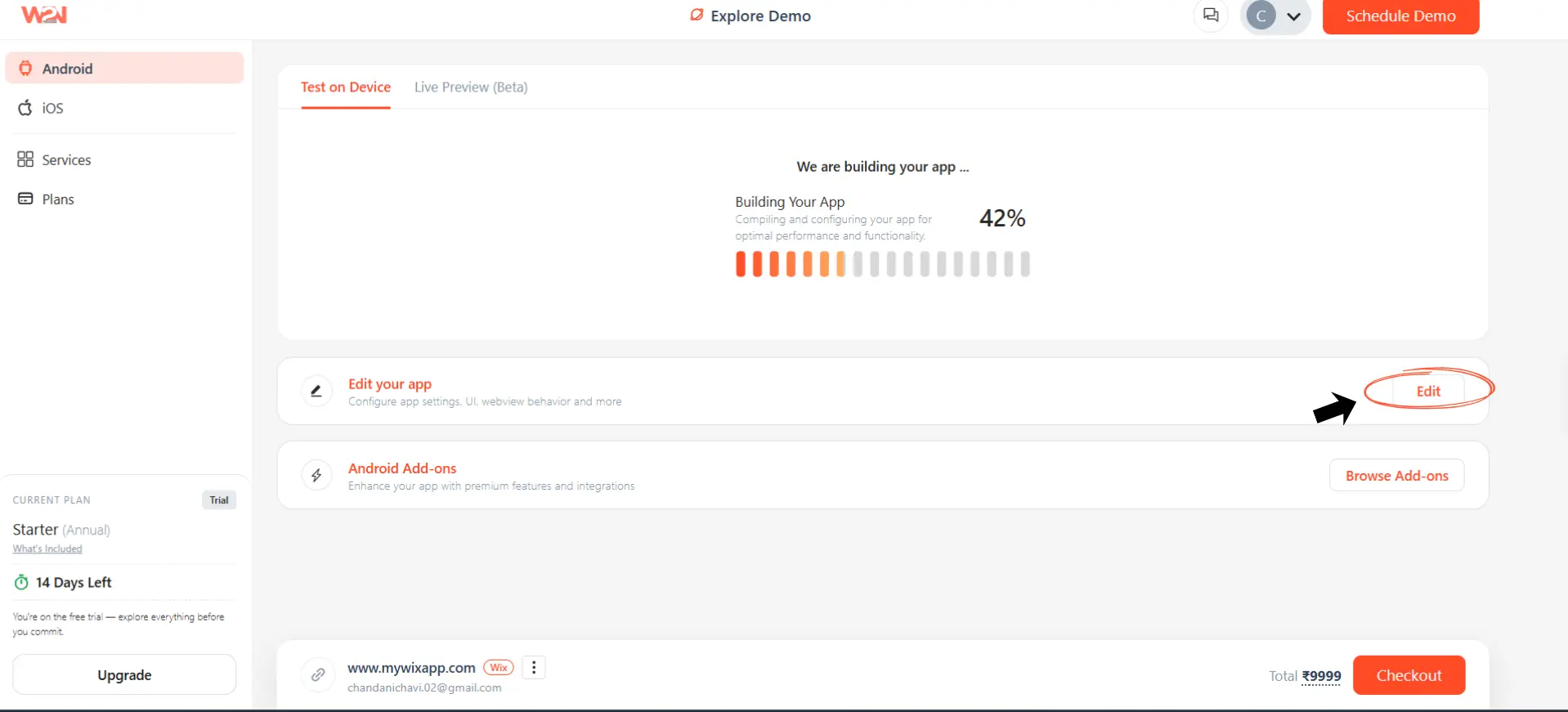
Step 4: Let WebToNative Build Your Demo
WebToNative will start creating your app. You’ll see the build progress on the screen while it prepares your app. Once it's ready, you can check the demo before making any final changes.
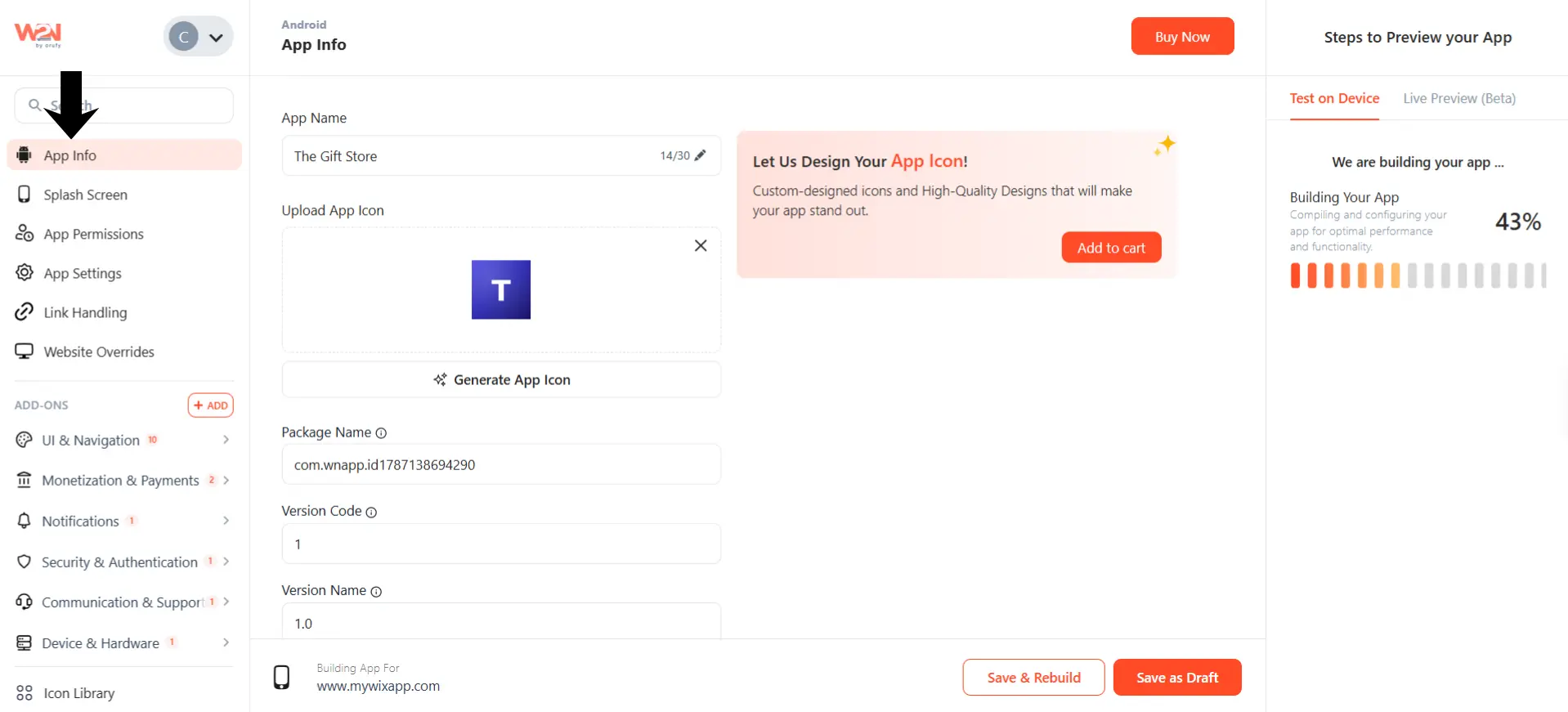
Step 5: Customize Your App
Now you can make your app feel more like your own. WebToNative gives you options for things like:
- App name and icon
- Splash screen
- App permissions
- App settings
- Link handling
- Website behavior
You can also explore add-ons to add extra mobile features to your app.
Step 6: Test Your App
Before publishing, use Test on Device to check how your app looks and works on a real phone. Go through your important pages and features to make sure everything works properly.
Step 7: Publish Your App
Once you're happy with the app and everything has been tested, you can move forward with publishing it to the Google Play Store and Apple App Store. And you’re done. You've taken your existing Wix website and turned it into a mobile app without rebuilding the whole thing from scratch.
WebToNative VS Wix App Builder: Which One Should You Choose?
| Feature | Wix App Builder | WebToNative |
|---|---|---|
| How It Works | Lets you build a native app directly from your Wix dashboard using Wix's own app builder tools. | Turns your existing website into a native Android and iOS app. |
| Platform Flexibility | Locked into the Wix ecosystem | Works even if you switch website platforms later |
| Advanced Features | Basic features such as name, icon, theme, and layout | Biometric login, deep linking, offline screen, location support, file uploads, custom navigation, and more |
| Offline Features | Not the main focus of the Wix App Builder | WebToNative offers offline functionality, so some essential app features can continue to work with a low or no internet connection. |
| Best For | It is a good option for small businesses and creators who want to build a branded iOS or Android app without coding. | WebToNative is a good choice for website owners who already have a working website and want to turn it into a native iOS or Android app without rebuilding everything from scratch. |
Best WebToNative Features for Wix Web Apps
If you've already built a Wix app or website, these WebToNative features can help make the mobile experience more useful.
1. Push Notifications
- Send updates, reminders, offers, or other important alerts directly to app users.
- Help bring users back to your app even when they are not actively using it.
2. Social Login
- Let users sign in using supported social accounts instead of creating a new password.
- Makes the login process quicker and easier for users.
3. Biometric Authentication
- Let users access the app using fingerprint or Face ID.
- Provides a quick and secure way to log in without entering a password every time.
4. Custom Notification Sound
- Use a custom sound for OneSignal notifications.
- Helps important notifications stand out from regular phone alerts.
5. Advanced Bottom Navigation Bar
- Add a customizable navigation bar at the bottom of your app.
- Makes it easier for users to quickly move between important sections.
6. Floating Action Menu
- Add a customizable menu for frequently used actions.
- Gives users quick access to important features without taking up much screen space.
7. Onboarding Screen
- Show a series of introductory screens when users open the app for the first time.
- Help users understand the app and its main features before they start using it.
8. Google Firebase Analytics
- Track how users interact with your app.
- Helps you understand user activity and make better decisions about your app.
Frequently Asked Questions
Q1. Do I need to rebuild my Wix website to convert it into a native app?
A. No, if your Wix website already works well on mobile, you can go ahead with the conversion. WebToNative uses your existing website as the base of your app.
Q2. Will my Wix mobile app look different from my website?
A. No, your website's design, content, and layout stay the same. It just opens inside a native app, which gives it a more app-like experience.
Q3. Can I add push notifications to my Wix app?
A. Yes, WebToNative offers push notifications as an add-on. It allows you to send updates, reminders, offers, and other messages directly to your app users.
Q4. Can I publish my Wix app on the App Store and Google Play?
A. Yes, Once your app is ready and tested, you can prepare it for publishing on the Apple App Store and Google Play Store.
Q5. Do I need coding skills to convert my Wix website into an app?
A. No, WebToNative is designed to make the conversion process easier without requiring you to build the app from scratch.
Q6. Can I customize my Wix app after converting it?
A. Yes, You can customize things such as your app name, icon, splash screen, permissions, settings, and other app features before publishing.
Q7. Can I test my Wix app before publishing it?
A. Yes, WebToNative lets you preview a demo and test your app on a real device before you publish it, so you can check how everything looks and works.
Conclusion
So, you already built your Wix website. Why start all over again just because you want an app?
With WebToNative, you can take your existing Wix website and turn it into a mobile app without rebuilding everything. You can also add useful features like push notifications, social login, and biometric authentication.
And the best part? You can avoid letting your Wix site disappear. It can do the heavy lifting while your app provides a faster, more convenient way for users to access your business. You’ve already come this far with your Wix website. Now it’s time to get it in your users' pockets.
Ready to turn your Wix website into an app? Give WebToNative a try and see how your app comes to life.
Similar Blogs