


WebView app vs native app: what each is, examples, and when each fits
Published on:
12 November, 2026
TL;DR:
A WebView app is an installed app that shows your website inside a native shell; a native app is built with Android or iOS code. WebView is appropriate for a mobile website that already works well; native is for an app that is the product and needs advanced device access.
What is a WebView app?
A WebView lets an app display web pages within its own interface. According to Android's WebView guide,it shows web pages within an app without browser features like an address bar or navigation controls.
WebView is just one part of an app, not a complete app on its own. Developers need to add other browser features around it, such as access to phone features, error messages, navigation, etc.
Types of WebView Apps
There are two primary types of WebView apps: rendering-based and syncing-based WebView apps.
1. Live Website Apps
WebView apps load your existing website in real time. Any changes you make to your website are automatically reflected in the mobile app without a new App Store submission required. This is one of the most common ways used by many website-to-app platforms.
2. API-based Apps
WebView apps fetch data from your existing website, working in the browser through APIs to develop a user interface inside the mobile app. Your website must be compatible with your mobile app for a smoother user experience.
Webtonative uses the first approach. It wraps your existing website in a live website-based WebView app that users can install on their phones.
How does a WebView app work?
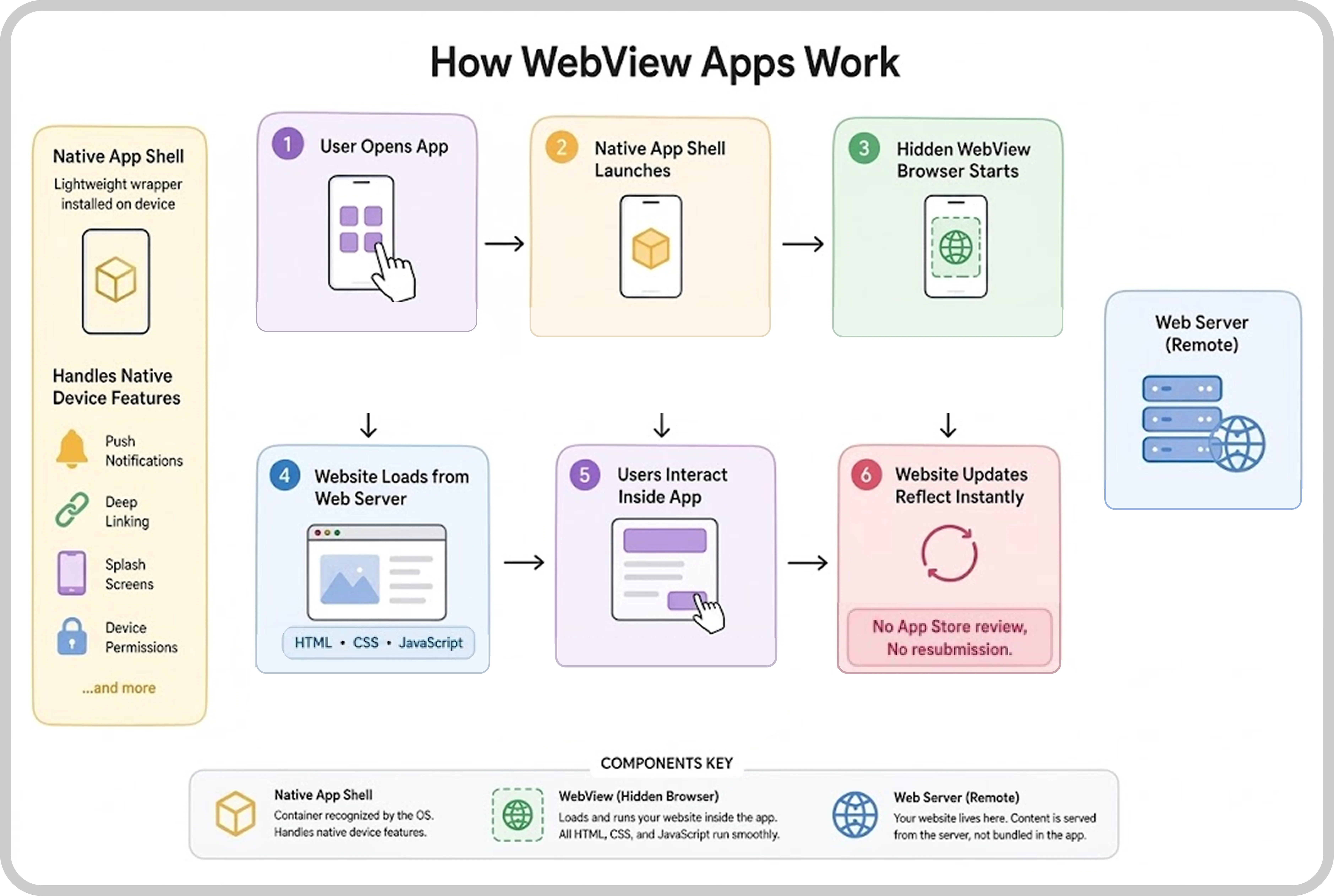
Here’s how a WebView app works:
1. The user opens the app.
They tap the app icon, which is already on the device like any other mobile application.
2. The native app shell launches.
The shell, the outer structure of the app, starts running. It acts as a lightweight wrapper that holds the WebView and connects the app with the phone’s native features, such as push notifications, a splash screen, a native menu, deep links, and a no-connection screen.
3. The hidden WebView browser starts.
A WebView component starts running. It works like a small browser inside the app, without the usual address bar or navigation controls.
4. The website is loaded from an online server.
The WebView connects to your server and fetches your HTML, CSS, JavaScript, images, and other content, then displays them inside the app. They run the same as they do in a mobile browser.
5. Users interact inside the app.
They browse pages, click buttons, log in, view products, fill out forms, and make purchases just as they would on the website. The website and its backend manage these interactions. On Android, web pages can also communicate with the app's code through a JavaScript interface provided by the app. Android’s guide warns that this lets JavaScript control the app, so use it only when you have written all the HTML and JavaScript the WebView shows.
6. Website updates reflect instantly.
The app loads your live website, so changes to content, images, or products generally appear when the relevant pages are loaded again. You don’t need to rebuild the app or make a new store submission for regular website content updates. Changes to the framework itself, such as the app icon, a new permission, or a new native feature, need a new build and a store review. If a site change modifies what the app does, it must still meet the store rules the app was approved for.
What is a native app?
Native apps are mobile applications built specifically for a platform, either Android or iOS. They are built using the platform’s own programming language and tools. Android apps are built with Kotlin or Java. iOS apps are built with Objective-C or Swift.
These apps run directly on the device and communicate with the operating system through official SDKs and APIs, giving them direct access to all device hardware and other capabilities.
3 Types of Native Apps
There are three types of Native apps:
1. iOS-Only Native Apps
They are built exclusively for Apple devices using Swift or Objective-C. These apps strictly follow Apple’s Human Interface Guidelines and are fully designed for iPhone or iPad. This is common for apps that rely on Face ID, Apple Pay, or ARKit.
2. Separate iOS + Android Native Apps
Many businesses build two separate native apps for each platform. This is one of the more expensive approaches, but it offers consistent performance and experience on both.
3. Android-Only Native Apps
They are built especially for Android devices using Kotlin or Java. These apps follow Google’s Material Design guidelines and might use Android-specific features such as widgets and deeper Google services integration.
How does a native app work?
Here’s how a native app works:
1. App Development:
Developers build the app using programming languages and tools designed for a specific operating system. For example, Kotlin or Java for Android and Swift for iOS.
2. User Interface Design:
Developers create the app's screens, buttons, menus, and layouts specifically for mobile devices. This helps make the app easy to use and gives users a smooth experience.
3. App Setup:
Once the app is ready, it is published to the Google Play Store or Apple App Store. Users can download and install it directly on their phones.
4. Running on the Device:
After installation, the app runs directly on the phone using the device's operating system. It displays content using the app's screen rather than loading your website directly.
5. Accessing Phone Features:
Native apps can connect directly with phone features such as the camera, GPS, microphone, contacts, and push notifications. They can use these features after getting the required user permissions.
6. Updates and Maintenance:
Developers regularly update the app to fix bugs, improve performance, add new features, and make it usable with newer operating system versions. These updates are usually released through the app stores.
WebView vs. Native App: Side-by-side comparison
A detailed comparison between WebView and native apps:
| Feature | WebView App | Native App |
|---|---|---|
| Performance | Depends on website speed and network | Runs directly on OS runtime |
| Device Hardware Access | Limited (requires plugin setup for more access) | Full and direct access to hardware and OS APIs |
| Offline Support | Very Limited (needs a live server connection) | Complete offline capabilities with local storage |
| User Interface & Animations | Browser-driven transitions might feel slow | Fully native components (responsive and smooth) |
| Push Notifications | Supported through native bridges | Complete support natively |
| Biometric Authentication | Possible with native bridge plugins (e.g., fingerprint login through Webtonative’s biometric add-on) | Supported natively |
| Development Cost | Low (no- or low-code app builder platforms) | Higher (separate builds for Android and iOS) |
| Deep Linking | Supported with the right tools | Full native support |
| App Store Approval | Higher rejection risk if there is no uniqueness in the app | Lower if guidelines are followed properly |
| Time to Market | Days to Weeks | Weeks to months |
| Maintenance | Easier, as website updates are reflected inside the WebView apps instantly. | Complex, as separate updates are required on the two platforms |
| Team Required | Not for a no-code or low-code mobile app builder; basic skills for a custom app | Dedicated iOS and Android developers |
| Deployment | Website updates occur without resubmission | Requires approval and submission to the App Store |
| Monetization | Depends on integration | In-app purchases or subscriptions |
| Security | Depends on the website’s security | Stronger with OS-level data protection |
| Scalability | Good for content-driven websites with limited features | Excellent and scales to any product complexity |
| Best For | MVPs, content apps, SMBs, blogs, and catalogs | Fintech, health, e-commerce, games, and productivity |
| Content Reuse | Reuses existing website pages, designs, and functionalities | Reuses the website’s backend, but screens are developed separately |
| App Communication | Uses JavaScript interfaces or native bridges to connect web pages with app features. | Uses app code to communicate directly with device features |
Will the app stores accept WebView apps?
Yes, both the Apple App Store and Google Play allow WebView apps. However, simply bundling up your website in an app may not be enough. Your app should offer some useful features and a good experience beyond what users get from opening your website in a browser.
Apple App Store: Apple expects apps to offer more than just a copy of a website. Your app should have useful features and provide a good user experience. If it only displays your website without adding much value, Apple may reject it. You can read more in the App Store Guidelines.
Google Play Store: Google allows WebView apps, but it does not allow apps that display a website without permission from its owner. If you are converting your own website into an app, this particular restriction does not apply. However, your app must still follow Google's other app policies. Read the Google Play Policy.
How to Improve Your Chances of Approval
Here are a few things you can do to make your WebView app more useful:
- Add native features: Include useful features such as push notifications, offline screens, and intuitive navigation to improve the app experience. -** Make your website mobile-friendly:** Check that all pages, buttons, images, and menus work properly on mobile screens.
- Add deep links: Let users open specific pages of your app directly instead of always starting from the home screen.
- Explain your app's features: When submitting your app, tell the reviewers what it offers beyond simply displaying your website.
Real Examples from Webtonative Gallery
The table shows the real use cases of the apps built with Webtonative:
| App | Stores | Country | Category | Site platform listed |
|---|---|---|---|---|
| PincelPay - Carteira Digital | Google Play | Brazil | Finance | PHP |
| MOMOGEST | Google Play | Burkina Faso | Financial services | Hostinger |
| Together With Kai | Google Play and App Store | Indonesia | Lifestyle | Lovable |
Each one displays its owner's website inside an app, with its own name and icon in the app store. Whether the website was built using PHP, Hostinger, or Lovable does not matter. What matters is that the website works properly on mobile devices.
When to choose a WebView app?
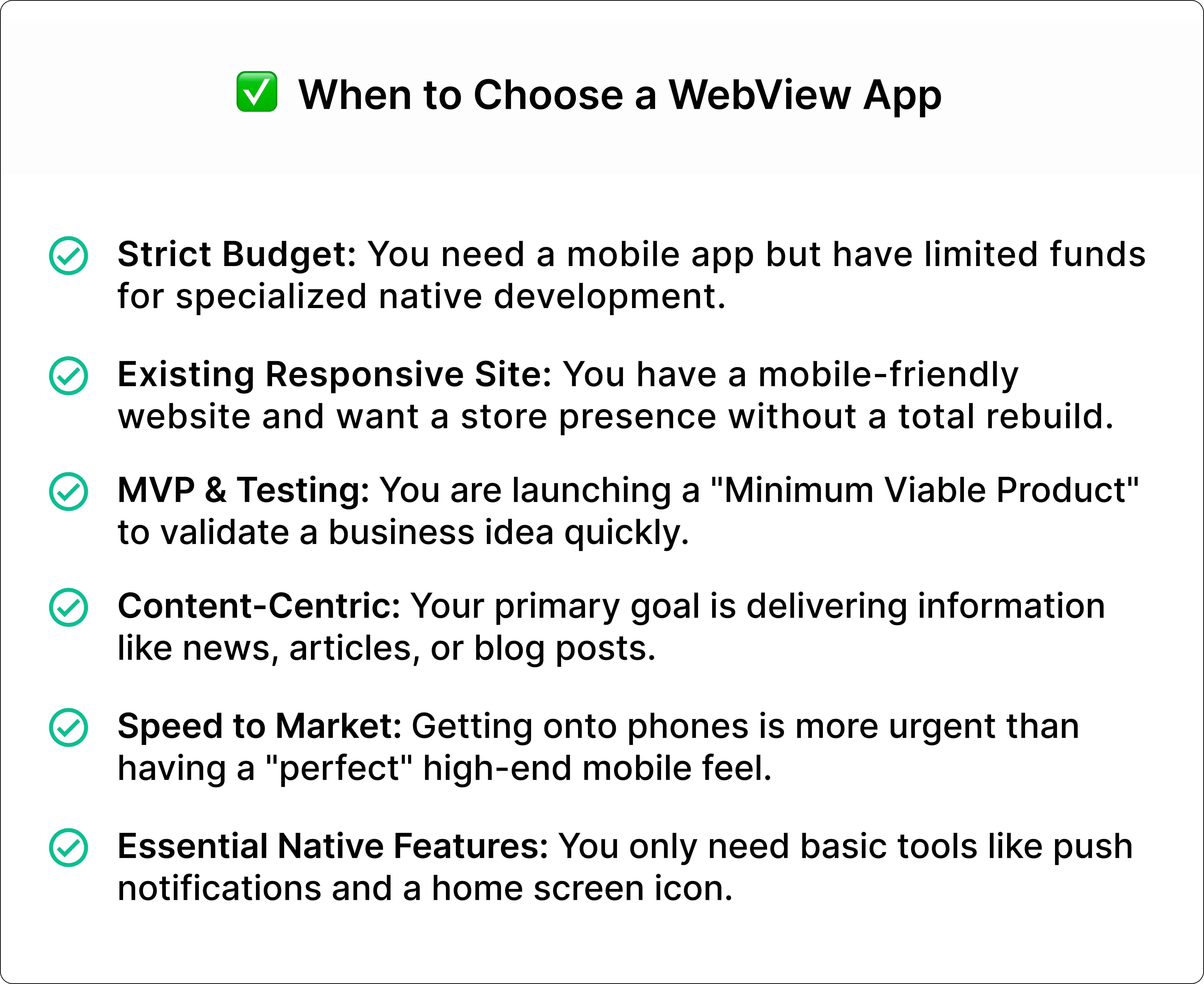
A WebView app is the ideal choice when:
- You already have a mobile-responsive website and require a mobile presence without rebuilding from scratch.
- You have a tight budget to develop an entire native app.
- You are testing a product idea or building an MVP (Minimum Viable Product) to verify its existence before spending more.
- Your app is completely content-focused, such as news, articles, service information, or blogs.
- Time to market is a higher priority than delivering an effective mobile app experience.
- You want to deliver push notifications and maintain home screen visibility but don’t require complex device features.
If your website is already mobile-friendly, take advantage of a platform like Webtonative that instantly transforms your website into a publish-ready mobile app with all the essential native features without any technical knowledge.
Who a WebView app is not for: When does a native app fit better?
Native apps are the right choice when:
- Mobile apps like gaming, real-time tracking, or financial transactions cannot afford to lag in between.
- Your native app requires complete access to hardware features like Bluetooth devices, camera controls, background GPS, system health data, or biometric sensors.
- The native app is the core product whose growth depends on the long-term mobile experience it delivers to users.
- You require a platform-specific user interface that feels completely natural for both Android and iOS.
- Offline performance of the native app is essential for users. They might require your app in a low or no internet connection.
- You want to generate revenue through subscriptions.
If you want any of these, a native app is a practical option for your product.
Frequently Asked Questions
Question 1. What is the main difference between a WebView app and a native app?
Ans: WebView and native apps differ in how they are developed and how they show content to users. A WebView app loads your existing website inside an app, so it mostly uses the same design, layout, and features as your website. A native app is created separately for Android and iOS using the tools and technologies designed for each platform. It has its own design, screens, and features and runs directly on the phone. WebView apps are generally quicker and less expensive to build, while native apps usually offer better performance and more control over device features.
Question 2. Can a WebView app be rejected from the App Store or Google Play?
Ans: Yes, a WebView app can be rejected by the Apple App Store or Google Play Store if it simply displays your website inside an app without offering anything extra. Both stores expect apps to provide a useful experience for mobile users. If your app only looks and works like your website, without adding any app-specific features or improvements, it may not meet their requirements. Adding useful features such as push notifications, offline screens, native navigation, and deep linking can make your app more valuable to users and improve its chances of approval. However, final approval depends on the app store's review process.
Question 3. Are WebView apps cheaper than native apps?
Ans: Yes. Native app development generally requires a higher budget because the apps are built separately for Android and iOS. Each platform needs its own development, testing, and maintenance. The overall cost depends on several factors, such as the app's complexity, design, number of features, and third-party integrations. Apps with advanced features, custom designs, payment systems, and complex backend requirements usually take more time and resources to develop. Regular updates and maintenance also add to the overall cost.
Question 4. Should I start with a WebView app and move to native later?
Ans: Yes, you can start with a WebView app and move to a native app later as your business grows. This approach allows you to launch your app with less time and investment, test how users respond to it, and understand which features they need. Once your requirements become more advanced or you need better control over app performance and device features, you can consider building a native app.
Question 5. Can I send push notifications from a WebView app?
Ans: Yes, you can send push notifications through a WebView app using third-party platforms like Webtonative. However, you need to set up push notifications separately within the app using a supported service. Once configured, you can send updates, offers, reminders, and other important messages directly to users' phones.
Question 6. Do WebView apps work offline?
Ans: WebView apps usually need an internet connection to load your live website and its content. However, some content can still be accessed offline if it has been saved on the device in advance. Webtonative also provides a no-internet screen that appears when users lose their internet connection. It offers an additional offline feature that allows selected website content to be saved on the device. Before publishing your app, test what works and what does not work without an internet connection.
Conclusion
WebView and native apps are mobile app development options. WebView is the perfect choice if the business requires speed & cost and has an existing website. Native apps are a great investment choice when businesses demand hardware access, performance, and long-term growth. A smart approach is to start with a WebView app, learn from real users' feedback, and scale when the business is growing.
Similar Blogs