



Convert a WordPress Website into an Android App
Published on:
5 April, 2026

In a technology-driven world, most users spend their time inside mobile apps on mobile devices. WordPress websites are the backbone of digital presence. According to the WordPress Statistics 2026 report, WordPress is the most popular Content Management System (CMS), acquiring 42.6% of all websites.
Nowadays, people spend 4 to 6 hours on their mobile devices, according to Harmony Healthcare IT. It indicates the shift from websites to mobile devices due to evolving market trends and demands.
According to Venna Apps, more than 70% of the time is spent scrolling through mobile apps every day. So, you can estimate how many people and traffic you are losing on mobile devices.
The best part is you don’t even have to build a mobile app from scratch. You only need your website to convert it into a mobile app. No coding or higher development costs.
In this blog, we will walk you through the need for an Android app, choosing the right method for conversion, how to convert a WordPress website into an Android app, and the best WordPress mobile app builder for your business.
So, continue reading the blog.
Why convert WordPress website into Android app?
The growing usage of mobile apps among people has shifted a large amount of traffic to mobile apps. According to JMango 360, mobile apps provide 80% of the total traffic. It indicates the time to shift your WordPress website to an Android app. According to Adapty, 71% to 72% are Android users globally.
An Android app is far better than a responsive WordPress website. The app will load faster, save users’ information & preferences, and have smoother navigation in the app. Once installed on the user’s mobile device, your app is visible without forcing and accessible without manual effort.
Transforming a WordPress website into Android app will not only bring traffic but also enhance your digital presence. The app will extend your reach and provide a better user experience, customizations, and an increase in conversions.
Choose the Right Method for Conversion
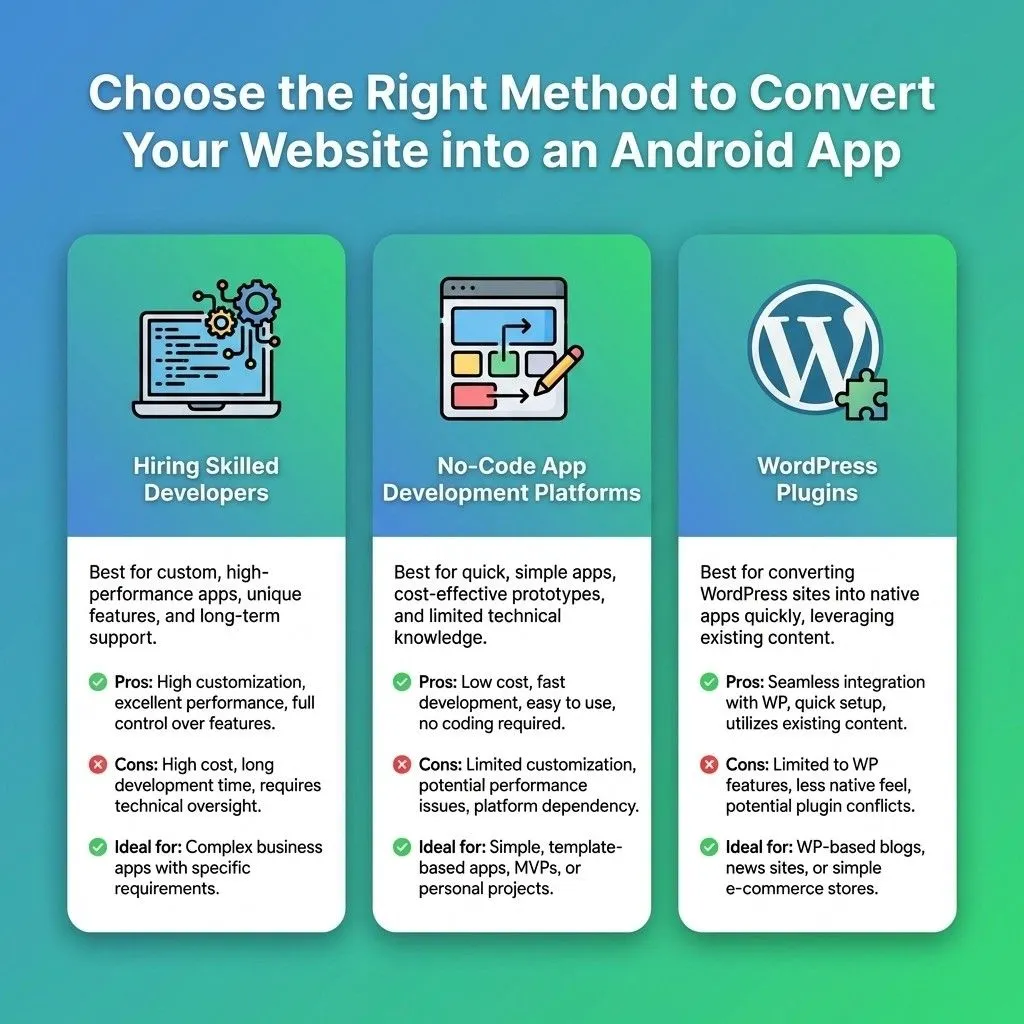
Below are the three conversion methods listed. You can select the right one according to your business and app requirements.
1. Hiring Skilled Developers
This method comes with a lot of challenges to encounter. Firstly, you should have an extensive, higher budget for maintenance, hiring skilled developers, and development. Secondly, the time taken to build the app is more than 4 to 5 months. After this, more time will be required for proper testing and reviewing the app. It is ideal for businesses requiring highly specialized apps.
2. Using No-code App development Platforms (Recommended)
The no-code or low-code app development platforms help businesses and individuals turn websites into mobile apps without coding and technical knowledge. It is considered one of the most affordable, fastest, and smoothest processes to build apps. These types of platforms wrap your current website into mobile app with all your website content, elements, and functionality. This method is perfect for everyone, whether a startup, an individual, or an organization.
Some of the well-known WordPress mobile app builders are AppMySite, MobiLoud, WebToNative, Median, and GoodBarber.
3. Using WordPress Plug-ins
WordPress plugins are a quick method to build an app directly within WordPress. Although plugins have limited functionality and customization, which is suited for basic mobile apps.
Best WordPress Mobile App Builder- WebToNative
Among the many no-code app development platforms, WebToNative stands ahead of the competition. It is a perfectly structured WordPress website-to-Android app conversion platform. WebToNative converts a website into a mobile app for Android, iOS, Windows, Linux, and Mac. The platform delivers 24/7 support assistance, one-time payment, 30+ add-ons, and powerful app customizations. It provides a 14-day free trial for each plan.
How to Convert WordPress Website into an Android App using WebToNative
Below is the process of turning WordPress website into Android app using WebToNative.
1. Go to WebToNative.
2. Enter your current WordPress website URL in the field shown below.
3. After entering, a pop-up will appear to select the platform for your app. You can select from the three given options:
-
Android
-
iOS
-
Android & iOS
4. Then, you have to enter the name of your Android app. And the email address to receive notifications and updates regarding the app.
5. Click on View Your Demo App. You will be taken to the checkout page.
6. You can scan and download the demo file of your Android app. Or, you have to download the demo file for your iOS app.
7. You can test the app across devices for proper functionality.
8. In case you want to edit your app, you have to click on "Edit Android." It will take you to the edit section of your app.
9. You can also add add-ons to your mobile app using the Add-ons button on the checkout page for advanced functionality.
10. Once you're done with your app’s customizations, you can publish the Android app on the Google Play Store for customers.
Real Examples of WebToNative Building WordPress Apps
1. Hire Motorcycle
Hire Motorcycle is a Maldives-based scooter and motorcycle rental platform offering insured, well-maintained bikes with free delivery, helmets, and a simple online booking system. The business runs its Android app on the WebToNative platform, turning its booking website into an app rather than building one from scratch.
2. Amedzon
Amedzon is a Malaysia-based AI-powered healthcare platform connecting users with doctors, clinics, medicine verifications, medical financing, and other health products inside a unified ecosystem. The business chose to launch the Android app through WebToNative to make it easily accessible to AI health tools, doctor checks, and tools for ordering directly from their mobile phones.
3. Multiverso
Multiverso is a Brazil-based social platform that brings together students, universities, institutions, and teachers through online courses, streaming, a research hub, and digital classrooms inside a single global structure. Multiverso relied on WebToNative to package their entire website into an Android app with a wide range of native features.
FAQs
Q1. Can an Android app be built from a WordPress website?
A. Yes, you can build an Android app from a WordPress website using developers, WordPress plugins, or no-code app development tools.
Q2. Will the Android app work the same as my WordPress website?
A. Yes, your Android app built with low-code app builders will work the same as your WordPress website. Any change made to the website will be reflected in the Android app.
Q3. Can I convert a WordPress website into an Android app for free?
A. Yes, WebToNative offers a 14-day free trial to convert a WordPress website into an Android app. After the free trial expires, you have to purchase the app.
Q4. Can I customize my app to reflect my WordPress website?
A. Yes, WebToNative offers various customization options, such as splash screen, app logo, and many more, to make your app a reflection of your website. Look WebToNative’s features to look for more exciting power.
Q5. Are low-code solutions more expensive than hiring developers?
A. No, low-code solutions are more affordable than hiring developers. You have to pay only one or two times for low-code app development. But hiring developers and maintaining them is more expensive than low-code solutions.
Conclusion
Converting a WordPress website into an Android app is not complex or expensive now. You just require a reliable and trustworthy platform for a smooth conversation. A mobile app reduces the friction between developers and customers. It is a visual identity on your user’s mobile device.
But to survive in this world of technology, you need a mobile app. With platforms like WebToNative, this is achievable and expandable at the same time. It not only converts website into an Android app but also gives a premium appearance to your app with future advancements.
If you already have a WordPress website, then don't wait. Just convert it into an Android app to unlock unlimited conversion and traffic.
Similar Blogs