



How to Monetize Your Lovable App Without Coding
Published on:
9 September, 2026

By Chavi Chandani
Technical Content Writer
Table of contents
AI app builders like Lovable have changed the way people build apps. Instead of spending weeks learning to code or hiring a developer, you can just describe what requirements you have, and Lovable will do it for you and turn your idea into a working app.
But building an app is just the starting point. What comes next? How do you make money from your app?
According to Lovable’s 2026 Build Economy report, 8 out of 10 people plan to make money from the app they build. This shows that for many app creators, building an app is no longer enough, it is also about turning that idea into a real source of income.
The good news is you don't need a team of developers to get started. With the help of the right app monetization strategy, you can offer subscriptions, premium features, one-time purchases, or other paid options without creating a complex payment system from scratch.
In this guide, we’ll explore how to monetize a Lovable app, the best ways to monetize an app, and how to price your own subscription plans for your users, all without coding.
Can You Really Make Money With a Lovable App?
Yes, you can. Lovable makes it possible to create working apps by just chatting with AI. Instead of spending weeks learning to code or hiring a developer, you can turn your idea into a functional app much faster.
This makes it easier to
- Build an app with a smaller budget
- Launch your idea faster
- Test your product before launching
- Find ways to earn from your app sooner
Today, 80% of people building apps with Lovable come from non-technical roles, which means that you don't need to be a developer to create an app. Lovable projects also get about 720 million visits a month, so that gives you an idea of the scale these apps can reach.
And it's not just about building apps for fun. More than half of Lovable’s builders say they’re building a business, and another quarter are working on side projects that they want to monetize. Some builders have already earned five and six figures off what they built.
So, if your lovable app solves a real problem, then you already have a good starting point. Now, all you need to do is choose the right way to monetize your lovable app. One that works for both you and your users.
Add Payments and Subscriptions to Your Lovable App Without Coding
One thing to know before you start. Lovable's built-in payments require a Pro plan or higher. On the Free plan, you can still charge for your app, but you'll need to connect your own Stripe account instead of using the built-in integration.
Before You Start
- Plan: Pro or higher
- Backend: Newer apps on TanStack Start work without extra setup. Older apps may require Lovable's built-in backend (Cloud) and may not be compatible with your own Supabase project.
- Authentication: Recommended, so purchases can be linked to individual users.
- Permissions: Only project admins/owners and workspace admins/owners can set up payments.
Now you have a live working app people find useful, the next step is to help them find a way to pay for it. It can be a monthly subscription, a one-time purchase, or a premium feature.
The great news is that Lovable has built-in payment support for both one-time payments and subscriptions. You can connect your app with Stripe or Paddle and set up the payment using simple prompts instead of learning the entire system yourself
Stripe vs. Paddle: Which One Should You Choose?
If you are new to app monetization, you may be wondering what Stripe and Paddle actually do.
Stripe and Paddle are payment services that help your app accept payments from customers. They handle the payment process when someone purchases a product or subscribes to your app.
Lovable currently supports both Stripe and Paddle for payments.
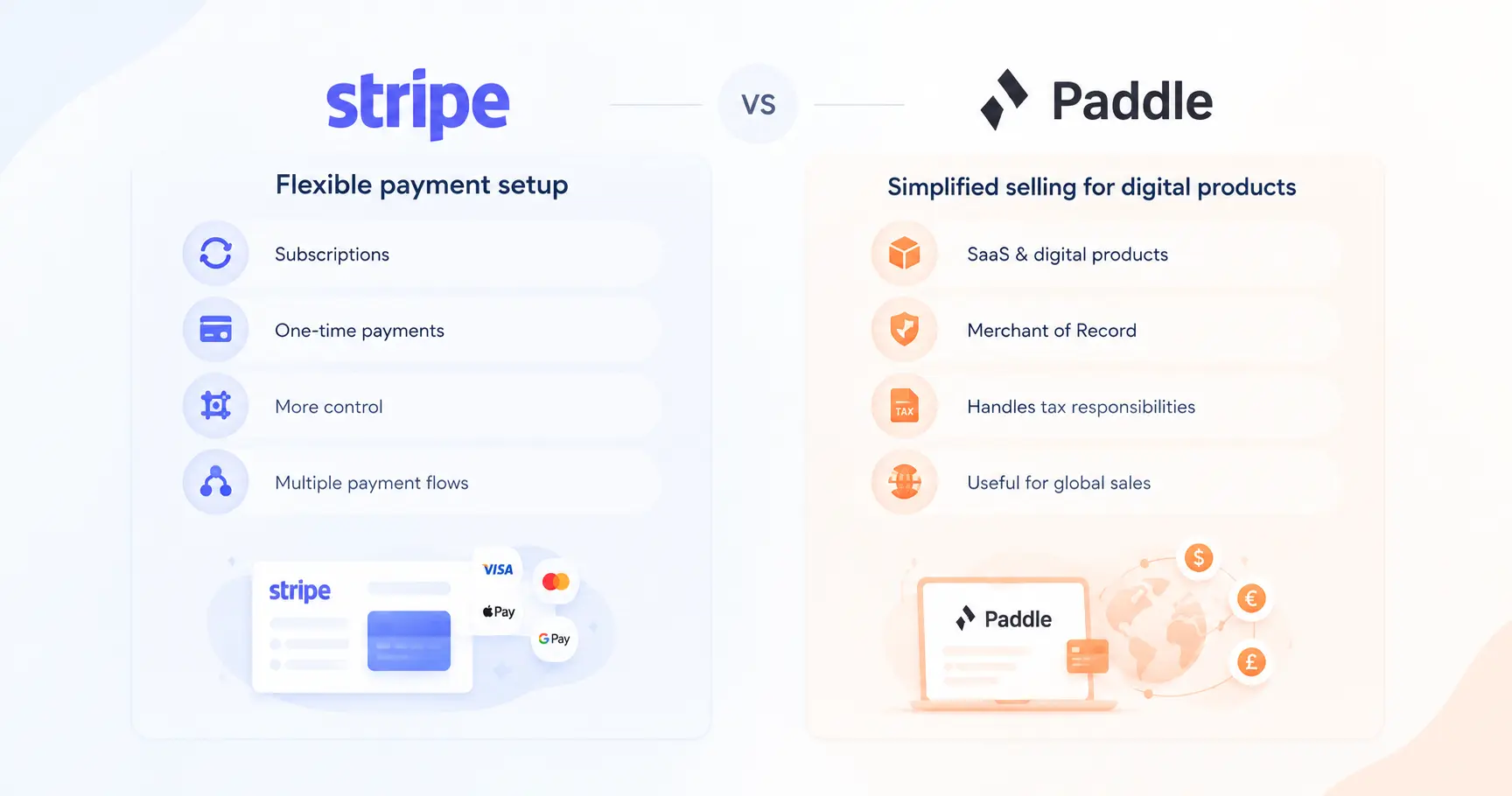
| Feature | Paddle | Stripe |
|---|---|---|
| What it does | Handles payments and taxes for your digital product | Helps you accept and manage payments. |
| Best for | SaaS apps, subscriptions, and digital products | Apps, subscriptions, one-time payments, and services |
| Main advantage | Less work for you when selling globally because Paddle handles Merchant of Record responsibilities | More flexibility and control over your payment setup |
| Works with Lovable | Yes | Yes |
Paddle is useful for selling SaaS or digital products, especially to clients in other countries. Paddle operates as a Merchant of Record, which means Paddle becomes the legal seller of your product. It calculates, collects, and remits sales tax on your behalf, issues invoices and receipts, and pays out your earnings after processing the transaction. Stripe offers a comparable service called Managed Payments, but it works differently: it's optional, enabled on a per-transaction basis rather than by default, and available in fewer countries than Stripe's standard payment processing.
Another well-known payment platform is Stripe, which provides businesses with tools to accept and manage payments. It can be used for subscriptions, one-time payments, and other payment flows. Stripe also offers a Merchant of Record option for the sale of eligible digital products.
You don't have to figure out everything yourself. When you ask Lovable to add payments, it can look at your project and either show you both options or recommend one based on what you are selling.
How to Add Payments to Your Lovable App
Now that you know what Stripe and Paddle are, let's look at how you can actually add payments to your Lovable app.
1. Tell Lovable What You Want to Sell
Start by telling Lovable what you want your customers to pay for.
For example:
“Add a pricing page to my app with a $9/month Starter plan and a $19/month Pro plan.”
Lovable will create the payment flow based on your request.
You can also use payments for different types of products, including
- Monthly or yearly subscriptions
- Premium features
- One-time purchases
- Memberships
- Digital downloads
- SaaS access
- Developer tools or paid access
2. Choose Stripe or Paddle
Now you will see the available payment provider options. You can choose Stripe or Paddle depending on your business requirements and what you are selling.
Lovable takes care of the technical setup, so you don't need to manually build a payment system from scratch.
3. Create Your Pricing Plans
Next, decide how much you want to charge from your customers.
For example:
- Free: Basic features
- Starter: $9/month
- Pro: $19/month
- Business: $99/month
You can also create one-time payment options, such as a $49 lifetime purchase.
Lovable lets you create products and prices through prompts. You can also ask it to add things such as a free trial or discount code.
The important thing is to keep your pricing simple. Give users a clear idea of what they get with each plan so they can easily decide which option is right for them.
4. Add Checkout to Your App
When your products and prices are ready, your app needs a way for customers to pay.
This is where checkout comes in. Checkout is the payment page where users enter their payment information and complete the purchase.
Lovable can create the payment flow for your app with your payment provider, so you don't have to build the complete checkout system yourself.
5. Test the Payment Flow
Before asking real customers to pay, test everything first.
Lovable provides a test environment where you can go through the payment process without charging real money. This helps you check whether:
- The correct price is displayed
- The checkout works
- The correct plan is given to the user
- Premium features are unlocked after payment Subscription information is handled correctly
Testing your payment flow before launch is important because even a small payment issue can create a bad experience for your customers.
6. Complete Verification and Go Live
Before you can start accepting real payments, you need to complete a few checks. If you are using Paddle, the process includes the following steps:
-
Readiness check: Lovable checks that your privacy policy, terms of service, and refund policy are available and that your website has genuine content.
-
Project setup: Your project must have at least one product with a price, and your latest changes need to be published.
-
Verification (KYC/KYB): You will need to complete Paddle's seller verification process. Starting as an “Individual” can be faster, and you can upgrade your account later if needed.
-
Domain review: Paddle reviews your live website to make sure it has real content and the required legal pages.
-
Approval: Once your account is approved, you can add your bank details in the Paddle dashboard to receive payouts.
Most users are approved within a day, but the process can take several days depending on your location and product.
If you choose Stripe, the go-live process is a little different. Some of the setup and verification happens through the Stripe dashboard, rather than entirely inside Lovable.
Ways to Actually Make Money From Your Lovable App
Built-in payments are mainly designed for digital products and software, such as SaaS subscription tiers, premium feature unlocks, memberships, digital downloads, and developer tools. If you want to sell physical products, you can use the Shopify integration instead. Keep in mind that some product categories are restricted or forbidden by Paddle and Stripe. Restricted products may require additional review, and approval is not guaranteed. You can decide among multiple options that fit your app and your users.
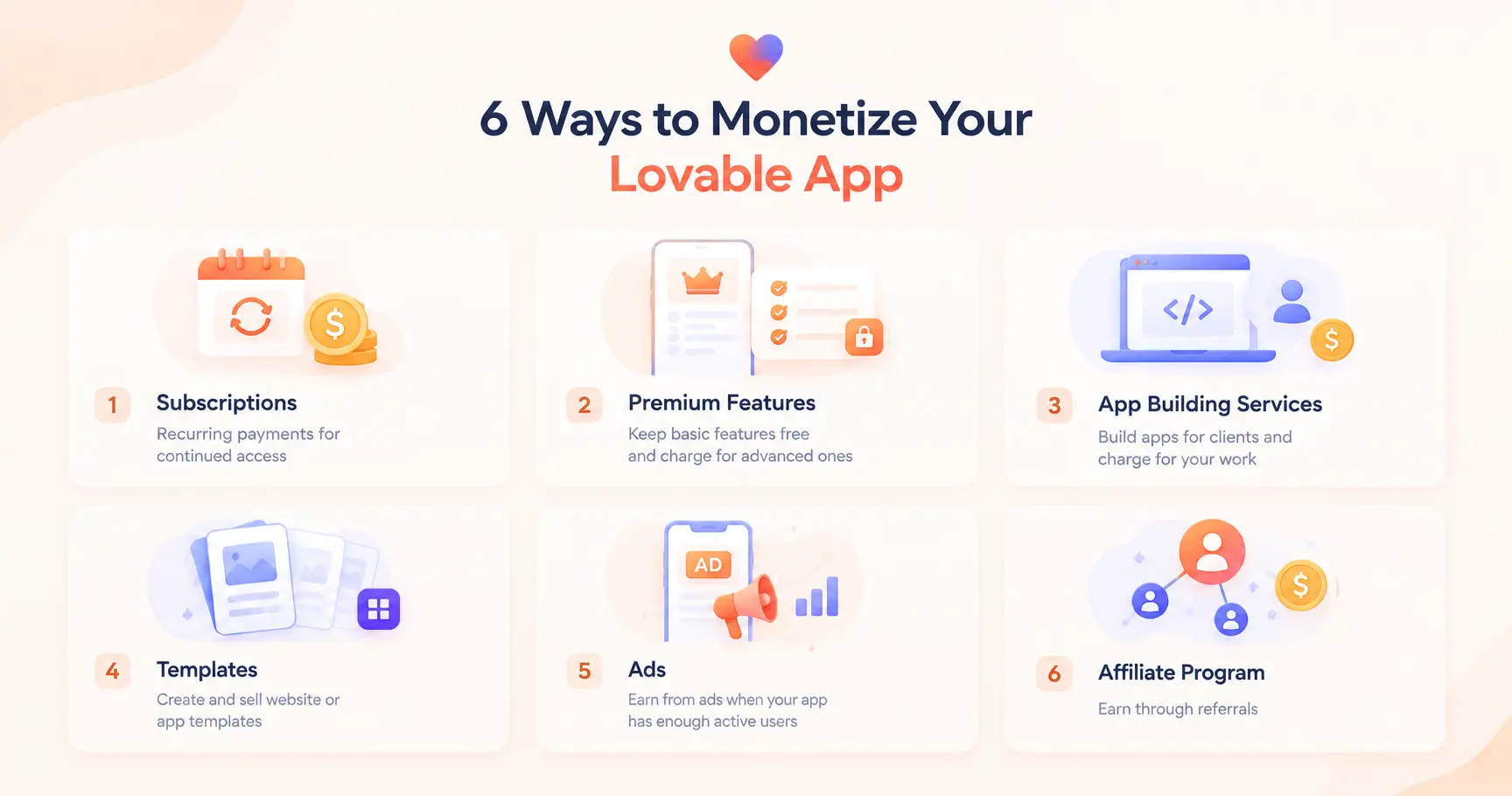
Here are some of the most common user-centric monetization models.
1. Offer a Subscription
Users pay you a recurring fee to use your app. This model can work well for SaaS apps, productivity tools, and other apps that users will spend time inside.
Basically, you can offer a free subscription that has limited features and a paid subscription for users who want all of the features.
This model will help you predictably make money over the long term since users will naturally want to keep their subscriptions.
2. Charge for Premium Features
Selling parts of your app is another way to make money without putting the whole app behind a paywall.
Take the fitness app example. It could offer basic workout plan features for free while charging for services like creating a customized workout plan.
A design app could offer basic features for free and charge users for advanced features.
3. App Building Services
You can take on commissions to build applications for clients.
Small businesses, lacking IT support, may begin their journey with Lovable by developing a custom, stand-alone app or booking system. Lovable can help you to develop your skills and charge the client for the services.
This is not the same as developing your own app and then profiting from it, but it is a good way to put your knowledge of Lovable to use while you build your own product.
4. Re-Sell Website & App Templates
If you create a useful web app or landing page template, you can resell it.
This is also a bonus potential money-maker (in case you aren’t profiting nearly enough). Lovable also has a library of community-made website and app templates that you can explore for different use cases.
5. Get Apps Ad Support
When you have thousands of users, advertising is a valid money earner.
Instead of charging every user, you can offer the app for free and earn money when users see or interact with ads.
This model usually makes more sense for apps that have a high number of active users. If your app has a smaller but highly engaged audience, subscriptions or premium features may be a better option.
6. Earn Through the Lovable Affiliate Program
Affiliate programs, such as Lovable's, are a way to earn money through referrals.
Lovable has an affiliate program where approved affiliates can earn up to $100 for each first-time subscriber they refer.
Referral programs like this shouldn't usually be your primary monetization technique. Think of them more as a side income stream.
Limitations to Know Before You Commit
Before choosing Lovable's built-in payments, there are a few limitations you should know:
-
One payment provider per project: You can use either Paddle or Stripe, but not both at the same time in the same project.
-
One subscription per user by default: Each user can have one active subscription per environment by default. If you need multiple subscriptions or add-ons, you can ask Lovable to adjust this.
-
Projects with payments cannot be remixed: Once payments are enabled, the project cannot be forked or remixed.
-
Checkout settings: Checkout styling and payment methods need to be configured in your payment provider's dashboard rather than directly through Lovable.
-
Use Lovable for webhooks: Lovable automatically registers the required webhook endpoints, so you should not create them manually.
Which monetization technique should you choose?
There are several monetization techniques to choose from. You don't need to implement all of them. Start with one technique that you think is the best fit for your app.
If you have a service that offers continued value, then a subscription-based program would fit the bill. If you have a free, basic version of your app and offer a paid version of your app with a lot of additional features, then selling Premium Features is a great option. Lastly, if you run a design shop and sell a lot of templates, then this is an opportunity for you to put your templates up for sale.
The most important thing is thinking about what your users want and need and charging for that. Instead of overwhelming your users with different charge methods, simplify it with a clear-cut pricing plan.
What Changes When Your Lovable App Becomes a Mobile App?
When you turn your web app into a mobile app, your payment setup may need to change.
If your iOS or Android app sells digital products, subscriptions, premium features, or other digital content inside the app, you need to follow the payment rules of the app store where you publish it.
On iPhone and iPad
Apple generally requires apps to use In-App Purchase when users pay to unlock digital features, premium content, subscriptions, or other digital functionality inside the app. Apple also has specific exceptions and regional rules, so you should check the latest App Store Review Guidelines before publishing.
This means you should not simply assume that the Stripe or Paddle checkout you use on your website can also be used inside your iOS app for digital purchases.
On Android
Google Play generally requires apps distributed through Google Play to use Google Play's billing system for in-app purchases of digital goods and services, including subscriptions and premium app features. There are some exceptions and alternative billing options in certain countries, so always check the latest Google Play policy for your target market.
What does this mean for your Lovable app?
If you are only selling through your website, Stripe or Paddle can handle the payment flow supported by Lovable.
But if you later turn that app into a native mobile app, don't assume the same checkout can simply be carried over. Your mobile version may need to use Apple's or Google's in-app payment system for digital purchases.
This is why it's important to think about your platform before finalizing your monetization setup.
Frequently Asked Questions
Q1. Can you make money with a Lovable app?
A. Yes. You can make money from a Lovable app through subscriptions, premium features, one-time payments, templates, advertising, or other monetization methods. The right option depends on the type of app you have and what your users are willing to pay for.
Q2. How can I monetize my Lovable app?
A. You can monetize your Lovable app in several ways. Some common options include offering paid subscriptions, charging for premium features, selling templates, accepting one-time payments, or showing ads if your app has a large number of active users.
Q3. Does Lovable support payments?
A. Yes. Lovable has built-in payment support for one-time payments and subscriptions. You can use Stripe or Paddle to accept payments from your customers.
Q4. Do I need coding skills to monetize a Lovable app?
A. No. Lovable lets you set up payment flows using prompts, so you don't need to build the entire payment system from scratch. You can describe what you want and let Lovable help create the required payment flow.
Q5. Can I earn money by referring people to Lovable?
A. Yes. Lovable has an affiliate program that allows approved affiliates to earn money when new users subscribe through their referral link. It can be used as an additional income source rather than the main way to monetize your app.
Q6. Should I use Stripe or Paddle?
A. It depends on what you're selling. Paddle works well for SaaS and digital products, especially if you're selling globally, since it handles taxes and billing for you. Stripe gives you more flexibility and control over your payment setup. Lovable can also recommend one based on your product.
Conclusion
Creating an app with Lovable is only the first step. The next step is finding the right way to turn that app into a source of income.
Whether you choose subscriptions, premium features, one-time payments, templates, or another monetization model, the best choice depends on what your app offers and what your users are willing to pay for.
The good thing is that you don't need to be a developer to get started. With Lovable's built-in payment support, you can connect Stripe or Paddle, create pricing plans, and set up payments using simple prompts.
Start with one clear monetization strategy, test what works, and improve it as you learn more about your users. Your Lovable app doesn't just have to be something you create, it can become a real product that earns money.
Similar Blogs