



Turn Your Bubble Web App Into a Native Mobile App
Published on:
24 August, 2026

By Chavi Chandani
Technical Content Writer
Table of contents
You’ve built your Bubble web app. The workflows work, the database is in place, and your users can already do everything they need to do. But there’s still one problem. They still have to open a browser to use it. And let's be honest, if your users are already doing everything on their phones, asking them to open a browser, find your website, and log in every time isn’t exactly the best experience.
That’s where a mobile app comes in.
But turning a Bubble web app into a mobile app doesn’t mean starting the whole project over or rebuilding every feature from scratch. Your existing website can be the starting point.
In this guide, we’ll walk through how to turn your Bubble web app into a mobile app with WebToNative, from setting up your app and adding useful mobile features to testing and getting it ready for the App Store and Google Play.
What is Bubble?
Bubble is a no-code platform that lets you build web and native apps without writing code. You design your app visually, dragging and dropping elements, and Bubble handles the logic and database behind the scenes.
It's popular with founders, freelancers, and small teams because you can build a working app fast, without hiring developers. Marketplaces, SaaS tools, internal dashboards, and booking systems, many of these get built on Bubble.
But there’s one important thing to know for this guide. A Bubble app is primarily built for the web. So if you want users to install your app from the App Store or Google Play and use it like a mobile app, you’ll need to take the next step and make it mobile-ready.
Why Go Native After Building on Bubble?
Your Bubble web app already works. So why turn it into a mobile app?
Because being mobile-friendly and being a mobile app aren't quite the same thing.
A responsive Bubble web app can work well in a phone browser. But a mobile app can be installed directly on the device and give users access to features such as push notifications, camera access, location, gestures, and other device capabilities.
Here are some of the biggest reasons to go native:
1. Get Your App on the App Stores
Instead of asking users to remember a website URL, you can give them an app they can download from the Apple App Store or Google Play.
Being available in the app stores can also make your product easier for users to discover and gives them the familiar experience of installing an app on their phone.
2. Give Users a Better Mobile Experience
A responsive website can adjust to smaller screens, but a mobile app is designed around the way people use their phones.
Taps, swipes, mobile navigation, and other touch interactions can feel more natural, while users can open the app directly from their home screen.
3. Use More of the Phone's Features
Another major reason to go native is access to mobile-specific features. Depending on your app and setup, you can add:
- Push notifications to keep users updated
- Camera and photo library for capturing or uploading content
- Location services for location-based features
- Biometric authentication where supported
- Native gestures such as taps and swipes
4. Keep Your Existing Bubble App as the Starting Point
And here's the part that makes the process easier. You don't necessarily have to rebuild your Bubble app from scratch.
With WebToNative, you can use your existing Bubble web app as the foundation for your mobile app while adding the mobile-specific features and configuration you need.
Your Bubble app can continue handling the web experience and its existing functionality, while the mobile version gives users a dedicated app experience.
Bubble Web App vs. Native Mobile App: What’s the Difference?
Your Bubble app already works on the web, but a native mobile app gives users a more app-like experience with features built for their phones. Here’s a quick look at how the two compare.
| Feature | Responsive Bubble Web App | Native Mobile App |
|---|---|---|
| App Store Access | Users access it through a browser | Users can download it from app stores |
| Push Notifications | Limited browser support | Native push notifications |
| Mobile Interactions | Browser-based touch interactions | Supports native taps, swipes, and gestures |
| Performance | Depends on browser and connection | Optimized for mobile devices |
| Your Existing Bubble App | Works as your web app | Can be used as the foundation |
| Home Screen Access | Can be saved as a shortcut | Has its own app icon |
WebToNative vs. Bubble Native Mobile Builder: Which Approach Fits Your App?
WebToNative and Bubble’s Native Mobile Builder can both help you bring your Bubble app to mobile, but they take different approaches. Here’s how they compare when you’re turning an existing Bubble web app into a mobile app.
| What to Compare | WebToNative | Bubble Native Mobile Builder |
|---|---|---|
| How the App Is Built | Turns your existing website into a mobile app | Builds a native mobile app within Bubble |
| Starting Point | Your existing website | A Bubble project and its mobile interface |
| Technology Behind It | Uses a native app wrapper around your website | Uses React Native to create native mobile components |
| Existing Website Updates | Website changes can automatically reflect in the app | Changes are managed within the Bubble project |
| Development Effort | No need to rebuild your existing web app | Mobile views need to be designed and built |
| Best Suited For | Businesses that already have a working website | Builders creating a new web + native mobile experience |
Step-by-Step: How to Convert Your Bubble Web App With WebToNative
Let's look at how you can turn your existing Bubble web app into a mobile app with WebToNative.
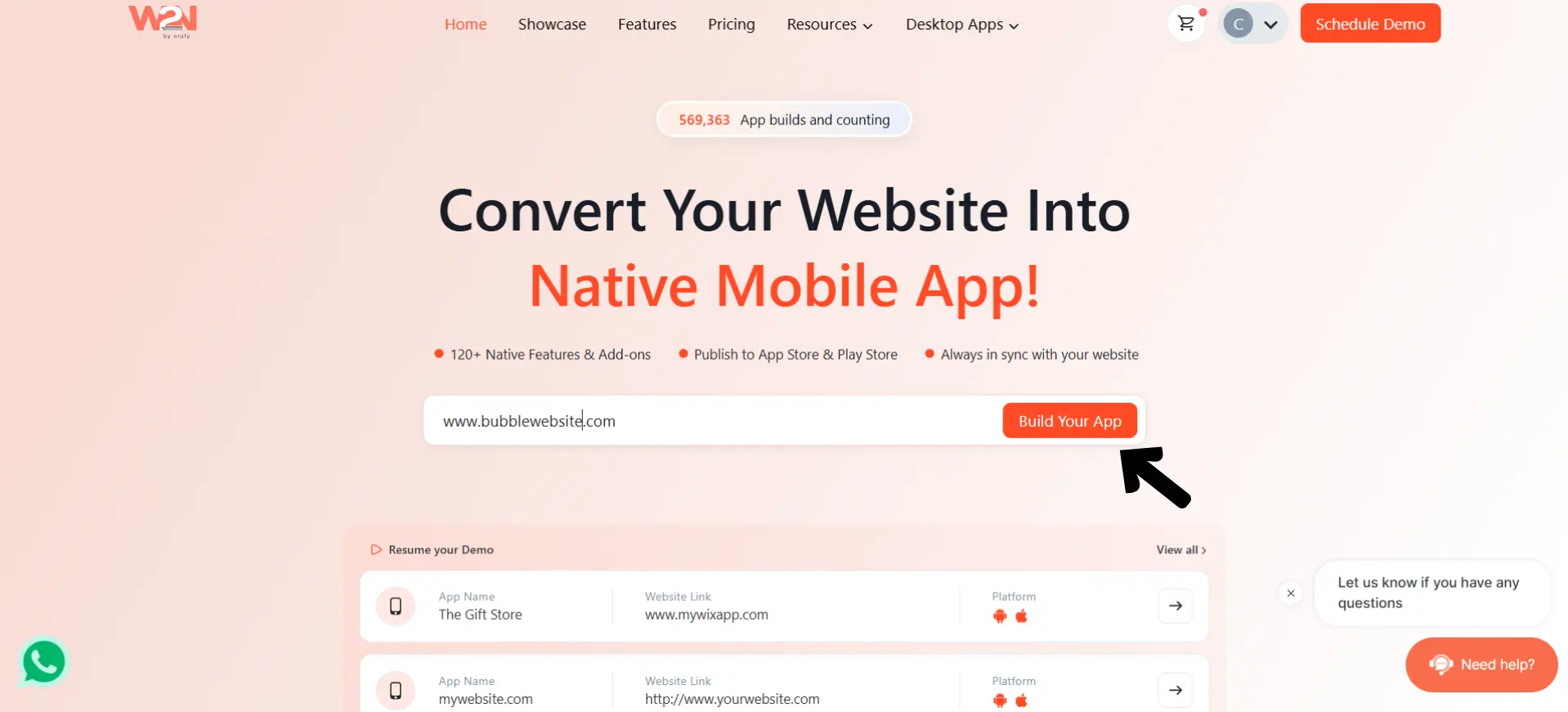
Step 1: Enter Your Bubble App URL
-
Start by opening WebToNative and entering the URL of your live Bubble web app.
-
Click Build Your App to get started. WebToNative will use your existing website as the foundation for creating the mobile app.
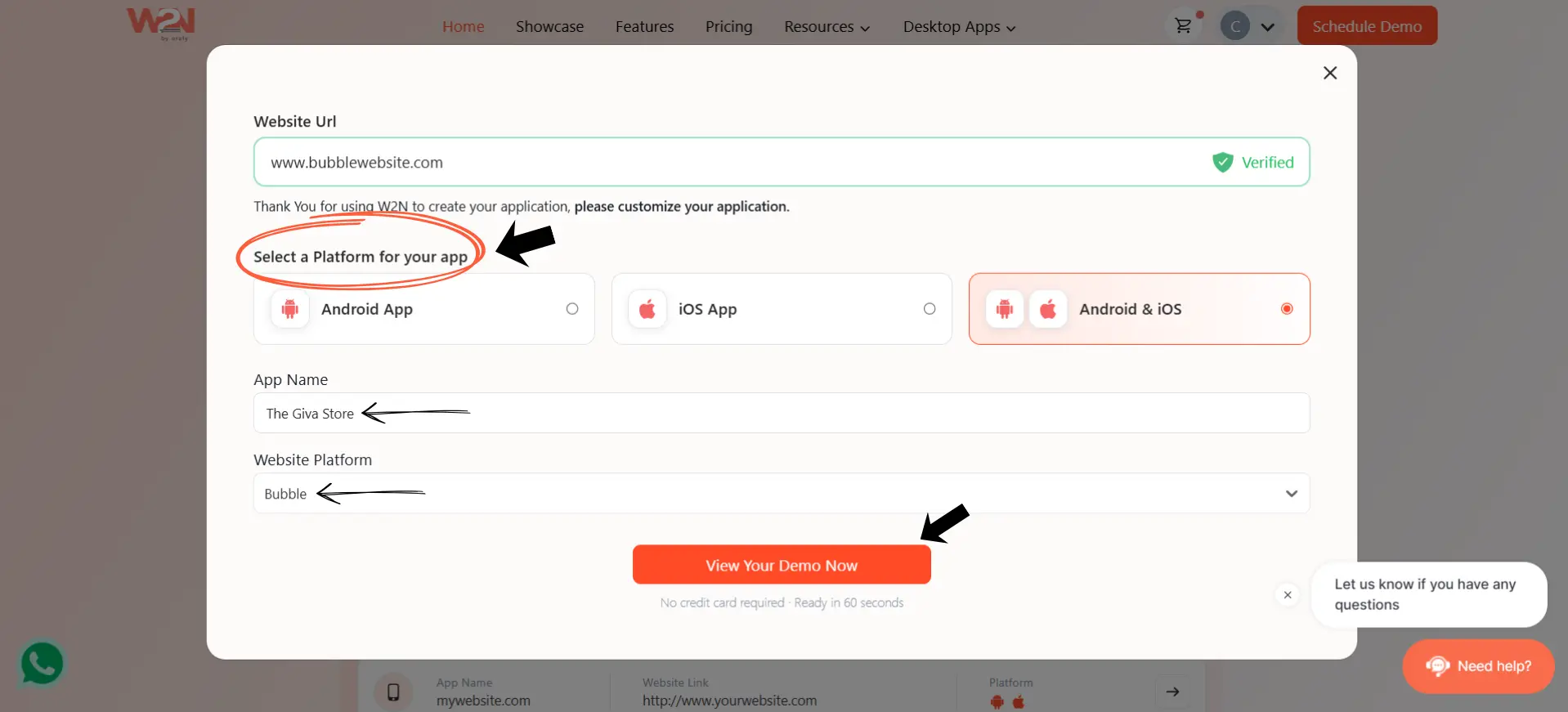
Step 2: Choose Your Platform and Add App Details
-
Next, choose where you want your app to run. You can select Android, iOS, or both Android & iOS.
-
Then enter your App Name and select Bubble as your website platform. Once you've added these details, click View Your Demo Now to continue.
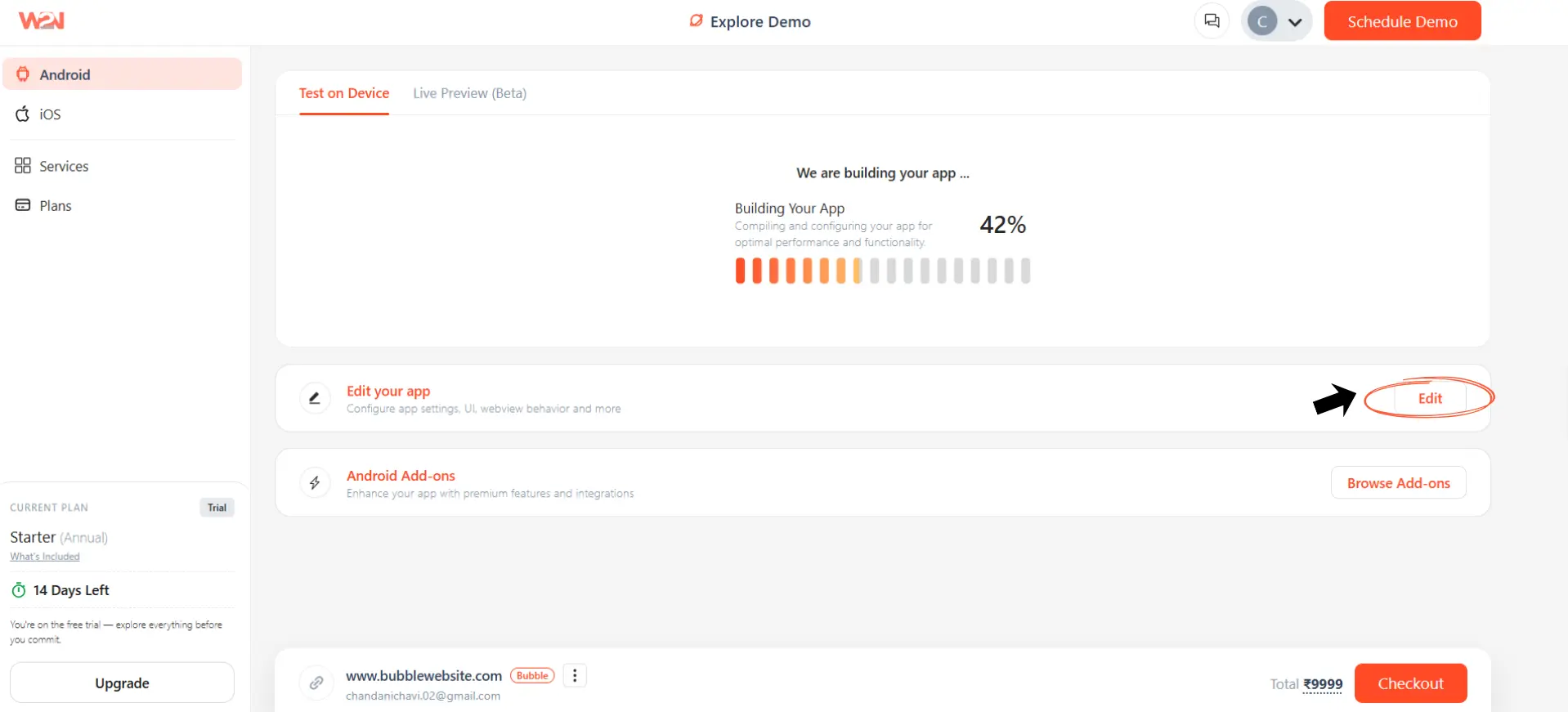
Step 3: Let WebToNative Build Your App
-
WebToNative will start preparing your app for the selected platform. You can see the build progress while it compiles and configures the app.
-
Once the initial build is ready, you'll get access to your app dashboard, where you can edit the app, add features, and configure its settings.
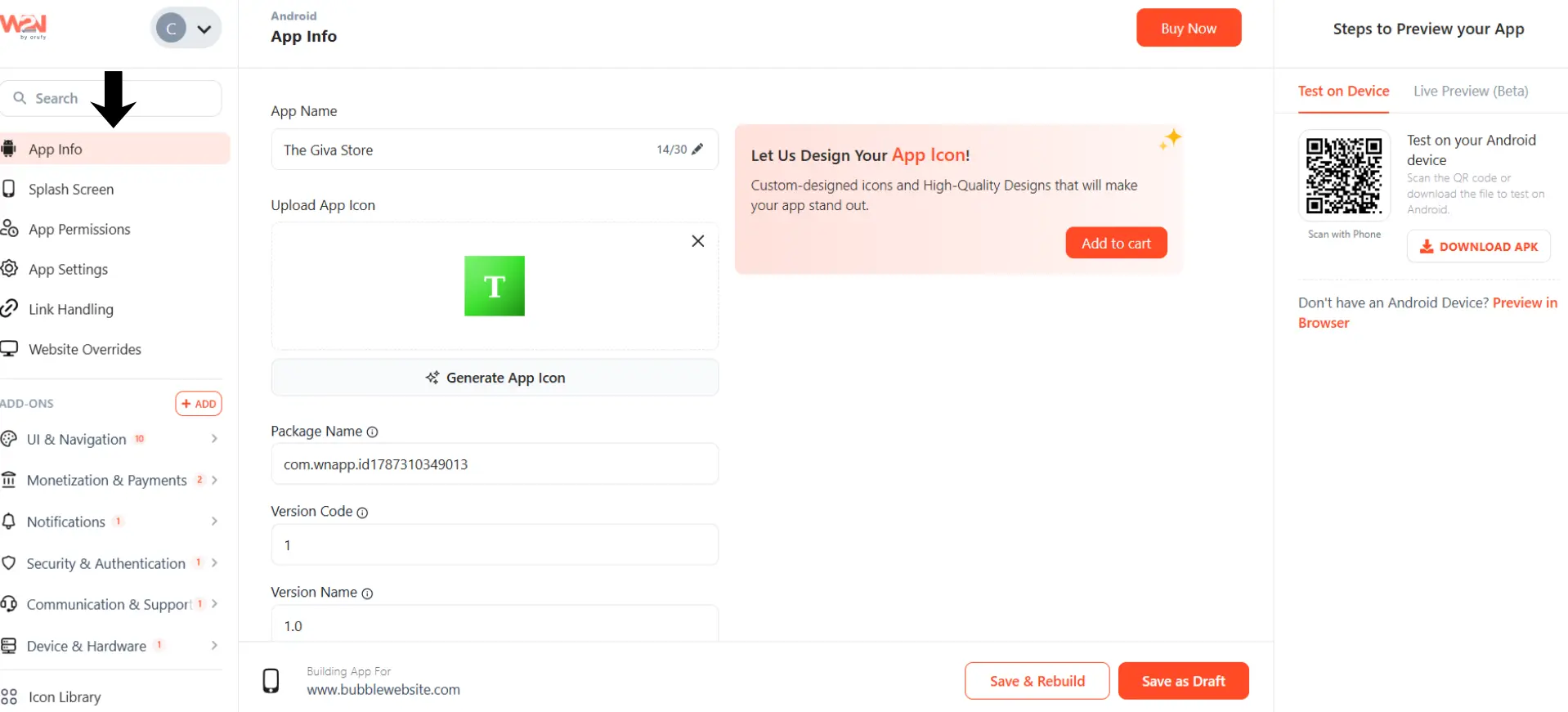
Step 4: Customize Your Mobile App
-
This is where you can make your Bubble app feel like a proper mobile app.
-
From the app dashboard, you can update details such as your app name, app icon, splash screen, package information, and version details.
-
You can also explore additional options such as UI & Navigation, Notifications, Security & Authentication, Device & Hardware, and other add-ons depending on the features your app needs.
-
Before publishing, use the available preview and testing options to check how your app works on a real device or in the browser.
Step 5: Add the Features You Need
Now you can add the features your Bubble app needs to give users a better mobile experience. WebToNative offers different add-ons, so you can pick the ones that make sense for your app.
-
Push Notifications: Send updates, reminders, and important alerts directly to your users' phones.
-
Onboarding Screen: Introduce new users to your app and show them how it works when they open it for the first time.
-
Bottom Navigation: Make it easier for users to move between the main sections of your app.
-
Social Login: Let users sign in using accounts such as Google or other supported social platforms.
-
Biometric Authentication: Allow users to use fingerprint or Face ID where supported for a quicker login experience.
-
Deep Linking: Open a specific page or section of your app directly when a user taps a link.
-
Analytics: Track how people use your app and understand which parts they interact with most.
-
In-App Updates: Let users know when a newer version of your app is available.
You don't need to add every feature. Choose the ones that actually fit your Bubble app and make the mobile experience more useful.
Step 6: Preview and Test Your App
-
Before publishing, test your app to make sure everything works properly on mobile.
-
WebToNative lets you test your app on a real device using the QR code or use the available preview option. Check important things like navigation, login, forms, buttons, links, and any native features you added.
Step 7: Build and Publish Your App
-
Once you're happy with the app, it's time to prepare it for the app stores.
-
Choose the platform you're publishing to, complete the required app details and configurations, and generate your app build. You can then submit it to the Google Play Store and Apple App Store for review. And that’s it, your Bubble web app is now ready to jump from a browser to a mobile app.
Frequently Asked Questions
Q1. Can I turn my Bubble app into a mobile app without coding?
A. Yes. With WebToNative, you don't need to write code. Just enter your Bubble app's URL, choose your platform, and start the conversion process.
Q2. Do I need to rebuild my Bubble app from scratch?
A. No. You can use your existing Bubble app as the starting point, so you don't have to build everything again.
Q3. Will my Bubble app's database and workflows still work?
A. Yes. Since the mobile app is based on your existing Bubble app, your existing database, workflows, and core functionality can continue to work.
Q4. What mobile features can I add to my Bubble app?
A. You can add features such as push notifications, social login, biometric authentication, deep linking, bottom navigation, onboarding screens, and analytics, depending on what your app needs.
Q5. Can I publish my app on both Google Play and the Apple App Store?
A. Yes. You can create your app for Android, iOS, or both and prepare it for submission to the Google Play Store and Apple App Store.
Q6. Do I need a developer to convert my Bubble app?
A. No. WebToNative is designed as a no-code solution, so you can handle the conversion without needing to write native mobile code or hire a developer.
Q7. Does my Bubble database stay in sync with my WebToNative app?
A. Yes. Your Bubble app remains the main source of your data, so updates made to your Bubble app can be reflected in the mobile app.
Q8. How long does it take to build the app?
A. The initial app build can take around 2–3 minutes. If you add extra features or customizations, the total time may vary depending on what your app needs.
Conclusion
You’ve already done the hard part. Your Bubble web app is built, your workflows are working, and your users can already use it. Why make them take the long route through a browser?
With WebToNative, you can take that existing Bubble experience and bring it to mobile without rebuilding everything from scratch. Add the features that actually make sense for your users, test the app on a real device, and get it ready for the app stores.
Switching to a native mobile app isn't about simply putting your website inside an app. It’s about making your product easier to reach, easier to use, and a little more at home on the devices your users already carry everywhere.
So, if your Bubble app is ready for its next step, maybe it’s time to give them a mobile app they can access with just one tap.
Similar Blogs