


What is TestFlight? iPhone Beta Testing and Android Equivalent

Published on:
13 November, 2026
TL;DR:
TestFlight is Apple's official app testing platform that allows developers to share their iOS apps with users before publishing them on the Apple App Store. It helps developers test their apps on real iPhones and iPads, identify issues, and collect feedback before making the app available to everyone.
What is TestFlight?
TestFlight is Apple's official beta testing tool. It is part of the App Store Connect environment and allows you to share an early version of your iOS app, called a build, with real testers before submitting it for App Store review. Testers can install the app on their own iPhones or iPads using the TestFlight app, explore its features, and report crashes, bugs, and other problems directly to the developer.
TestFlight helps developers understand how their app performs on real devices instead of relying only on their own testing. This gives them time to identify issues, collect feedback, and fix problems before the app goes live on the Apple App Store. To use TestFlight, developers need an Apple Developer Program membership.
How Does TestFlight Work?
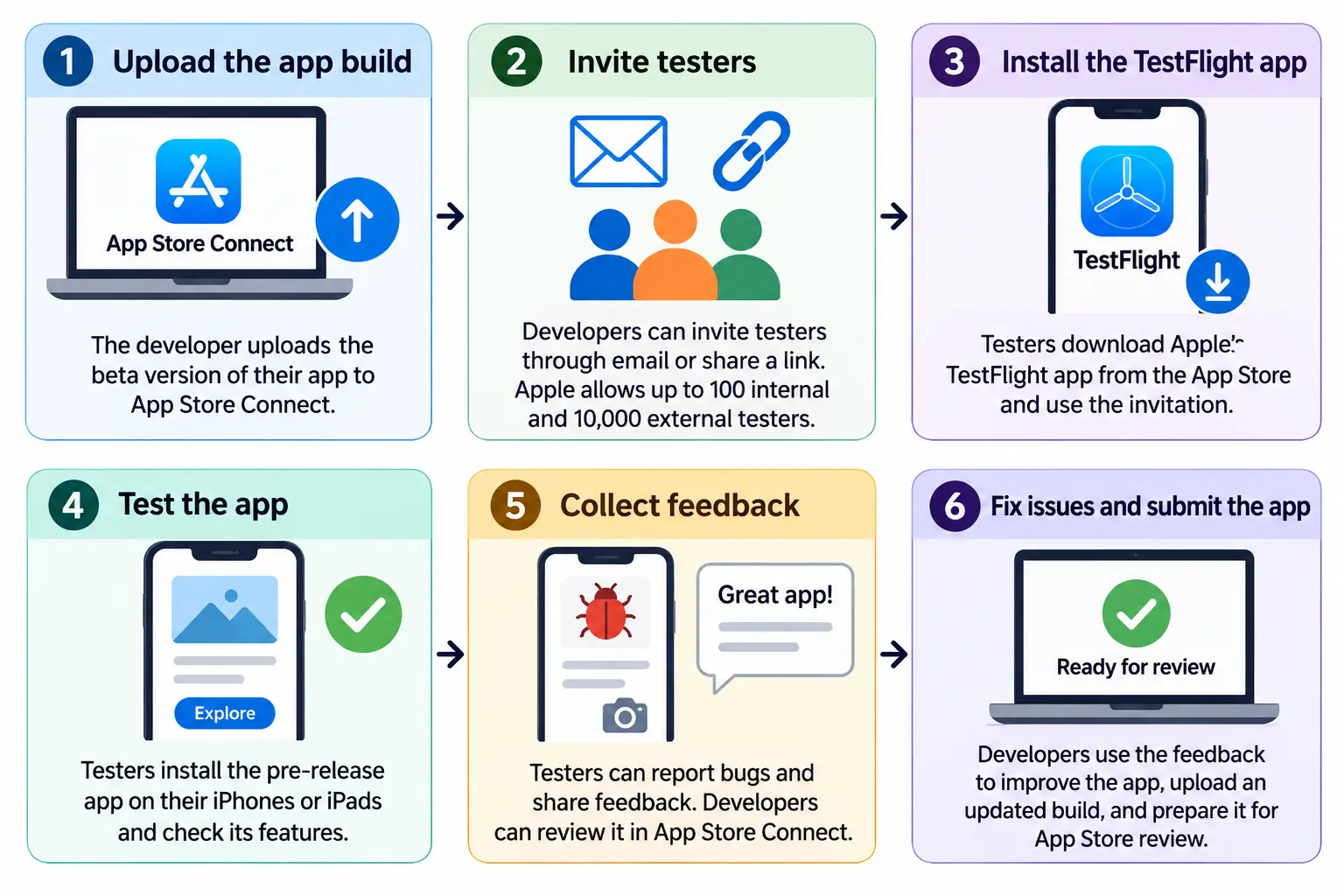
Here’s how TestFlight works:
1. Upload the app build: The developer uploads the beta version of their app to App Store Connect. 2. Invite testers: Developers can invite testers through email or share a public invitation link. Apple allows up to 100 internal testers and 10,000 external testers. 3. Install the TestFlight app: Testers download Apple's TestFlight app from the App Store and use the invitation to access the beta app. 4. Test the app: Testers install the pre-release app on their iPhones or iPads and explore its features to check whether everything works properly. 5. Collect feedback: Testers can report bugs, crashes, and other problems, along with screenshots and feedback. Developers can review this information in App Store Connect. 6. Fix issues and submit the app: Developers use the feedback to make improvements, upload updated builds, and prepare the app for official App Store review.
If you are struggling with the process of inviting testers to TestFlight, read our comprehensive blog on How to Invite Testers to TestFlight.
What are TestFlight’s limits?
TestFlight is a helpful tool for testing your iOS app, but there are a few things you should know before using it.
Here are a few limitations of TestFlight listed below:
| Limit | Explanation |
|---|---|
| Internal Testers | You can invite only up to 100 App Store Connect users to test your app. |
| External Testers | You can invite only up to 10,000 external testers through email or a public link. |
| Build expiration | Each build expires 90 days after its upload date. You need to upload a new build when it expires. |
| Build sharing limit | You can share a maximum of 100 builds for an app. |
| Review submission limit | You can submit up to six builds for TestFlight App Review within 24 hours. |
| Beta App Review | The first build you share with external testers needs Apple's approval, but later builds of the same version may not need to go through the full review process again. |
Understanding these limitations will help you plan testing with your own Apple Developer account, identify issues early, and prepare your app for a smoother App Store launch.
Is there a TestFlight for Android?
Android does not have a separate app like Apple's TestFlight. However, Google Play Console offers similar testing options that let developers share their apps with real users before making them available on the Google Play Store.
These testing options help you check whether your app works properly, find bugs, and get feedback from users before the official launch.
Google Play Console offers three main testing options:
1. Internal testing: This option lets you share your app with up to 100 testers. It is mainly used for quick testing when you want to check whether the app opens properly and its basic features work as expected.
2. Closed testing: With this option, you can invite a selected group of people to test your app. You can add testers through their email addresses or a Google Group. It is useful when you want a smaller group to try the app and share feedback before the public launch.
3. Open testing: This option allows more people to join your testing program through Google Play. Anyone who meets the testing requirements can join and try your app. It is helpful when you want feedback from a larger group of users.
If you want to understand this process in more detail, read our guide on how to apply for production access in Google Play Console.
Why is real device testing essential?
Testing your app on a simulator is useful, but it may not show all the problems users can face on a real phone. Testing on actual devices helps you understand how your app works in everyday use.
Here are 6 reasons why real device testing is important:
1. Check different screen sizes: Make sure your app looks good on phones with different screen sizes. Text, images, and buttons should fit properly without getting cut off.
2. Test internet connection: Check how your app works with slow or unstable internet. Pages should load properly, and users should know when the connection is lost.
3. Check login issues: Make sure users stay logged in even after closing and reopening the app. They should not have to enter their login details every time.
4. Test buttons and navigation: Check whether all buttons, menus, and links work properly. Also, make sure links open in the right place, either inside the app or in the browser.
5. Check app performance: See how easily your app runs on different phones, including older devices with limited memory. Look for slow loading, freezing, or crashes.
6. Test important features: If your app has payment options, forms, camera access, or location features, test them on real devices to make sure they work as expected.
How does TestFlight make your app better?
Imagine you own an online clothing store and have converted your website into an iOS app. Before making it available on the App Store, you share it with a few customers through TestFlight and ask them to try it. While using the app, one customer tells you that the product images take too long to load. Another finds that the checkout button is difficult to locate, while someone else reports that they have to log in every time they open the app.
These may seem like small problems, but they can affect how people use your app. TestFlight helps you find such issues early so you can fix them before your customers start using the app regularly.
Here are ways TestFlight helps you improve your app:
-
Find bugs and errors: Testers can tell you if a button is not working, a page is not opening, or the app crashes while using a feature. You can fix these problems before launch.
-
Check app performance: You can see whether your app loads quickly and runs smoothly on different iPhones and iPads. This helps you find issues like slow loading, freezing, or crashes.
-
Get feedback from real users: Sometimes, a feature that seems easy to use to you may confuse someone else. Testers can share their experience and tell you what they like or find difficult.
-
Make navigation easier: Testers can help you understand whether people can easily find products, move between pages, and complete their tasks without getting confused.
-
Check important features: You can ask testers to try features like login, payments, push notifications, and product searches to make sure they work as expected.
-
Make changes and test again: Once you receive feedback, you can fix the issues and upload an updated version to TestFlight. Testers can try the new version to see whether the problems have been solved.
Getting the most from testers’ feedback
Setting up TestFlight is just the first step. To get useful feedback, you also need to manage the testing process properly.
First, tell testers what you want them to check. Instead of simply asking them to "try the app," give them a clear task. For example, ask them to open the checkout page, make a test payment, and check whether the payment confirmation message appears. This way, they know what to look for and can give you better feedback.
Next, keep sharing updated versions of your app. Whenever you fix a problem, upload a new build and ask testers to check it again. If they keep using the same version without seeing any changes, they may lose interest. When they see that you are working on their feedback, they are more likely to stay involved and help you further.
Also, check crash reports regularly. TestFlight collects information about app crashes, but you need to review it to understand what went wrong. This helps you find problems and fix them before sharing the next version with testers.
How long should an iOS app beta test run?
There is no fixed time limit for how long you should test your iOS app before launching it. However, if you are preparing for your first release, one to two weeks is a good starting point. This gives you enough time to let people use the app, find problems, share feedback, and check whether the fixes are working properly.
During the first few days, you can focus on basic issues like app crashes, login problems, and pages not loading properly. As testing continues, you can check other features like payments, navigation, links, and push notifications. This helps you understand whether users can easily use the app and complete common tasks without facing problems.
The testing time also depends on the type of app you are building and the number of features it has. For example, a simple app with a few pages may need less testing time than an online shopping app with product searches, payments, and order tracking. You should also give testers enough time to use the app in their daily routine, rather than checking it only once.
If testers find any problems, fix them and share an updated build so they can try those features again. You may need extra time to check whether the changes have solved the problem and whether other parts of the app still work properly.
The main goal is not to complete testing within a certain number of days. Take enough time to check the important features, fix problems, and make sure your app is ready for users before launching it.
Common mistakes that impact your app’s quality
Setting up TestFlight is only the first step. How you test your app also matters. A few things can affect the feedback you get and the overall testing process.
Here are 8 common mistakes you should avoid:
1. Giving unclear instructions.
Just asking testers to "try the app" may not help much. Tell them what you want them to check, such as login, checkout, or push notifications. This makes it easier for them to give useful feedback.
2. Testing only with your own team.
Your team already knows how the app works. But someone using it for the first time may find some things confusing. Ask people outside your team to test the app so you can understand their experience too.
3. Not sharing updated builds.
If testers use the same version for a long time, they may lose interest. Whenever you fix something, share the updated version and ask them to check it again.
4. Ignoring crash reports.
TestFlight collects crash reports automatically. Make sure you check them regularly to understand why the app is crashing and fix those problems before the next update.
5. Testing on only one type of iPhone.
Your app may work perfectly on the latest iPhone but have problems on older models. Try testing it on different iPhone models and supported iOS versions to see how it works on each device.
6. Not testing push notifications.
Do not assume that push notifications will work on iPhones just because they work on Android. Send test notifications to check whether they arrive properly and open the right page when tapped.
7. Forgetting to build versions and expiry dates.
Make sure testers are using the latest version of your app. Also, remember that TestFlight builds expire after 90 days, so upload a new build when needed to keep testing.
8. Thinking TestFlight approval means App Store approval.
Even if your app works well during TestFlight testing, Apple may still reject it during the final App Store review. TestFlight helps you find problems, but it does not guarantee that your app will be approved.
Testing Is Not the Same as the App Store Review
TestFlight has its own review process called the Beta App Review. But this is a simple check to ensure that a build is safe to send to testers. It is not the same as the entire App Store review every app must pass before it goes live.
Passing the TestFlight review process does not mean an iOS app will automatically pass the App Store review also. The two checks look at very different things. TestFlight is where quality gets built up over time through real feedback. App review is the final stage; finished apps still have to pass through it before they reach everyone.
Who is this not for?
TestFlight may not be the right option in every situation. It may not be suitable for:
1. Android app developers: TestFlight is only for iOS apps. If you want to test an Android app, you can use Google Play Console.
2. People who want to launch their app immediately: TestFlight is for testing an app before launch. It does not publish your app on the App Store.
3. People without an Apple Developer account: You need an Apple Developer Program membership to upload and share your app for testing through TestFlight.
4. Apps that are still under development: If your app is missing important features or basic functions are not working, it is better to finish those parts before inviting testers.
5. People expecting guaranteed App Store approval: TestFlight helps you find and fix problems, but it does not guarantee that Apple will approve your app.
Frequently Asked Questions
Question 1. Is TestFlight free?
Ans: Yes, TestFlight is free for people who want to test an app. They can download the TestFlight app from the App Store, install the beta app, and try its features without paying anything. But if you are a developer and want to upload your app builds to TestFlight and invite people to test them, you need a paid Apple Developer Program membership. It costs $99 per year.
Question 2. Can Android users use TestFlight?
Ans: No, TestFlight is only available for testing iOS apps, so Android users cannot use it to test their applications. If you have an Android app, you can use Google Play Console. It offers different testing options, such as internal, closed, and open testing, where you can share your app with selected users, collect feedback, and fix problems before making it available on the Google Play Store.
Question 3. How many testers can I invite to TestFlight?
Ans: With TestFlight, you can add up to 100 internal testers and 10,000 external testers for each app. Internal testers are members of your App Store Connect team, while external testers can be invited through email or a public link. The first build shared with external testers must pass Apple's Beta App Review before they can access it.
Question 4. How long does a TestFlight build last?
Ans: A TestFlight build is available for up to 90 days from the day it is uploaded to App Store Connect. After 90 days, the build expires, and testers can no longer open or use it. If you want to continue testing, you need to upload a new build and share it with your testers.
Question 5. Do I need to test an app build from my website?
Ans: Yes. Even if your app is built from your website, you should test it on real phones before submitting it. Check the login, links, push notifications, and offline screen to make sure everything works properly. Sometimes, a link may open in the phone's browser instead of staying inside the app.
Conclusion
TestFlight helps you test your iOS app and prepare it for launch on the App Store. Before making your app available to everyone, you can share it with a group of testers and ask them to use it just like regular users. They can check different features, try different pages, and share what they like or find difficult to use. You can use their feedback to find problems, fix bugs, improve the app's design, and make navigation easier.
Make sure to test important features like login, buttons, links, payments, and push notifications. Also, check how your app works on different iPhones and iPads, screen sizes, and internet connections. After making changes, share the updated app with testers so they can check if the problems are fixed. Remember, TestFlight testing is not the final App Store approval. You still need to submit your app to Apple for review before it becomes available on the App Store. For Android app testing, you should use Google Play Console to test it before publishing it to the Google Play Store for review.
Taking these steps helps you find and fix problems early, make your app easier to use, and give users a better experience when they download it.
Similar Blogs