



Webview Ads
Your AdSense ads already run legally on your website. When you convert your website into an app with WebToNative, those ads are still there — but they're operating in a new jurisdiction: a mobile app's WebView.
Without a "work permit" (registration with Google AdMob), the ads run, but Google can't verify that they're legitimate app traffic. Ad signals don't pass through correctly, advertisers can't trust the source, and your revenue suffers.
WebView Ads is the work permit. It registers your app with the Google AdMob SDK so that all ad events — impressions, clicks, interactions — are correctly attributed to your app, advertisers get verified signals, and you get full credit and better payouts for your traffic.
This feature is available for both Android and iOS. You can start with the Starter plan to access this feature on Webtonative.
AdSense vs AdMob — what's the difference?
Google AdSense
The ad platform you use on your website. You paste AdSense code into your site, and Google displays ads on your pages. Your current ads run through AdSense.
Google AdMob
Google's ad platform for mobile apps. When your website runs inside an app's WebView, AdMob bridges the two — passing app signals to your AdSense tags so they're recognised as legitimate app traffic.
How do WebView Ads work — The Full Flow
According to the Google AdMob documentation (opens in a new tab), the WebView API for Ads works by registering your WebView with the AdMob SDK. This adds message handlers that listen for ad events triggered by your AdSense code — impressions, clicks, video events — and pass those signals back to Google correctly.
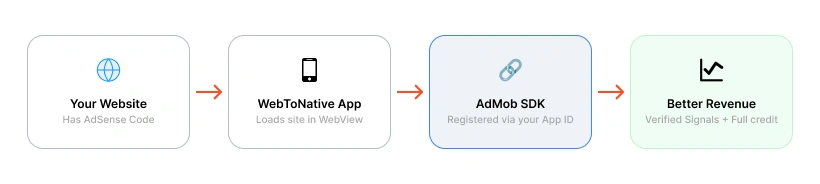
The WebView API for Ads responds to ad events from AdSense code, Google Publisher Tags, and IMA for HTML5. If your website uses any of these for ads, this feature improves how those ads perform inside your app.
Why enable WebView Ads?

Reuse your existing ad tags
No need to rebuild your ad setup from scratch. Your website's existing AdSense or Google Publisher Tag code works directly inside the app — nothing changes on the website side.

App signals protect ad quality
The AdMob SDK passes your app's ID to ad tags. This tells Google the traffic is from a real, registered app — protecting advertisers from spam and invalid traffic, which in turn gets you better payouts.
One codebase, both platforms
You don't need to build or maintain separate native ad setups for Android and iOS. One configuration in WebToNative handles both platforms through the same WebView approach.

Change ads without rebuilding
Because ads are rendered from your website, you can update ad placements, swap campaigns, or change formats in AdSense — and the changes appear in the app without submitting a new app update.
High-intent in-app ad traffic
Traffic from WebView ads in well-engaged apps often converts at higher rates than standard web traffic — because users are actively browsing content in a context they chose.

No context switching
Users can click ads and view landing pages within your app rather than being ejected to an external browser. This keeps them inside your app longer and improves the ad experience.
Where to find it in your dashboard
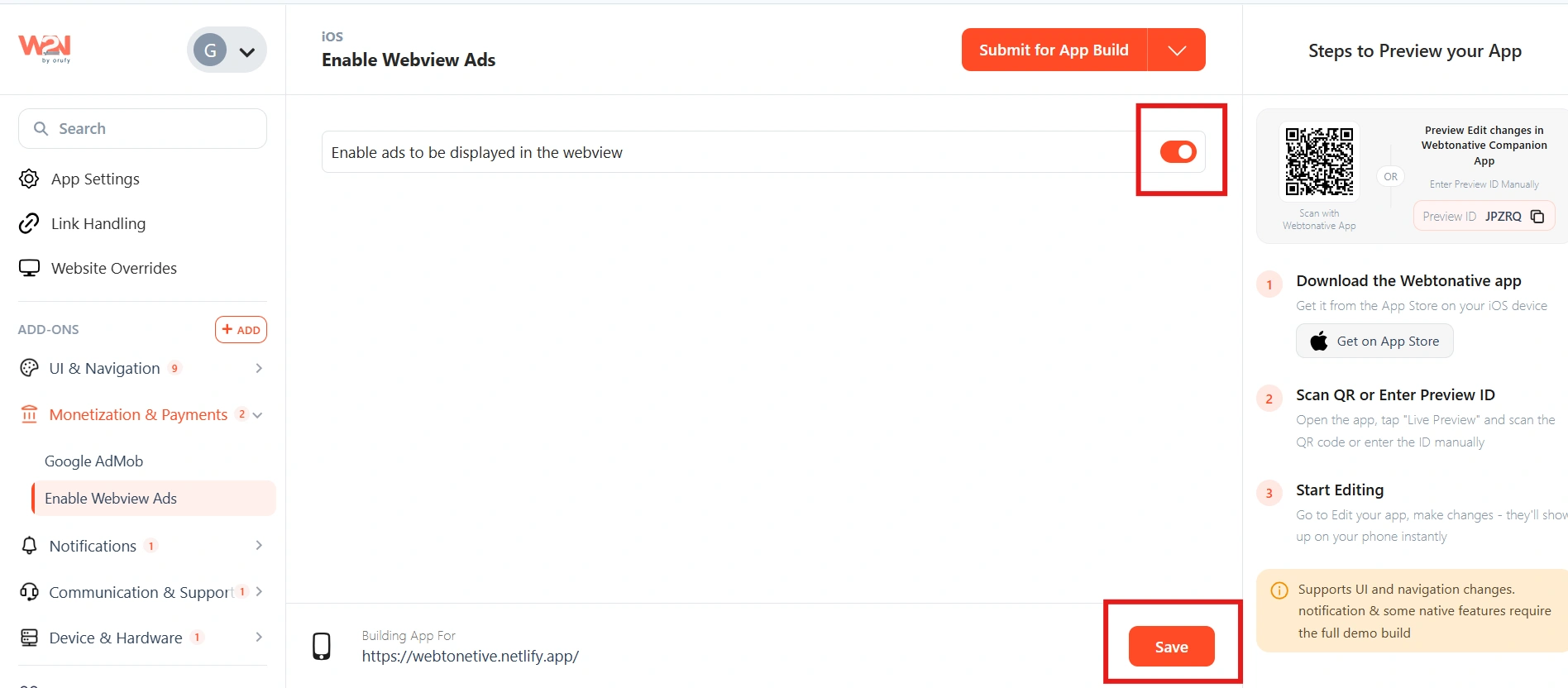
My Apps ➡️ Edit your app ➡️ Add-ons ➡️ Monetisation and Payments ➡️ Enable Webview Ads
Steps to apply the WebView Ads to your app with WebToNative
Enable/Disable Toggle
Switch the WebView Ads toggle to ON to activate the feature, or OFF to disable it.
Your website must already have Google AdSense, Google Publisher Tags, or IMA for HTML5 ad code running on it. This feature connects your existing website ads to the app — it does not create ads from scratch.
WebToNative updates your app configuration files
When you enable the toggle, WebToNative automatically adds the required value to your app's core configuration files — info.plist on iOS and AndroidManifest.xml on Android. This entry is what activates the Google AdMob WebView API for Ads inside the app, allowing your existing website ads to pass signals correctly through the WebView.

iOS - info.plist
WebToNative adds the AdMob flag to your iOS app's property list file.
Android - AndroidManifest.xml
WebToNative adds the AdMob flag to your Android app's manifest file.
Save & Rebuild
Click Save and rebuild your app to apply and see the changes.
Frequently Asked Questions
1. Do I need an AdMob account if I already have AdSense?
Yes — AdSense and AdMob are separate Google products. AdSense handles ads on your website; AdMob handles ads in mobile apps. To use WebView Ads, you need a Google AdMob account with your app registered. Create one free at admob.google.com and connect it to your Google account. Your existing AdSense ads will then run through the AdMob SDK inside the app.
2. Will my ads look different inside the app compared to the website?
No — the ads render from the same AdSense code on your website, so they appear the same as on your site. The difference is behind the scenes: with WebView Ads enabled, Google now knows this traffic is from a registered app and attributes it correctly. The visual appearance of the ads does not change.
3. What happens if I run ads without enabling this feature?
Your AdSense ads will still display in the WebView — but without app signal registration, Google cannot verify the traffic source. This can result in lower ad revenue (advertisers pay less for unverified traffic), potential policy concerns if Google can't attribute the traffic correctly, and ad events that don't pass through to reporting accurately.
4. Which ad formats are supported through WebView?
According to Google's documentation, the WebView API for Ads works with AdSense code, Google Publisher Tags (GPT), and IMA for HTML5 (video ads). Any ad format your website runs through these systems — display, banner, in-article, in-feed, video — will benefit from WebView registration.
5. Does this work on both Android and iOS?
Yes — WebView Ads work on both Android (via Android WebView) and iOS (via WKWebView). Google provides the WebView API for Ads support for both platforms. One configuration in your WebToNative dashboard handles both.
6. Can I update my ads without rebuilding the app?
Yes — this is one of the key advantages. Because ads are rendered from your website's code (not baked into the app), you can change ad placements, swap ad units, update campaigns, or modify formats in AdSense and they update in the app immediately.