



In-App Review
Normally, a user who wants to leave a review has to remember to do it later, open the App Store or Play Store, find your app, and navigate to the review section — a journey most never complete. The result: fewer reviews, lower ratings visibility, and a feedback gap you can't close.
In-App Review brings the native rating dialog directly into your app at the right moment. Users see the familiar 5-star prompt without switching apps. They rate you in seconds and continue what they were doing. More completions, more ratings, more reviews — without any extra friction.
This add-on is included free with your Premium plan on Android and iOS, and you can unlock it from your Pro plan.
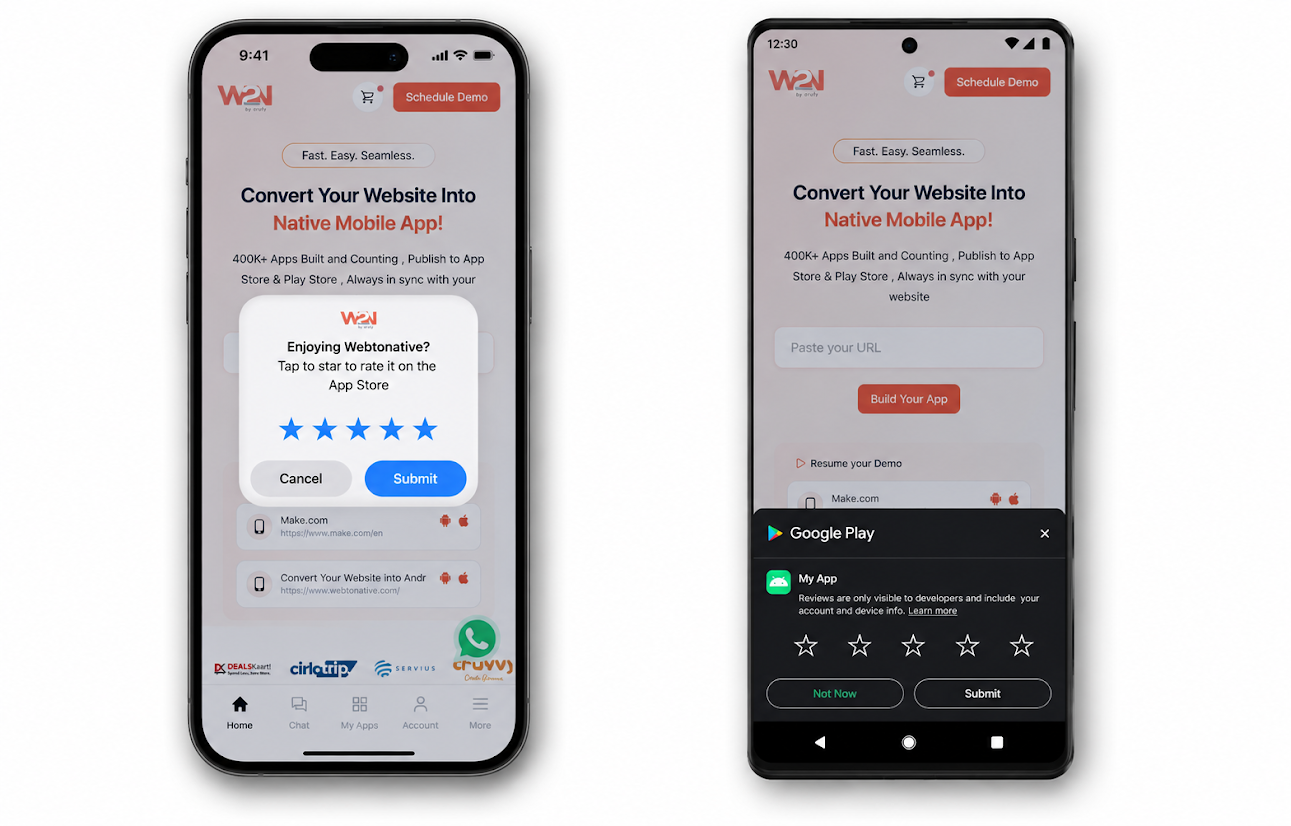
How does In-App Review work?

You call one function
Add AppReview.prompt() to your website's JavaScript on the page or event where you want the review prompt to appear.

The OS takes over
The native system dialog from Google Play or Apple App Store appears inside your app — using the exact design and text defined by the platform, not WebToNative.

User Experience
The user submits their rating or review directly in the dialog. No app switching, no search, no friction. The review goes straight to the store.
You cannot customize the dialog. The design, text, and layout of the review prompt are defined and enforced by Apple and Google — they look the same as the review dialogs in any other app on the device. WebToNative simply calls the native SDK; the OS handles everything else.
Why reviews matter — and why in-app prompts work better

Zero friction for users
The native dialog appears right where the user already is. No app switching, no searching, no multi-step store navigation. Users who would never leave to write a review can rate you in one tap..

More reviews, higher volume
Lower friction means more completions. Apps that implement in-app review prompts consistently see higher review counts — especially valuable for newer apps building their store presence.

Better App Store Optimization
Both the App Store and Google Play factor the quantity and recency of ratings into search ranking and conversion rates. More reviews from satisfied users directly improves your app's discoverability.
How to trigger it — the JavaScript function
There is no dashboard to configure. Add a function call to your website's JavaScript on the page or at the point in the user journey where you want the review prompt to appear. Read the full doc: https://docs.webtonative.com/javascript-apis/app-review (opens in a new tab)
Call this function only once per meaningful user milestone — not on every page load. Each platform has strict internal limits on how often the prompt can appear. Calling the function more frequently than the OS allows will simply result in the dialog not showing.
Guidelines to call the function
Do’s

After completing a purchase
The user just achieved something valuable. They're in a positive moment — the best time to ask for a reflection on their experience.

After reaching a milestone
Completing a level, hitting a usage goal, finishing onboarding — moments where the user has invested time and likely feels positive about the product.

After multiple sessions
Once the user has returned to the app several times and engaged consistently, they have formed an opinion and are more likely to leave a thoughtful review.
Don’ts

On first app launch
The user has experienced nothing yet. A review prompt here signals poor judgment and can immediately frustrate a new user.

If the user hits an error
If something just went wrong in the app, asking for a review will almost certainly yield a negative rating. Always prompt from a positive context.

Immediately after session
Repeated prompts train users to dismiss without rating and can result in negative reviews about the prompts themselves. One prompt per meaningful moment is enough.
iOS — Apple StoreKit Rules for In-App review
- Call the function after a user successfully completes a meaningful task — finishing a purchase, completing onboarding, reaching a milestone.
- Wait until the user has had enough time to experience the app and form a genuine opinion before prompting.
- Let the user pause on a completion screen for a few seconds before the prompt appears — this reduces the chance of interrupting them.
- Never trigger as a direct response to a user action (e.g. tapping a "Rate us" button) — Apple requires the timing to feel organic, not transactional.
- Never interrupt a task the user is actively trying to complete.
Read the proper guidelines https://developer.apple.com/documentation/storekit/requesting-app-store-reviews (opens in a new tab)
Android — Google Play Guidelines for In-App Review
- Trigger the prompt after the user has experienced enough of the app to provide meaningful feedback — typically after several sessions or completing a key flow.
- Choose natural pauses in the experience — after completing a level, finishing a purchase, or reaching the end of a session.
- Respect the user's time: prompt once at the right moment rather than repeatedly.
- Don't prompt excessively — Google Play enforces internal quotas and repeated calls will result in the dialog not appearing.
- Don't use the prompt as a persistent "Rate us" mechanism on every session.
Read Android Guidelines: https://developer.android.com/guide/playcore/in-app-review (opens in a new tab)
Frequently Asked Questions
Can I customize the text or design of the review dialog?
No — and this applies to every app, not just WebToNative apps. Apple and Google control the design, text, and layout of the in-app review dialog completely. The prompt looks the same in every app that uses it. This is intentional — it prevents developers from manipulating the UI to inflate ratings.
I called AppReview.prompt() but nothing appeared. Why?
This is expected behavior, especially on iOS. Apple's StoreKit silently suppresses the dialog when internal conditions aren't met — for example, if the user has already seen it 3 times in the past year, if they've already rated the current version, or if Apple's system determines the timing isn't appropriate. On Android, Google Play also enforces internal quotas. Calling the function is a request, not a guarantee of display.
Will users see the prompt multiple times?
On iOS, a user can see the prompt a maximum of 3 times within a 365-day period. Once they rate a version of your app, they won't be prompted for that same version again — only after you ship a new version. On Android, Google Play manages similar frequency capping internally — the exact limits aren't publicly documented but excessive calls are suppressed.
Does this work in a browser or only inside the app?
In-App Review only works inside the WebToNative app shell on Android and iOS. Calling AppReview.prompt() in a regular web browser has no effect. Make sure you only trigger this function when the user is inside the app — you can check for this using window.WTN being defined before calling the function.
Can I see how many users rated the app after the prompt?
Neither Apple nor Google returns any data to the app about what the user chose — whether they submitted a rating, dismissed the dialog, or didn't see it at all. This is a privacy design decision by both platforms. You can track the overall effect indirectly by monitoring your App Store and Play Store rating counts and scores over time.